Redundancy
Redundancy is a high-availability solution that ensures uninterrupted network service by enabling seamless control plane failover and rapid recovery. RBFS supports Redundancy for both IPoE and PPPoE subscribers. The Redundancy framework provides redundancy mechanisms to maintain subscriber services during node failures or switchover events.
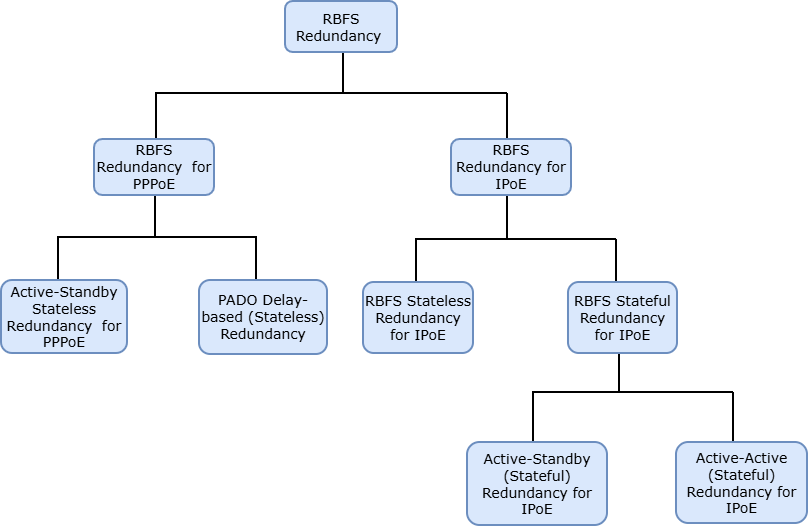
RBFS supports the following Redundancy models for IPoE and PPPoE subscribers.
For IPoE subscribers, RBFS supports:
-
RD-Based Stateful Redundancy (Supports both Active-Active and Active-Standby). For details, see RD-Based Stateful Redundancy for IPoE Subscribers.
-
Stateless Redundancy (Supports Active-Standby model). For details, see RBFS Stateless Redundancy for IPoE Subscribers.
For PPPoE Subscribers, RBFS supports:
-
RD-Based Stateless Redundancy. For details, see RD-Based Stateless Redundancy for PPPoE Subscribers.
-
PADO Delay-based Redundancy (Stateless). For details, see PADO Delay-based Redundancy
The following diagram illustrates the RBFS Redundancy models for various deployments.
Stateful vs Stateless Redundancy for IPoE
Stateful Redundancy:
Stateful redundancy maintains full subscriber session state synchronized between the redundant nodes. In the event of a failure, the standby node takes over seamlessly without requiring subscriber re-authentication or session re-establishment.
Key Benefits:
-
Almost seamless failover with minimal traffic disruption.
-
Subscribers do not need to renew DHCP or restart sessions.
-
Maintains accounting, QoS, and policy information.
When to Use:
-
For high-availability environments where packet loss must be minimal.
-
When re-authentication or changes in IP address are not acceptable.
Stateless Redundancy:
Stateless Redundancy does not synchronize subscriber session state between the nodes. When an outage occurs on the active node, all existing IPoE sessions on that node are terminated. Affected subscribers are required to re-initiate abd re-establish the sessions.
Key Benefits:
-
Simple design
-
Easy to deploy and manage.
When to Use:
-
Deployments where brief service interruptions are acceptable.
-
Networks that prefer scalability and simplicity over seamless failover.
-
Cost-sensitive networks with limited resources.
Licensing
-
RD-Based Redundancy is supported only with the Benefits licensing for subscribers.
-
All other redundancy modes are supported with both Essentials licensing for subscribers and Benefits licensing for subscribers.
Stateless Redundancy for IPoE Subscribers
Stateless Redundancy uses active-standby node model. Only one BNG node is active at a time, handling all subscriber sessions. The standby BNG node stays ready to take over if the active node fails.
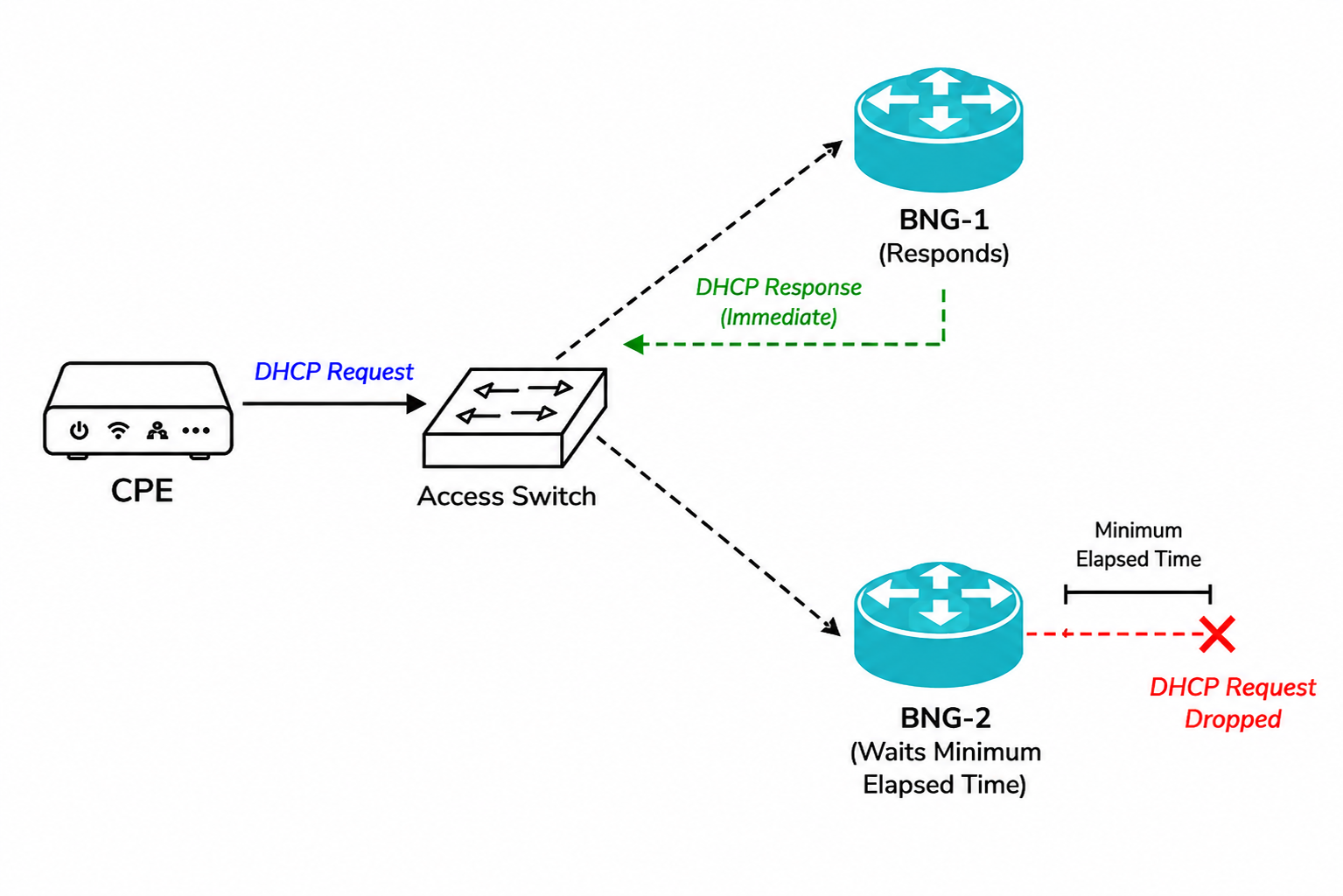
Both the active and standby BNG nodes receive the same DHCP broadcast messages from clients for IPv4. When a client sends a DHCPDISCOVER message, both BNG nodes receive it. The active BNG processes and responds right away. The standby BNG node, configured with a non-zero DHCP minimum elapsed time ignores requests if the elapsed time is below the set threshold.
If the active BNG does not respond in time, the client re-sends the DHCP request with an updated elapsed time that meets the threshold. The standby BNG node then processes the request and performs the subscriber service, ensuring continuous service.
DHCP Minimum Elapsed Time
The system leverages the DHCP minimum elapsed time technique. For DHCPv4, the 'secs' field in DHCPDISCOVER and DHCPREQUEST messages is compared to the configured threshold. For DHCPv6, the elapsed time option in SOLICIT messages is used. Messages below the threshold are dropped.
This method ensures only one BNG node responds at a time and allows automatic failover if the active becomes unavailable.
By default, the minimum elapsed time is '0' seconds. This feature is supported in all DHCP operating modes which include 'server', 'relay', and 'proxy'.
| The DHCP minimum elapsed-time configuration option is available at both the Access Interface and DHCP Relay configurations for DHCPv4 and DHCPv6. |
Syntax:
The following table provides command options and descriptions.
| Attribute | Description |
|---|---|
|
Specifies the physical interface on which double-tagged subscriber access is configured. |
|
Specifies the access method as IPoE. |
|
Defines the minimum elapsed time, in seconds, for DHCPv4/DHCPv6 transactions. This setting ensures that a DHCP request must meet the specified minimum duration before it is processed. Default: Disabled. Range: 1 - 600. |
The following example configures double-tagged interface 'ifp-0/0/0' for IPoE access and sets DHCP minimum elapsed time to 5 seconds.
set access interface double-tagged ifp-0/0/0 access-type IPoE
set access interface double-tagged ifp-0/0/0 dhcp-min-elapsed-time 5
{
  "rtbrick-config:double-tagged": {
    "interface-name": "ifp-0/0/0",
    "access-type": "IPoE",
    "dhcp-min-elapsed-time": 5
  }
}
In IPoE Stateless Redundancy deployments, rapid-commit must be set to 'false' to ensure the standard four-message DHCPv6 exchange is used. This is required to prevent dual-stack splitting and ensure correct subscriber session establishment.
|
For Rapid Commit configuration information, see DHCPv6 Rapid Commit Control.
Dual-Stack Splitting Prevention in IPoE Stateless Redundancy Deployments
This feature prevents dual-stack splitting by delaying DHCPv6 session establishment until a valid DHCPv4 binding exists for the subscriber in IPoE Stateless Redundancy deployments. This ensures that both IPv4 and IPv6 sessions are established on the same BNG, maintaining a consistent dual-stack subscriber session in stateless redundancy deployments.
In Stateless Redundancy for IPoE deployments, DHCPv4 and DHCPv6 requests may be processed by different BNGs, resulting in dual-stack splitting. For example, consider a dual-stack IPoE subscriber who requires both DHCPv4 and DHCPv6 connectivity. In a Stateless Redundancy deployment, the DHCPv4 request may be processed by BNG-A, while the DHCPv6 request is processed by BNG-B. As a result, the subscriber’s IPv4 and IPv6 sessions are established on different gateways, creating a dual-stack split.
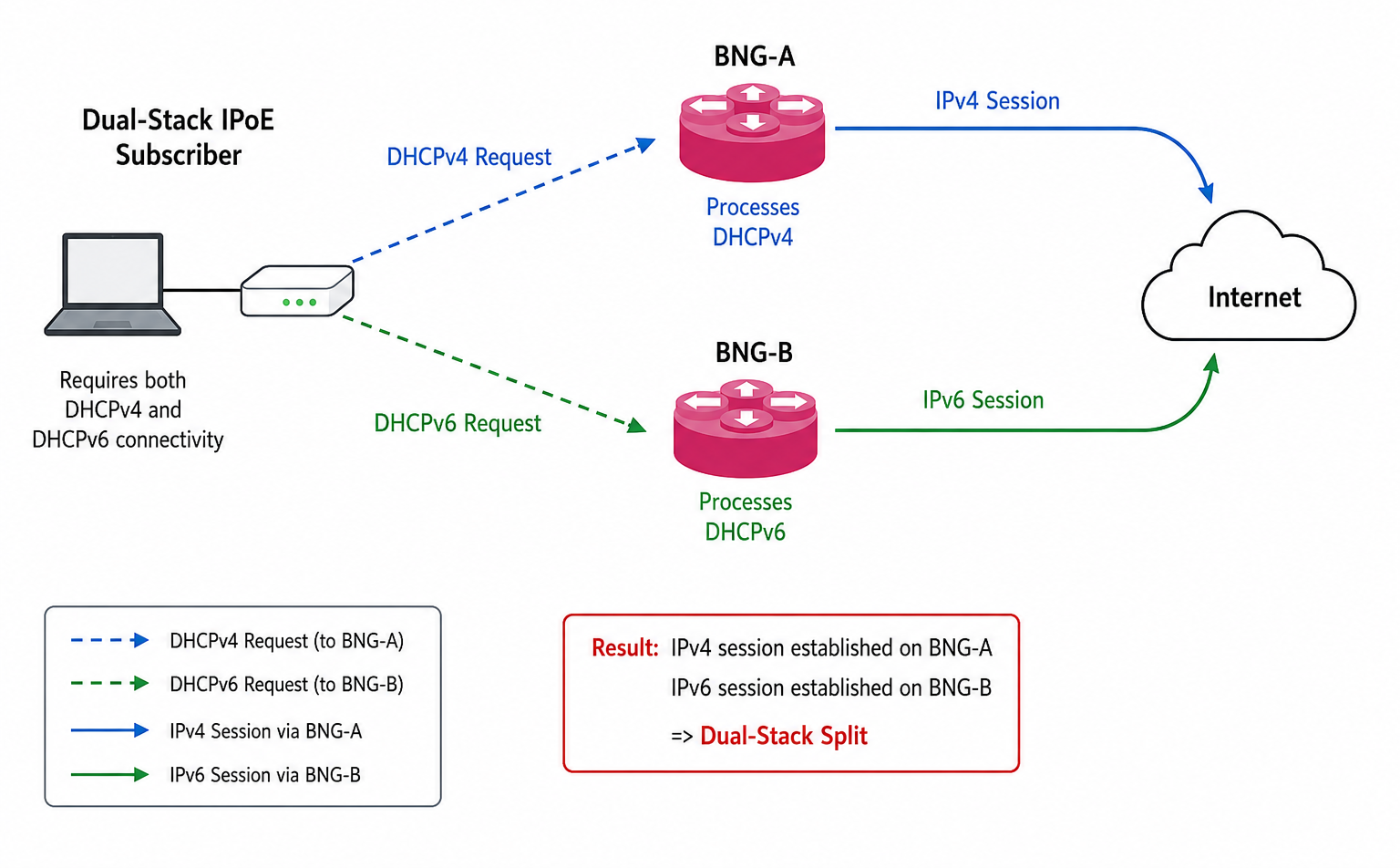
When wait-for-dhcpv4 is enabled, DHCPv6 session establishment is deferred until a valid DHCPv4 binding is present. It ensures that both IPv4 and IPv6 sessions are anchored to the same gateway.
For information about configuration commands, see Configuring DHCPv6.
Example:
The following configuration enables DHCPv4 session establishment before processing DHCPv6 requests by setting wait-for-dhcpv4 to true. It sets the DHCPv6 lease lifetime to 90 seconds.
set access access-profile ipoe protocol dhcpv6 wait-for-dhcpv4 true
{
  "rtbrick-config:dhcpv6": {
    "enable": "true",
    "wait-for-dhcpv4": "true",
    "lifetime": 90
  }
}
PADO Delay-Based Redundancy for PPPoE Subscribers
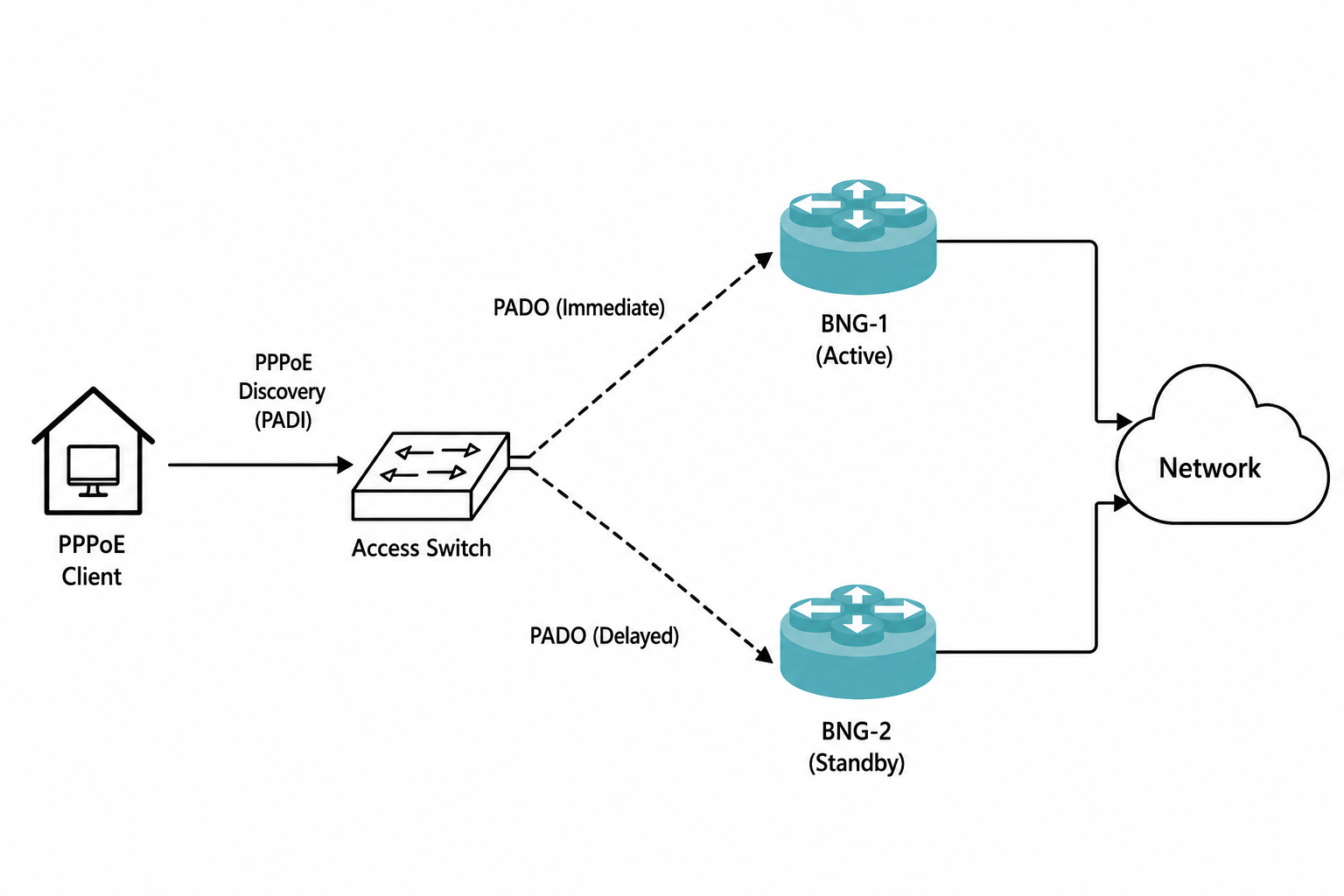
RBFS supports a PADO delay-based stateless redundancy method for PPPoE subscribers. By adding a configurable delay to PADO responses, multiple BNGs can participate in discovery while allowing a preferred BNG to respond first. This approach provides redundancy without requiring subscriber state synchronization between the BNG nodes. In the event of active BNG failure, subscriber sessions are re-established on the standby BNG as new sessions, with re-convergence typically taking about 90 seconds.
The following image illustrates the PPPoE client sending a PADI discovery message that is received by both BNGs through the access switch. The active BNG promptly responds with a PADO message, while the standby BNG, configured with the minimum elapsed time, delays its PADO response.
Syntax:
The pppoe-pado-delay parameter must be configured only on the standby BNG. The delay prevents the standby node from responding before the active BNG during PPPoE subscriber discovery.
|
| Attribute | Description |
|---|---|
|
Specifies the physical interface on which double-tagged subscriber access is configured. |
|
Defines the starting VLAN ID for the outer VLAN range. Range: 1 - 4094. |
|
Defines the ending VLAN ID for the outer VLAN range. Range: 1 - 4094. |
|
Defines the starting VLAN ID for the inner VLAN range. Range: 1 - 4094. |
|
Defines the ending VLAN ID for the inner VLAN range. Range: 1 - 4094. |
|
Configures the delay before sending PPPoE PADO responses. This setting allows you to specify a wait time in seconds after receiving a PPPoE Active Discovery Initiation (PADI) control packet from a PPPoE client before sending a PADO packet to indicate that it can serve the client request. Default: Disabled. Range: 1 - 255 seconds. |
Example:
This configuration enables PPPoE access on the double-tagged VLAN range on interface 'ifp-0/0/0', using the specified access and AAA profiles for subscriber authentication and session management. It also configures a PPPoE PADO delay of 30 milliseconds, allowing the Standby BNG to wait before responding to subscriber discovery requests.
set access interface double-tagged ifp-0/0/0 201 250 201 250
set access interface double-tagged ifp-0/0/0 201 250 201 250 access-type PPPoE
set access interface double-tagged ifp-0/0/0 201 250 201 250 access-profile-name pppoe-default-ds
set access interface double-tagged ifp-0/0/0 201 250 201 250 aaa-profile-name aaa-profile
set access interface double-tagged ifp-0/0/0 201 250 201 250 pppoe-pado-delay 30
{
  "rtbrick-config:double-tagged": {
    "interface-name": "ifp-0/0/0",
    "outer-vlan-min": 201,
    "outer-vlan-max": 250,
    "inner-vlan-min": 201,
    "inner-vlan-max": 250,
    "access-type": "PPPoE",
    "access-profile-name": "pppoe-default-ds",
    "aaa-profile-name": "aaa-profile",
    "pppoe-pado-delay": 30
  }
}