AAA Profile Configuration
Table: global.access.aaa.profile.config
The AAA profile for subscriber access is a mandatory configuration that serves as a cornerstone for managing and tracking subscriber activities. It ensures that all subscribers are authenticated before accessing services, authorized to use those services, and accounted for billing and monitoring purposes.
The following diagram illustrates how the AAA profile is associated with various subscriber management tasks.
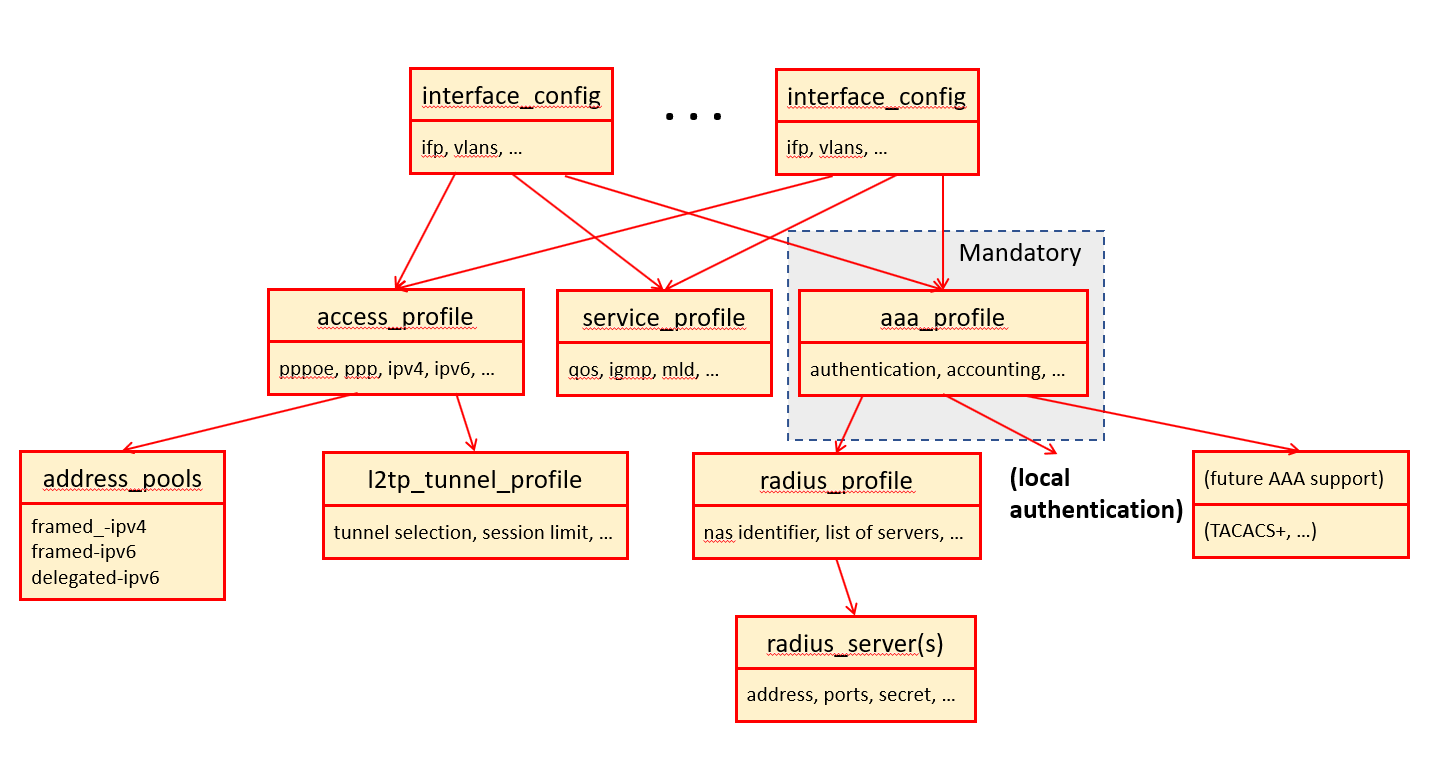
Configuring the AAA Profile
The following command and options configure an AAA profile, which defines authentication, authorization, and accounting parameters for subscriber access.
Syntax:
| Attribute | Description |
|---|---|
|
Name of the AAA profile. |
|
Specifies a factor applied to egress byte counters for accounting adjustment. |
|
Specifies the source for egress accounting counters: |
|
Specifies the RADIUS profile associated with this AAA profile. |
|
Specifies an additive adjustment value applied to egress byte counters. |
|
Specifies a multiplicative adjustment factor for class-based egress byte counters. |
|
Specifies an additive adjustment value for class-based egress byte counters. |
|
Specifies the source for ingress accounting counters. Options include: |
|
Specifies a multiplicative adjustment factor for ingress byte counters. |
|
Specifies an additive adjustment value for ingress byte counters. |
|
Specifies a multiplicative adjustment factor for policer-based ingress byte counters. |
|
Specifies an additive adjustment value for policer-based ingress byte counters. |
|
Specifies the interval (in seconds) for sending interim accounting updates to the RADIUS server. |
|
Specifies the accounting method. RADIUS enables RADIUS accounting, while NONE disables accounting. |
|
Defines the format of the session ID included in accounting records. |
|
Specifies the metric key to be used for subscriber accounting data exported to Prometheus. The options are:
|
|
Specifies the authentication method and order. The options include:
|
|
Specifies the idle timeout in seconds. A value of 0 disables the idle timeout. |
|
Specifies the maximum session duration in seconds. A value of 0 disables the session timeout. |
|
Configures accounting parameters for subscriber sessions. |
|
Configures authentication parameters for subscriber access. |
|
The session timeout defines the maximum (uptime) duration, in seconds, that a subscriber can remain connected before the session is automatically terminated. The value '0' indicates that the session has no time limit and can continue indefinitely. Default: 0, Range: 0 - 4294967295. |
|
The idle timeout is the time, in seconds, after which a subscriber will be disconnected if no data is being transmitted through their outgoing logical interface (IFL). Control traffic is not included in these statistics. The subscriber is not considered idle as long as outgoing traffic is detected. The idle timeout is not limited but should be set to at least double the time of the logical interface statistics counter update interval (between 5 to 45 seconds). The idle timeout does not have a specific limit, but it is recommended to set it to at least double the time of the logical interface statistics counter update interval (which is between 5 to 45 seconds). Therefore, it is advisable to set a minimum idle timeout of 90 seconds. The value '0' means that the timeout is infinite Default: 0, Range: 0 - 4294967295 |
|
The RADIUS profile, (for more details, see RADIUS Profile Configuration), which is used if RADIUS authentication or accounting is enabled. |
 To access the RESTCONF API that corresponds to this CLI, click
here.
To access the RESTCONF API that corresponds to this CLI, click
here.
Example:
This following example presents a AAA (Authentication, Authorization, and Accounting) profile configuration for RADIUS authentication and accounting. The profile name is 'aaa-radius.
The session-timeout value is set to '0', meaning there is no session timeout and the session can remain active indefinitely. The idle timeout value is also '0', indicating no idle timeout, so the session will not be terminated due to inactivity.
The parameter aaa-radius-profile is set to 'radius-default', which maps the AAA profile to the specific RADIUS profile named 'radius-default'. The RADIUS profile contains the necessary configuration details for communicating with the RADIUS server. In this profile, RADIUS is the selected method for handling all authentication requests. The order parameter indicates that RADIUS is the primary and only method of authentication configured.
For accounting, the order is specified as RADIUS, indicating that all accounting data is sent to the RADIUS server.
The ingress accounting-source is "POLICER", and the egress accounting source is "CLASS". "POLICER" indicates that the accounting data is based on a traffic policer, while "CLASS" indicates that the accounting data is based on traffic classes.
The class-byte-adjustment-value parameter is set to 16, adjusting the byte count for outgoing traffic by a specific value (16).
supervisor@switch: cfg> show config access aaa-profile aaa-radius
{
  "rtbrick-config:aaa-profile": {
    "profile-name": "aaa-radius",
    "session-timeout": 0,
    "idle-timeout": 0,
    "aaa-radius-profile": "radius-default",
    "authentication": {
      "order": "RADIUS"
    },
    "accounting": {
      "order": "RADIUS",
      "session-id-format": "DEFAULT",
      "ingress": {
        "accounting-source": "POLICER"
      },
      "egress": {
        "accounting-source": "CLASS",
        "class-byte-adjustment-value": 16
      }
    }
  }
}
The following example shows how to set the accounting metric key to USERNAME for a specific AAA profile.
supervisor@rtbrick.net: cfg> set access aaa-profile profile1 accounting metric-key USERNAME
supervisor@rtbrick.net: cfg> show conf access access-profile
{
  "rtbrick-config:access-profile": [
    {
      "profile-name": "profile1",
      "accounting": {
        "metric-key": "USERNAME"
      }
    }
  ]
Configuring Authentication
RBFS supports the authentication methods: NONE, LOCAL, RADIUS and LOCAL_RADIUS.
-
NONE: Disables authentication, accepting all credentials without verification.
-
LOCAL: Authenticates the subscriber based on locally defined user profiles. For more details, refer to User Profile Configuration.
-
RADIUS: Authenticates the subscriber remotely by sending an authentication request to the configured RADIUS servers.
-
LOCAL_RADIUS: Authenticates the subscriber based on locally defined user profiles. If no matching local user is found, the system attempts authentication via RADIUS. If a local user is found but the password does not match, the subscriber is immediately rejected, and no RADIUS request is made.
Syntax:
The following command and options allow you to define the order of authentication methods.
set access aaa-profile aaa-profile1 authentication order LOCAL_RADIUS
| Attribute | Description |
|---|---|
|
This option defines the order of authentication methods. The options include NONE, LOCAL, RADIUS, and LOCAL_RADIUS. Default: NONE. |
supervisor@rtbrick.net: cfg> show config access aaa-profile aaa-profile1 authentication
{
  "rtbrick-config:authentication": {
    "order": "RADIUS"
  }
}
To access the RESTCONF API that corresponds to this CLI, click
here.
Configuring Accounting
Subscriber accounting involves tracking and recording a subscriber session duration and data usage. This process includes two main components:
-
Time Accounting: Measures the duration of a subscriber’s session.
-
Volume Accounting: Tracks the number of packets and bytes transmitted or received.
Volume accounting operates in both directions (ingress and egress), and these can be configured independently.
| Currently, RBFS supports RADIUS as the only accounting method. |
Syntax:
| Attribute | Description |
|---|---|
|
Without any option, it sets accounting for the AAA profile. |
|
Egress volume accounting. |
|
Ingress volume accounting option |
|
This option defines the order of accounting methods. Default: NONE. |
|
Specifies the source of egress accounting counters. The available options include: IFL (specifies Interface-level counters) and CLASS (specifies Class-based (QoS class) counters. |
|
Adjusts egress byte counters to account for header overheads. It multiplies the byte count. For example, 1.10 adds a 10% overhead to the reported usage. |
|
Adjusts egress byte counters to account for header overheads. Adds a fixed number of bytes per packet. |
|
configure byte counter correction for class-based (QoS class) egress accounting. Applies byte adjustments specifically to class-based (QoS) egress accounting counters. |
|
Adds or subtracts a fixed number of bytes per packet from the class-based egress byte counter. |
|
Applies byte adjustment to ingress policer counters. Specifically adjusts the math only when the source is the POLICER. Parameters are applied only when ingress accounting-source is set to POLICER. |
|
Applies byte adjustment to ingress policer counters. Specifically adjusts the math only when the source is the POLICER. Parameters are applied only when ingress accounting-source is set to POLICER. |
|
The format of the accounting session identifier included in AAA records. EXTENSIVE includes detailed session context for enhanced correlations. |
|
The interim interval specifies the time between interim accounting requests in seconds. Sets how often the device sends update packets to the accounting server during an active session. If set to 60, the server gets a usage update every 60 seconds. 0 means disabled. Default: 0, Range: 0 - 4294967295. |
supervisor@rtbrick.net: cfg> show config access aaa-profile aaa-profile1 accounting
{
  "rtbrick-config:accounting": {
    "order": "RADIUS",
    "interim-interval": 60,
    "session-id-format": "DEFAULT"
  }
}
To access the RESTCONF API that corresponds to this CLI, click
here.
Configuring Accounting Adjustments
The accounting adjustment feature enables basic counter modifications for the configured accounting method, such as RADIUS accounting. This configuration is necessary to normalize counters across different platforms in each direction. On Broadcom Q2C and Q2A based platforms, packets are counted in the size they enter the switch. Without adjustment, egress accounting would count downstream traffic as received from the core, complete with MPLS labels, while ingress accounting typically includes VLAN headers and/or PPPoE headers.
This counter adjustment aims to normalize counters with diverse encapsulations (double-tagged, untagged, and so on), potentially aligning to L3 counters (IP header and payload) as an example, or exclusively adapting egress traffic to match the outgoing packet encapsulation. The possibility for separate adjustment configurations per direction allows parity in the counters for both ingress and egress.
In a scenario where packets enter a device with various encapsulations like PPPoE headers, MPLS labels, or VLAN tags, the system may count these additional headers in the packet size if the adjustment feature is not enabled. This can cause discrepancies in accounting reports.
For instance, an egress interface where traffic exits the device and goes to subscribers. If this traffic originally came from the core network with MPLS labels attached, the system counts the bytes of those labels in its accounting, inflating the byte count. Similarly, on the ingress side, the device counts VLAN tags or PPPoE headers, further impacting accurate accounting reports. To address this issue, you can configure a byte adjustment on both the ingress and egress sides to normalize these counters.
In RBFS, two configuration options are available for to achieve this: the byte adjustment value and the byte adjustment factor. The option byte adjustment value, which can be positive or negative (for example, -20 or 20), adjusts the byte count by a specific amount. Any decimal digits in the adjustment value are rounded to the nearest whole number (for example, 20.2 becomes 20). The option byte adjustment factor, which is less commonly used, adjusts the byte count by a percentage. It accepts positive values and considers up to two decimal places, such as 0.98 for a 2% reduction or 1.02 for a 2% increase.
Ingress Accounting
The ingress accounting configuration defines how incoming traffic counters are collected and adjusted for AAA accounting for the specified AAA profile. Subscriber ingress accounting refers to the process of measuring and recording the data usage or traffic that enters a subscriber interface (upstream).
Syntax:
The following command options allow you to set data usage accounting for incoming traffic.
| Attribute | Description |
|---|---|
|
This option provides control over the counters used for subscriber ingress accounting when RADIUS accounting is enabled. The counters in question are the RADIUS attributes
By default, the policer statistics (POLICER) are utilized, which represent the total traffic accepted across all policer levels (1-4). However, ingress control traffic is subject to a separate control plane policer and is therefore not included in the session policer statistics. Consequently, policers are necessary if session accounting is required. Alternatively, the logical interface (IFL) statistics can be used, which capture all received traffic, including control traffic and the traffic that is dropped by the ingress policer. It is important to note that this option may NOT be available on all platforms. Default: POLICER, Supported values: POLICER and IFL. |
|
Adjusts ingress IFL counters by +/- N bytes per packet. It allows you to adjust the ingress IFL counters by adding or subtracting a specified number of bytes per packet. Default: 0.00, Range: -32 to 32 |
|
Adjust the ingress IFL counters by applying a specified factor. (This adjustment is made after the |
|
Adjusts ingress POLICER counters by +/- N bytes per packet. It adjusts the ingress POLICER counters by adding or subtracting a specified number of bytes per packet. Default: 0.00 Range: -32 to 32 |
|
Adjusts the ingress POLICER counters by applying a specified factor. This adjustment is also executed after the |
Egress Accounting
Subscriber egress accounting refers to the process of measuring and recording the data usage or traffic that is sent from a subscriber interface (downstream).
Syntax:
The following command options allow you to set data usage accounting for outgoing traffic.
| Attribute | Description |
|---|---|
|
This option provides control over the counters used for egress session accounting when RADIUS accounting is enabled. The counters are the RADIUS attributes:
By default, the class statistics ( As an alternative, the logical interface (IFL) statistics can be used to account for all transmitted traffic, excluding control traffic. However, this option may not be supported on all platforms. Default: CLASS, Supported options include: CLASS and IFL. |
|
Adjust egress IFL counters by +/- N bytes per packet. That is, adjust egress IFL counters by adding or subtracting a specified number of bytes per packet. Default: 0.00, Range: -32 to 32. |
|
Adjust egress IFL counters by applying a specified factor. This adjustment is made after the |
|
Adjusts egress CLASS (queue) counters by adding or subtracting a specified number of bytes per packet (+/- N bytes per packet). Default: 0.00, Range: -32 to 32. |
|
Adjust egress CLASS (queue) counters by applying a specified factor. This adjustment is also made after the |