Layer 2 Cross-Connect
Overview
Layer 2 Cross-Connect (L2X) is used to directly connect two interfaces at Layer 2, allowing traffic to pass between them without layer 3 processing. It forwards Ethernet frames between two endpoints without MAC learning, switching, or IP routing. It provides isolated Ethernet connectivity for private line services or interconnecting customer sites.
L2X services provide Layer 2 connectivity between interfaces and support both local switching and remote transport use cases.
-
Local L2X services switch traffic between interfaces on the same device.
-
Remote L2X services extend Layer 2 connectivity across devices through an MPLS transport network.
L2X services can be configured as unidirectional or bidirectional, depending on the traffic forwarding requirements.
L2X supports:
-
Building point-to-point Ethernet services.
-
Extending Layer 2 connectivity between ports.
-
Providing transparent VLAN transport.
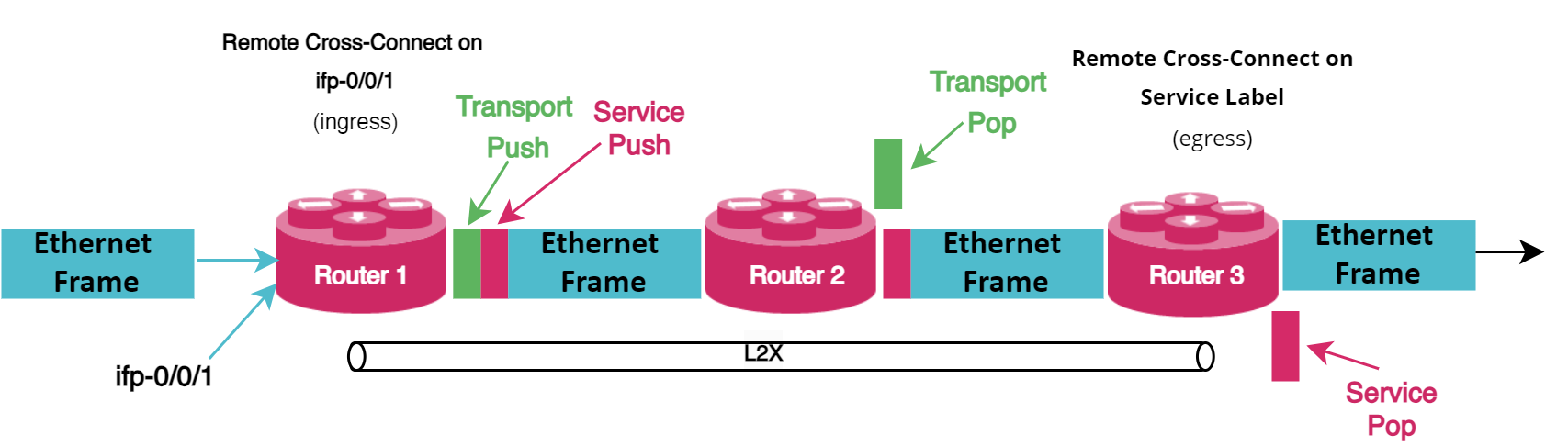
L2X binds two circuits into a dedicated path that provides traffic isolation. Frames received on one endpoint are forwarded unchanged to the paired endpoint. For remote endpoints, frames are encapsulated (using MPLS) and transported across the provider network. At the egress endpoint, encapsulation is removed and the original frame is delivered. This ensures predictable forwarding.
You can configure L2X locally on a single device or remotely across devices using an underlying transport network.
Types of L2X
L2X has two deployment types:
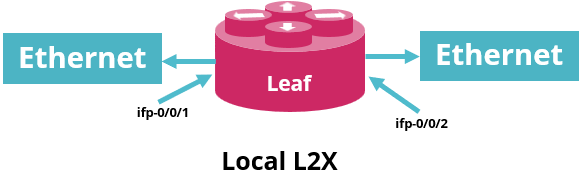
Local L2X: It creates a direct Layer 2 link between two ports or VLANs on the same router. Data frames move between the interfaces, supporting either unidirectional or bidirectional traffic flow depending on configuration.
The following figure shows a local L2X scenario.
Remote L2X: It establishes a Layer 2 connection between ports on different devices. Each interface resides on a separate router, and an MPLS tunnel carries traffic between them. The two remote devices must be reachable over an MPLS path.
The following figure shows the remote L2X scenario.
Traffic Direction
L2X service direction (unidirectional and bidirectional) is independent of the L2X service type (local or remote). Unidirectional and bidirectional L2X define the traffic forwarding direction between endpoints.
A bidirectional forwarding behavior can be implemented either by using a single bidirectional L2X service or by configuring two complementary unidirectional L2X services, with one service handling each traffic direction independently.
Unidirectional L2X:
Unidirectional indicates data moves in just one direction. For example, traffic flows only from Interface A to Interface B.
Bidirectional L2X:
Traffic flows both directions. For example, traffic flows from Interface A to Interface B and from Interface B to Interface A. You can use L2X to cross-connect two local ports, enabling bidirectional traffic between them. This feature is supported only for local cross-connects.
| VLAN manipulation is currently not supported on a single bidirectional local L2X service. However, this can be achieved by configuring two complementary unidirectional L2X services, with each service handling traffic in one direction independently. |
Ingress and Egress Traffic in L2X
Ingress refers to traffic entering the network and egress refers to traffic leaving the network.
The ingress mode defines how incoming traffic is classified when it enters an L2X service endpoint. Traffic classification is performed based on the encapsulation type and VLAN information configured for the service.
Port and VLAN-based Cross-Connects
Port and VLAN-based cross-connects (L2X) are used to forward Layer 2 traffic between interfaces. RBFS supports both local and remote cross-connect deployments for port and VLAN modes.
Port refers to either a physical interface or a LAG interface, both of which are supported as L2X service endpoints.
In a port-based L2X service, all ingress traffic received on the configured port is forwarded through the cross-connect without VLAN-based classification. This includes untagged Ethernet frames, tagged traffic, and supported Layer 2 control packets received on the interface.
-
Port-based cross-connects forward all traffic received on a port, regardless of VLAN tags. This mode operates purely at the port level and does not require VLAN configuration.
-
VLAN-based cross-connects forward traffic selectively, based on a specific VLAN identifier.
VLAN Tagging Support
L2X supports multiple VLAN tagging scenarios:
-
Single-tagged traffic
-
Double-tagged traffic (Q-in-Q) with inner and outer VLAN tags
-
Untagged traffic, supported only with port-based cross-connects
Double-tagged L2X services support traffic containing an inner VLAN tag encapsulated within an outer VLAN tag. The configuration is not limited to a specific VLAN ID combination and applies generally to double-tagged Ethernet traffic.
VLAN Operations Overview
RBFS supports VLAN manipulation on both ingress and egress interfaces. These operations allow modification of VLAN tags as traffic enters or leaves the device.
Supported VLAN Operations
The following table provides the supported VLAN operations:
| VLAN Operation | Description |
|---|---|
|
Adds a VLAN tag (802.1Q or 802.1ad) to the frame. |
|
Removes a VLAN tag from the frame. |
|
Replaces the outer VLAN tag with a new VLAN identifier. |
Encapsulation Support
L2X supports both 802.1Q and 802.1ad VLAN encapsulations, providing flexibility for deployments.
-
Supports both the
802.1Qand802.1adencapsulations. Default encapsulation is802.1Q. -
Traffic is matched against both
802.1Qand802.1adEthertypes by default in ingress mode.
Traffic Classification (Match Criteria)
Traffic classification determines how incoming traffic is matched before applying VLAN operations.
On a physical interface (ifp), traffic can be classified using the following match criteria:
| Match Criteria | Description |
|---|---|
|
Matches all traffic on the interface (port-based). |
|
Matches traffic based on the outer VLAN tag. |
|
Matches QinQ traffic with specific outer and inner VLAN tags. |
|
Matches traffic with a specific outer VLAN and any inner VLAN. |
|
Matches any tagged VLAN traffic on the interface. |
Configuration Rules and Restrictions
-
Some match criteria are mutually exclusive. For example,
(ifp, outer_vlan, inner_vlan)and(ifp, outer_vlan, any inner_vlan)cannot be configured together on the same interface. -
The
(ifp, any vlan)match criteria cannot be combined with any other match type on the same interface. -
The
match-typeattribute must be explicitly configured for:-
match-untagged -
match-any -
match-inner-any
-
VLAN Change Operation for IFLs
RBFS allows VLAN configurations changes on logical interfaces (IFLs) without removing the existing settings. This feature applies to both Layer 2 and Layer 3 IFLs.
Supported Match Types
The following table lists the supported match type options.
|
| Cases | Configuration A | Configuration B | Supported |
|---|---|---|---|
Case 1 : IFP A, * |
IFP A,* |
IFP A, ov 10 |
No |
IFP A,* |
IFP A, ov 10, iv 20 |
No |
|
IFP A,* |
IFP A, ov 10, * |
No |
|
IFP A,* |
IFP A, untagged |
No |
|
Case 2: IFP A, untagged |
IFP A, untagged |
IFP A, * |
No |
IFP A, untagged |
IFP A, ov 10 |
Yes |
|
IFP A, untagged |
IFP A, ov 30, iv 20 |
Yes |
|
IFP A, untagged |
IFP A, ov 20, * |
Yes |
|
Case 3: IFP A, outer_vlan: |
IFP A, ov 10 |
IFP A, * |
No |
IFP A, ov 10 |
IFP A, ov 10, * |
No |
|
IFP A, ov 10 |
IFP A, ov 20 |
Yes |
|
IFP A, ov 10 |
IFP A, ov 10 , iv 20 |
No |
|
IFP A, ov 10 |
IFP A, ov 40 , iv 7 |
Yes |
|
IFP A, ov 10 |
IFP A, ov 30, * |
Yes |
|
IFP A, ov 10 |
IFP A, untagged |
Yes |
|
Case 4: IFP A, outer_vlan, inner_vlan: |
IFP A, ov 10, iv 20 |
IFP A, * |
No |
IFP A, ov 10, iv 20 |
IFP A, ov 10, * |
No |
|
IFP A, ov 10, iv 20 |
IFP A, ov 10 |
No |
|
IFP A, ov 10, iv 20 |
IFP A, ov 30 |
Yes |
|
IFP A, ov 10, iv 20 |
FP A, ov 20 , * |
Yes |
|
IFP A, ov 10, iv 20 |
IFP A, untagged |
Yes |
|
IFP A, ov 10, iv 20 |
IFP A, ov 10, iv 30 |
Yes |
|
Case 5: IFP A, outer_vlan, * |
IFP A, ov 10, * |
IFP A, * |
No |
IFP A, ov 10, * |
IFP A, ov 10 |
No |
|
IFP A, ov 10, * |
IFP A, ov 10, iv 20 |
No |
|
IFP A, ov 10, * |
IFP A, ov 20, iv 7 |
Yes |
|
IFP A, ov 10, * |
IFP A, ov 30 |
Yes |
|
IFP A, ov 10, * |
IFP A, untagged |
Yes |
|
IFP A, ov 10, * |
IFP A, ov 40, * |
Yes |
Traffic Matching (Match Type)
A match type determines how incoming traffic is recognized and mapped to a particular Layer 2 cross-connect service. The match type specifies which attributes of an incoming packet are examined to associate it with the correct L2X instance.
The supported match type option includes:
| Match Type | Description |
|---|---|
|
Matches all frames, regardless of VLAN tags. |
|
Matches frames based on the outer VLAN tag, irrespective of the inner VLAN tag. |
|
Matches frames based on the outer VLAN tag. |
|
Matches frames based on both outer and inner VLAN tags. |
|
Matches frames based on a specific MPLS service label. |
|
Matches frames without any VLAN tags (untagged traffic). |
Information About IFL Traffic Statistics
IFL traffic statistics are counters collected on logical interfaces that track the volume of traffic flowing through the interface in ingress and egress directions. Statistics provide visibility into how traffic is handled at the interface level.
By default, traffic statistics for Layer 2 IFLs and L2X are disabled. You must explicitly enable statistics using the statistics true command.
-
Statistics can be enabled on up to 2048 interfaces, including:
-
Layer 2 IFLs
-
Layer 3 IFLs
-
L2X interfaces
-
-
When QoS is enabled on a Layer 2 or Layer 3 IFL, the interface uses QoS counters and does not count toward the 2048-interface limit.
-
After attaching or detaching a QoS profile, you must clear the IFL statistics to ensure accurate counter behavior.
-
L2X supports statistics collection for both Ingress direction and Egress direction.
-
For static L2X entries, statistics are available for only one direction. Ingress L2X supports ingress statistics only, while egress L2X supports egress statistics only.
Guidelines and Limitations
-
Bidirectional L2X:
-
No VLAN operation is supported.
-
No statistics is supported.
-
-
Untagged traffic:
-
Only port-based cross-connect is supported.
-
-
LLDP protocol packet cross-connects via L2X:
-
By default, LLDP protocol packets are cross-connected in the RtBrick stack and are not punted to the control plane.
-