Access Profile Configuration
You must configure an access interface with an access profile name, such as pppoe-dual
and it is also essential to configure the properties and parameters of the access profile itself.
The following image illustrates the access interface configurations and how they are associated with the entire subscriber management configurations.
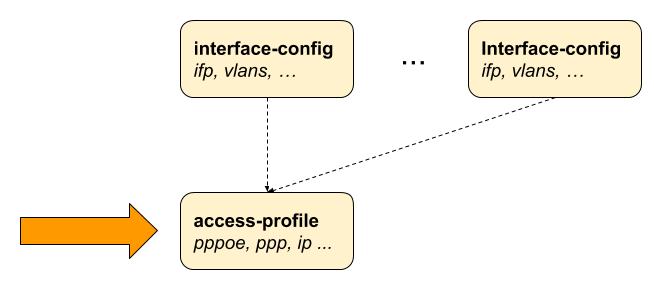
Configuring the Access Profile
Configuring an access profile involves specifying its name and defining various parameters to control how it handles network traffic and client interactions. The following command and options allow you to configure an access profile.
The following table provides the command options/attributes and descriptions.
| Attribute | Description |
|---|---|
|
Without any option, the command creates an access profile. |
|
Name of the access profile. |
|
Name of the outing instance. Default instance value is 'default'. The instance attribute in the access profile specifies the routing instance for PPPoE subscribers. For IPoE subscribers, the routing instance is determined by the 'gateway-ifl' parameter. |
|
Address-family configuration |
|
Protocol configuration. |
PPPoE with IPv4 and IPv6
The following access profile configuration is a PPPoE access profile named pppoe-dual that supports both IPv4 and IPv6. The instance is marked as default, and the session protection is enabled for PPPoE by setting the value to true, and the VLAN priority is set to 6.
The configuration defines various PPP parameters such as LCP, IPCP, and so on. For LCP (Link Control Protocol), the authentication protocol is specified as PAP_CHAP, indicating that both PAP (Password Authentication Protocol) and CHAP (Challenge Handshake Authentication Protocol) are allowed. The echo-interval, which is the interval in seconds for sending LCP echo requests to check the connection, is specified as 30 seconds. The echo-max-retransmit parameter, which is the maximum number of retransmissions for LCP echo requests before considering the link down, is set to 3. The configuration enables the LCP echo requests by specifying true for the echo-enable parameter.
In the configuration, both the IPCP and IP6CP are enabled by setting their values to true. These protocols are used to configure both the IPv4 and IPv6 settings over PPP. The source IFL (logical interface) for IPCP is specified as 'lo-0/0/0/1'. The RA (Router Advertisement) Configuration is enabled by setting the value to 'true', which allows the router to send RA messages for IPv6 configuration. The interval period for the RA messages is set to 60 seconds. DHCPv6 is enabled by setting the value to true, which allows the device to assign IPv6 addresses to the subscribers through DHCP.
The L2TP tunnel profile is defined as l2tp-default, which allows the encapsulation of PPP sessions over IP networks. Both IPv4 and IPv6 address families are enabled by setting their values to true using the address family configurations. For IPv4, the primary DNS server is specified '198.51.100.1' and the secondary DNS server is specified '198.51.100.4'. For IPv6, the primary DNS server is specified as '2001:db8:0:100::'' and the secondary DNS server is specified '2001:db8:0:104::'.
supervisor@switch: cfg> show config access access-profile pppoe-dual
{
  "rtbrick-config:access-profile": {
    "profile-name": "pppoe-dual",
    "instance": "default",
    "protocol": {
      "pppoe": {
        "enable": "true",
        "session-protection": {
          "enable": "true"
        },
        "vlan-priority": 6
      },
      "ppp": {
        "lcp": {
          "authentication-protocol": "PAP_CHAP",
          "echo-interval": 30,
          "echo-max-retransmit": 3,
          "echo-enable": "true"
        },
        "ipcp": {
          "enable": "true",
          "source-ifl": "lo-0/0/0/1"
        },
        "ip6cp": {
          "enable": "true"
        }
      },
      "ra": {
        "enable": "true",
        "interval": 60
      },
      "dhcpv6": {
        "enable": "true"
      },
      "l2tp": {
        "tunnel-profile": "l2tp-default"
      }
    },
    "address-family": {
      "ipv4": {
        "enable": "true",
        "primary-dns": "198.51.100.1",
        "secondary-dns": "198.51.100.4"
      },
      "ipv6": {
        "enable": "true",
        "primary-dns": "2001:db8:0:100::",
        "secondary-dns": "2001:db8:0:104::"
      }
    }
  }
}
IPoE with IPv4 and IPv6
The example configuration below sets up an IPoE access profile named 'ipoe-dual' to handle IPoE sessions, which support both IPv4 and IPv6 address families. The router acts as a DHCP server for both protocols, assigning IP addresses and DNS server information to client devices.
The profile name is ipoe-dual. By setting the value to true, this profile enables both DHCP and DHCPv6 protocols. The mode is defined as server for both DHCP and DHCPv6, which allows the router to act as a server for IPv4 and IPv6. The IPv4 address family is configured for the access profile by setting the value to true. For IPv4, proxy ARP is enabled by setting proxy-arp-enable to true.
The IPv4 address family is configured for the access profile by setting the value to ‘true. For IPv4, proxy ARP is enabled by setting proxy-arp-enable to true. This allows the router to respond to ARP requests on behalf of other hosts.
The pool name ipoe indicates the IPv4 address allocation to client devices. The primary DNS server for IPv4 is set to '198.51.100.1', and the secondary DNS server is specified as '198.51.100.4'.
The configuration includes various parameters for IPv6. The IPv6 pool name is ipoe-ia-na, which provides IPv6 addresses to subscribers. The prefix-delegation-pool-name parameter is set as ipoe-ia-pd for IPv6 prefix delegation. The primary and secondary DNS servers for IPv6 are specified as '2001:db8:0:100::' and '2001:db8:0:104::' respectively.
supervisor@switch: cfg> show config access access-profile ipoe-dual
{
  "rtbrick-config:access-profile":{
    "profile-name":"ipoe",
    "protocol":{
      "dhcp":{
        "enable":"true",
        "mode":"server"
      },
      "dhcpv6":{
        "enable":"true",
        "mode":"server"
      }
    },
    "address-family":{
      "ipv4":{
        "enable":"true",
        "proxy-arp-enable": "true",
        "pool-name":"ipoe",
        "primary-dns":"198.51.100.1,
        "secondary-dns":"198.51.100.4"
      },
      "ipv6":{
        "enable":"true",
        "pool-name":"ipoe-ia-na",
        "prefix-delegation-pool-name":"ipoe-ia-pd",
        "primary-dns": "2001:db8:0:100::",
        "secondary-dns": "2001:db8:0:104::"
      }
    }
  }
}
Unrestricted Proxy-ARP Support for Subscriber IFLs Configuration
This configuration option allows subscriber IFLs to enable unrestricted proxy-ARP, which responds to all ARP requests from subscribers using the MAC address of the corresponding subscriber IFL
Syntax:
Attribute |
Description |
|
Specifies the name of the access profile. |
|
Indicates that the configuration applies to the IPv4 address family. |
|
Enables and controls proxy ARP functionality for the access profile. |
|
Allows the device to respond to ARP requests for any IP address, regardless of whether it belongs to a known subscriber. |
|
Allows the device to respond only to ARP requests for known subscriber IP addresses. |
|
Disables Proxy ARP functionality for the access profile. |
Example:
This configuration creates an access profile that enables DHCP (server mode), DHCPv6 (server mode), and IPv6 Router Advertisements (RA) for subscriber address assignment. It uses the specified IPv4 and IPv6 address pools, supports IPv6 prefix delegation through a dedicated pool, advertises the configured IPv6 DNS server, and enables IPv4 proxy ARP with the 'any' option.
supervisor@rtbrick: cfg> show config access access-profile access-profile1
{
  "rtbrick-config:access-profile": [
    {
      "profile-name": "access-profile1",
      "protocol": {
        "ra": {
          "enable": "true"
        },
        "dhcp": {
          "enable": "true",
          "mode": "server"
        },
        "dhcpv6": {
          "enable": "true",
          "mode": "server"
        }
      },
      "address-family": {
        "ipv4": {
          "enable": "true",
          "pool-name": "pool1",
          "proxy-arp": "any"
        },
        "ipv6": {
          "enable": "true",
          "pool-name": "pool1",
          "prefix-delegation-pool-name": "pool2",
          "primary-dns": "1::1"
        }
      }
    }
  ]
}
 To access the RESTCONF API that corresponds to this CLI, click
here.
To access the RESTCONF API that corresponds to this CLI, click
here.
Configuring IPv4
To enable IPv4 support for access protocols like PPP (PPPoE) or DHCP (IPoE), explicitly activate the IPv4 address family in the access profile.
Syntax:
The following table provides the command options/attributes and descriptions.
| Attribute | Description | ||
|---|---|---|---|
|
Enable IPv4. Default: false. |
||
|
The |
||
|
Primary DNS server. |
||
|
The primary DNS and secondary DNS servers configured are used by protocols such as PPP (PPPoE) or DHCP (IPoE) and advertised to the client. |
||
|
Enable (or disable) proxy ARP support for IPoE subscribers. |
||
|
Configures the static IPv4 address to a subscriber. Multiple subscriber in the same instance cannot be configured with same static IPv4 address.
|
This configuration specifies the primary IPv4 DNS server that is advertised to subscribers using the access profile.
supervisor@rtbrick.net: cfg> show config access access-profile ipoe-intf2-st-default-profile add
ress-family ipv4 primary-dns
{
  "rtbrick-config:primary-dns": "10.1.1.1"
}
To access the RESTCONF API that corresponds to this CLI, click
here.
Configuring IPv6
To make IPv6 available for access protocols such as PPP (PPPoE) or DHCP (IPoE), you must explicitly enable the IPv6 address family within the access profile.
Syntax:
The following table provides the command options/attributes and descriptions.
| Attribute | Description |
|---|---|
|
Enable IPv6. Default: False. |
|
Local IPv6 pool name. |
|
The |
|
Primary DNS server. |
|
The primary DNS and secondary DNS servers configured are used by protocols such as ICMPv6 router advertisements or DHCPv6 and advertise to the client. |
This configuration assigns the specified IPv6 address pool (ipoe_v6_pool1) to the access profile for subscriber address allocation.
supervisor@rtbrick.net: cfg> show config access access-profile ipoe-intf2-st-default-profile add
ress-family ipv6 pool-name
{
  "rtbrick-config:pool-name": "ipoe_v6_pool1"
}
This configuration enables the DHCP protocol for the access profile and sets the DHCP lease time to 30.
supervisor@rtbrick.net: cfg> show config access access-profile ipoe-intf2-st-default-profile protocol dhcp
{
  "rtbrick-config:dhcp": {
    "enable": "true",
    "lease-time": 30
  }
}
To access the RESTCONF API that corresponds to this CLI, click
here.
Enabling IPv6 Router Advertisement
IPv6 Router Advertisement (RA) is a key function within the IPv6 Neighbor Discovery Protocol (NDP). Routers use RA messages to announce their presence and share essential network parameters with IPv6-capable devices. Enabling Router Advertisement is critical for the automatic configuration of IPv6 addresses and related settings on devices supporting IPv6.
The following table provides the command options/attributes and descriptions.
| Attribute | Description |
|---|---|
|
Enable IPv6 router advertisement. Default: False. |
|
IPv6 router advertisements interval in seconds. Sets the interval at which the Router Advertisement messages are sent. Default: 0 ('0' indicates disabled state). |
|
The valid lifetime for the prefix in seconds. Default: 14400. |
|
The preferred lifetime for the prefix in seconds. Default: 1800. |
Configuring DHCPv4
To enable and configure DHCPv4 in the access profile, use the following command. This configuration enables the access profile to process DHCP requests and assign IP addresses to clients.
Syntax:
The following table provides the command options and descriptions.
| Attribute | Description |
|---|---|
|
With any option, the command sets the DHCP mode for the specified access profile. |
|
True or false. Specify true to enable DHCP. Default: False. |
|
This option specifies the DHCP mode for handling DHCP requests. Default: server. Values: server and relay. |
|
Define the duration of IP address leases, in seconds. Default: 300 |
|
Configure global DHCP server. |
To access the RESTCONF API that corresponds to this CLI, click
here.
Configuring DHCPv6
To configure DHCPv6 in an access profile, use the following command. This configuration activates DHCPv6 functionality, sets prefix lifetimes, and defines the operating mode.
The following table provides the command options/attributes and descriptions.
| Attribute | Description |
|---|---|
|
Enable DHCPv6. Default: False. |
|
This option defines the DHCPv6 mode where the server handles DHCPv6 requests locally and relay/proxy forwards those to the configured servers. The difference between relay and proxy is that proxy can hide the actual DHCPv6 server. Default: server. Values: server and relay. |
|
The duration for which the advertised prefix is valid. This is the total time the prefix remains usable before it needs to be renewed. Set this to the desired lifetime in seconds. Default: 14400. |
|
Set the lifetime for IPv6 prefixes, in seconds. It defines the duration during which the prefix is preferred for use. It should be less than or equal to the lifetime. If set higher than the lifetime, it will be adjusted to match the lifetime. The values for T1 and T2 are 0.5 and 0.8 times the shortest preferred lifetime. Default: 1800. |
|
Configure DHCPv6 server. |
To access the RESTCONF API that corresponds to this CLI, click
here.
Configuring PPPoE and PPP
The PPPoE protocol must be explicitly enabled in the access profile to allow PPPoE sessions.
PPPoE
The PPPoE configuration allows changing the default behavior of the PPPoE protocol.
Sample command:
set access access-profile pppoe-dual protocol pppoe enable true
The following table provides the command options/attributes and descriptions.
| Attribute | Description |
|---|---|
|
Without any option, the command sets the access protocol. |
|
Enable PPPoE. Default: False. |
|
Maximum outstanding PPPoE sessions. Default: 64 Range: 1 - 65535. |
|
PPPoE session protection. When PPPoE session protection is enabled, any short-lived or failed sessions are logged. By default, a session that does not remain established for at least 60 seconds (min-uptime) is classified as a failed or short-lived session. Such failures trigger a block on new sessions for this IFP, VLAN, and MAC for one second (min-lockout) by default. With each subsequent failed session, the lockout duration increases exponentially until it reaches a maximum of 300 seconds (max-lockout). If no failed sessions occur for 900 seconds, the lockout interval is reset (currently, not configurable). PPPoE session protection also logs the last subscriber ID and terminates the session with a code that indicates the reason for the failure. |
| Attribute | Description |
|---|---|
|
Without any option, the command sets session protection for the access profile. |
|
Enables PPPoE session protection. Default: false. |
|
Session protection minimum lockout time (in seconds). Default: 1. |
|
Session protection maximum lockout time (in seconds). Default: 300. |
|
Session with an uptime less than this will trigger protection (in seconds). Default: 60. |
To access the RESTCONF API that corresponds to this CLI, click
here.
Configuring PPP LCP
The PPP Link Control Protocol (LCP) configuration allows changing the default behavior of the LCP protocol.
Syntax:
The following table provides the command options and description.
| Attribute | Description |
|---|---|
|
This option allows you to specify the authentication protocol used during the LCP negotiation phase. By default, PPP authentication is set to |
|
By default, RBFS responds to LCP echo requests but does not initiate them unless |
|
LCP echo request interval in seconds. Default: 30, Range: 1 - 255. |
|
LCP echo request retransmissions. Default: 3, Range: 1 - 255. |
|
Negotiate MRU. Default: true. |
|
Maximum local MRU (peer MTU). Default: 1492, Range: 1280 - 1500. |
|
Maximum local MTU (peer MRU). Default: 1492, Range: 1280 - 1500. |
|
This is used during the PPP connection process to detect and prevent loops in the network. It is achieved through the negotiation and validation of 'magic numbers'. Magic numbers are unique values used by both ends of a PPP connection to ensure that the data sent is not simply being looped back from the other end. By default, the negotiation and validation of magic numbers are enabled, providing protection against looping connections. You can disable loop detection by setting |
|
The LCP request retransmission interval. Default: 5, Range: 1 - 255. |
|
The LCP requests retransmission before the session is terminated if no response is received. Default: 3, Range: 1 - 255. |
|
The option |
To access the RESTCONF API that corresponds to this CLI, click
here.
Configuring PPP IPCP
To configure IPv4 over PPPoE, explicitly enable both the address-family IPv4 and the PPP IPCP protocol in the access profile. The source-ifl is a mandatory option that specifies the logical interface from which the local IPv4 address will be derived.
Syntax:
The following table provides the command options/attributes and descriptions.
| Attribute | Description |
|---|---|
|
Enable IPCP. Default: False. |
|
IPCP passive mode. Default: False. |
|
This setting is required and should be set to obtain the local IPv4 address from a specific logical interface. It should be configured to use the loopback interface of the corresponding routing instance. If a |
|
The IPCP request retransmission interval. Default: 5, Range: 1 - 255. |
|
The IPCP requests retransmission before the session is terminated if no response is received. Default: 8 Range: 1 - 255. |
|
The option config-nak-max defines the maximum PPP IPCP configuration reject/nak messages that can be sent or received before the session is terminated. Default: 8, Range: 1 - 255. |
To access the RESTCONF API that corresponds to this CLI, click
here.
Configuring PPP IP6CP
To enable IPv6 over PPPoE, you must explicitly configure both the IPv6 address family and the PPP IPv6 Control Protocol (IP6CP).
The following command demonstrates how to enable PPP IP6CP in the pppoe-dual access profile.
The following table provides the command options/attributes and descriptions.
| Attribute | Description |
|---|---|
|
Enable IP6CP. Default: false. |
|
IP6CP passive mode. Default: false. |
|
This option sets the interval, in seconds, between retransmissions, for IP6CP requests. Default: 5 Range: 1 - 255. |
|
This option sets the maximum number of retransmission attempts. The IP6CP requests retransmission before the session is terminated if no response is received. Default: 8, Range: 1 - 255. |
|
The option defines the maximum PPP IP6CP configuration |
To access the RESTCONF API that corresponds to this CLI, click
here.
Configuring IPoE Username and Password Options for Access Profiles
You can configure the IPoE username suffix and password in both encrypted and plain-text formats.
Syntax:
The following table provides the command options/attributes and descriptions.
| Option | Description |
|---|---|
|
Specifies the encrypted password for IPoE subscribers. The value must be between 4 and 16419 characters in length. |
|
Specifies the plain text password for IPoE subscribers. The value must be between 1 and 64 characters in length. |
|
Specifies the suffix for the IPoE username. By specifying a suffix, the username suffix can be modified from its standard |
The following example shows how to set the IPoE password in encrypted text format and the username suffix for an access profile.
supervisor@rtbrick.net: cfg> show conf set access access-profile
set access access-profile profile1
set access access-profile profile1 protocol ipoe username-suffix #test
set access access-profile profile1 protocol ipoe password-encrypted-text $1a00367e016f343e121d3eb7d573c02ae
supervisor@rtbrick.net: cfg> show conf access access-profile
{
  "rtbrick-config:access-profile": [
    {
      "profile-name": "profile1",
      "protocol": {
        "ipoe": {
          "username-suffix": "#test",
          "password-encrypted-text": "$1a00367e016f343e121d3eb7d573c02ae"
        }
      }
    }
  ]
}
Retention Timer for Subscriber Termination History Configuration
You can configure a retention period (in hours) for storing the termination history of access subscribers after they have been disconnected.
Syntax:
| Option | Description |
|---|---|
|
Specify the period of time (in hours). Range: 0 - 720. If '0' is specified, the data is not retained. |
This configuration sets the terminate-history-timeout to 10, defining the duration the system retains information about terminated subscriber sessions.
set access terminate-history-timeout 10
{
  "rtbrick-config:access": {
    "terminate-history-timeout": 10
  }
}
Configuring DHCP Asymmetric Lease
You can configure the DHCP Asymmetric Lease feature for both DHCPv4 and DHCPv6 in relay mode.
Syntax:
The following table provide the command options and descriptions.
| Attribute | Description |
|---|---|
|
Name of the access profile. |
|
Specify 'true' to enable the asymmetric lease feature. By default, this is false. |
|
Specifies the DHCP rebind time that is sent to DHCP clients. If lease renewal is unsuccessful, the client waits until the timer expires and then attempts to rebind the lease. Range: 1 - 4294967295. |
|
Defines when a client should attempt to renew its existing lease time with the original DHCP server. Range: 1 - 4294967295. |
|
Specifies the DHCPv6 rebind timer that will be advertised to the client. Range: 0 - 4294967295. |
|
Specifies the DHCPv6 renewal timer that will be advertised to the client. Range: 0 - 4294967295. |
Example Scenario:
Server Assignment: A DHCPv6 server assigns a lifetime of 360 seconds, a renewal timer of 240 seconds, and a rebind timer of 300 seconds.
RBFS Configuration: RBFS is configured with Asymmetric Lease enabled and overwrites only the renewal time to 30 seconds.
Result: Because the client attempts to renew every 30 seconds, RBFS will locally serve the first 5 renewal requests (up to 150 seconds). The 6th renewal occurs at 180 seconds, exactly 50% of the 360-second lifetime, prompting RBFS to forward this request to the upstream server.
The following are example configurations for DHCPv4 and DHCPv6.
This configuration enables DHCPv4 relay for subscribers using the default-profile access profile and forwards DHCPv4 messages to the server 'dhcp_server2'. The asymmetric value is set to 'true'. Assigned IPv4 addresses have a lease time of 360 seconds. The CPE tries to renew its lease after 60 seconds and, if unsuccessful, enters the rebind phase after 300 seconds.
set access access-profile default-profile protocol dhcp enable true
set access access-profile default-profile protocol dhcp mode relay
set access access-profile default-profile protocol dhcp asymmetric true
set access access-profile default-profile protocol dhcp lease-time 360
set access access-profile default-profile protocol dhcp renewal-time 60
set access access-profile default-profile protocol dhcp rebind-time 300
set access access-profile default-profile protocol dhcp dhcp-server dhcp_server2
{
  "rtbrick-config:dhcp": {
    "enable": "true",
    "mode": "relay",
    "asymmetric": "true",
    "lease-time": 360,
    "renewal-time": 60,
    "rebind-time": 300,
    "dhcp-server": [
      "dhcp_server2"
      ]
  }
}
DHCPv6:
This configuration enables DHCPv6 relay for subscribers using the 'default-profile' access profile and forwards DHCPv6 messages to the server 'dhcp_server2'. The asymmetric value is set to 'true'. Assigned IPv6 addresses have a valid lifetime of 360 seconds and a preferred lifetime of 320 seconds. The CPE tries to renew its lease after 60 seconds and, if unsuccessful, enters the rebind phase after 300 seconds.
set access access-profile default-profile protocol dhcpv6 enable true
set access access-profile default-profile protocol dhcpv6 mode relay
set access access-profile default-profile protocol dhcpv6 asymmetric true
set access access-profile default-profile protocol dhcpv6 lifetime 360
set access access-profile default-profile protocol dhcpv6 preferred-lifetime 320
set access access-profile default-profile protocol dhcpv6 renewal-time 60
set access access-profile default-profile protocol dhcpv6 rebind-time 300
set access access-profile default-profile protocol dhcpv6 dhcpv6-server dhcp_server2
{
  "rtbrick-config:dhcpv6": {
    "enable": "true",
    "mode": "relay",
    "asymmetric": "true",
    "lifetime": 360,
    "preferred-lifetime": 320,
    "renewal-time": 60,
    "rebind-time": 300,
    "dhcpv6-server": [
      "dhcp_server2"
      ]
  }
}