Getting the Training Topology by Installing Locally (Advanced)
Prerequisites
In order to build a local test environment, your organization needs access to the RtBrick image store. Please follow the instructions in the RBFS Image Download to get the required permissions and install rtbrick-image package. In addition, you will need some packages that allow you to run the virtual RBFS images as LXC containers on your system and that provide the robot infrastructure used in training:
~$ sudo apt install rtbrick-apigwd rtbrick-lxcd rtbrick-ctrld rtbrick-ansible rtbrick-robot-infrastructure rtbrick-robot-rest rtbrick-bngblaster-robotframeworkThe system requirements for a minimalistic virtual lab environment are a VM with 8 cores, 16 GB of memory, and Ubuntu 22.04 being installed.
Setup
Provided that all prerequisites for running a local RBFS environments are fulfilled, you can download the files necessary to run the virtual lab environment with the command
~$ sudo rtb-image stores activate resources
~$ sudo rtb-image update
~$ sudo rtb-image pull --here -r trainings_resources -v latest|
This command downloads an entire directory and the files it contains have interdependencies, i.e., they should not be moved individually. In addition, the commands for the rtb-tools should be run as a normal user with sudo permissions, but not as a root user. |
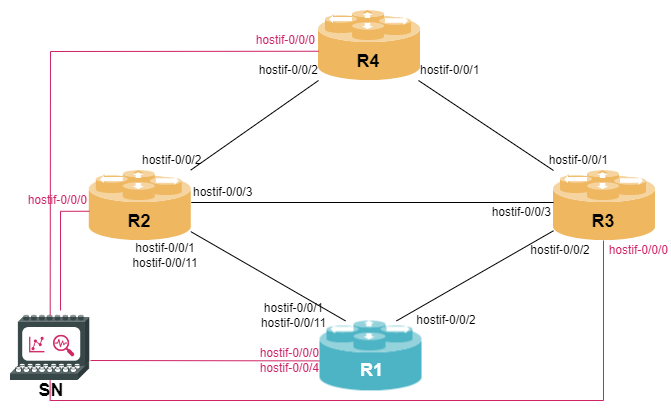
Afterwards, the following commands will spawn the local test environment and create four RBFS containers running systems R1, R2, R3, and R4 as well as a service node containing and starts the ctrld service. The topology is defined in the file topology.yaml.
~$ sudo rtb-image stores activate latest
~$ sudo rtb-image update
~$ cd trainings_resources/infra
~/trainings_resources/infra$ rtb-ansible full-setup
Before executing the rtb-ansible full-setup command, you must activate the latest store to enable rtb-ansible to download the right RBFS image.
|
The figure below shows the lab network topology.
Running the Exercises
Each module comes along with two robot files: a setup file and a check file. Before you start a module, you should execute the corresponding setup file to prepare your lab environment, e.g., for the first BGP module
~/trainings_resources/robot$ robot bgp_ebgp/bgp_ebgp_setup.robotFor more information about Robot Framework, see the Robot Framework documentation.
The nodes R2, R3, and R4 are loaded with the full configuration at the beginning of each module, while node R1, which is your device under test (DUT), is loaded with some initial configuration in order to avoid configuring all steps that have already been done in previous modules.
You can login to R1 to perform your configuration exercises using either ssh or rtb-ssh:
~/trainings_resources$ rtb-ssh R1After you have completed the module, you can execute the check file to see if everything was done correctly, e.g., for the first BGP module
~/trainings_resources/robot$ robot bgp_ebgp/bgp_ebgp_verify.robotGetting Started with the Exercises
With the RBFS Tour topology now running, you are ready to begin the configuration exercises. Start with the Command Line Interface section and continue through the subsequent modules.