Configuring EVPN Virtual Private Wire Service
Module Introduction
Before you start the hands-on part of this module, you should load the appropriate configuration and verify that the testbed is up and running by executing the corresponding robot file:
student@tour:~/trainings_resources/robot$ robot mpls_evpn_pw/mpls_evpn_pw_setup.robot|
We use IS-IS as IGP for the examples and exercises in this module. The choice of IGP is not important for understanding and configuration of EVPNs. However, if you prefer to run OSPF instead, you can alternatively load the setup using the |
In order to get a better understanding, the lab setup is shown in the picture below.
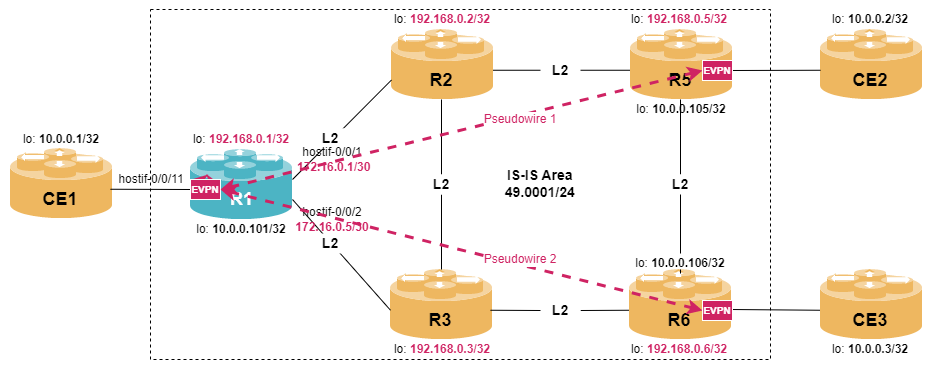
|
In RBFS version 26.1.1, EVPN is only supported on Q2A/Q2C/QAX-based platforms, but not in virtual environments. In this module, the configuration steps are explained and the corresponding control plane outputs are shown. However, the data plane is working due to missing EVP support in VPP. |
Virtual Private Wire Service and EVPN
A pseudowire is a mechanism that emulates a point-to-point Layer-2 connection (e.g., Ethernet) over an MPLS network. It provides a transparent Layer-2 connection between two endpoints, as if a physical wire existed between them. A service that provides point-to-point Layer-2 VPNs using pseudowires is called a Virtual Private Wire Service (VPWS). The terms pseudowire and VPWS are sometimes used interchangeably, but to be precise, a VPWS refers to a service, while a pseudowire is a mechanism.
EVPN can be used to setup and maintain a pseudowire re-using existing BGP infrastructure. In addition, EVPN supports multihoming, thus providing better resiliency. Unlike regular EVPN services, EVPN VPWS does not rely on MAC learning. Since it’s a point-to-point service, each PE knows where to forward traffic without having to learn MAC addresses. The focus is on simple Layer 2 frame forwarding between two endpoints. As a result, the BGP MAC/IP Advertisement Route (Type 2) is not used in EVPN VPWS. EVPN VPWS primarily uses Route Ethernet Auto-Discovery (Type 1) to advertise the existence of a point-to-point Ethernet segment. Ethernet Segment Route (Type 4) may still be used for multi-homing in EVPN VPWS scenarios where redundancy is needed between two sites.
Since VPWS is a point-to-point service, it doesn’t involve broadcast, unknown unicast, or multicast traffic handling, i.e., there is no need for mechanisms like inclusive multicast routes or ingress replication.
EVPN Pseudowire Configuration
Configuring EVPN Support in BGP
In order to use the BGP control plane, we need to activate the corresponding address-family l2vpn evpn at both the BGP protocol level and the peer-group level.
Configure two iBGP peering to BGP neighbor 192.168.0.5 and 192.168.0.6, both supporting IPv4 unicast and L2VPN EVPN address family. The local AS number is 64500.+
Use your primary loopback address, 192.168.0.1, as your end of the BGP session, and name the peer-group INTERN.
Verify your configuration with show bgp peer, and once the two peers come up, use show bgp peer <name> to check the the l2vpn-evpn address family was correctly negotiated.
Click to reveal the answer
set instance default protocol bgp hostname R1
set instance default protocol bgp local-as 64500
set instance default protocol bgp router-id 192.168.0.1
set instance default protocol bgp address-family ipv4 unicast
set instance default protocol bgp address-family l2vpn evpn
set instance default protocol bgp peer ipv4 192.168.0.5 192.168.0.1 peer-group INTERN
set instance default protocol bgp peer ipv4 192.168.0.6 192.168.0.1 peer-group INTERN
set instance default protocol bgp peer-group INTERN remote-as 64500
set instance default protocol bgp peer-group INTERN address-family ipv4 unicast
set instance default protocol bgp peer-group INTERN address-family l2vpn evpn
commit
Let’s check if the EVPN address-family was successfully negotiated:
cfg> show bgp peer
Instance: default
  Peer                                     Remote AS    State         Up/Down Time               PfxRcvd              PfxSent
  R5                                       64500        Established   0d:00h:00m:02s             0                    0
  R6                                       64500        Established   0d:00h:00m:05s             0                    0

cfg> show bgp peer R5
Peer: R5, Peer IP: 192.168.0.5, Remote AS: 64500, Local IP: 192.168.0.1, Local AS: 64500, Any AS: False
  Type: ibgp, State: Established, Up/Down Time: Thu Jun 25 11:33:02 GMT +0000 2026
  Discovered on interface: -
  Last transition: Thu Jun 25 11:33:02 GMT +0000 2026, Flap count: 0
  Peer ID        : 192.168.0.5, Local ID: 192.168.0.1
  Instance       : default, Peer group: INTERN
  6PE enabled    : False
  TTL security   : False, TTL limit: -
  Timer values:
    Peer keepalive : 30s, Local keepalive: 30s
    Peer holddown  : 90s, Local holddown : 90s
    Connect retry  : 30s
  Timers:
    Connect retry timer : 0
    Keepalive timer     : expires in 17s 64501us
    Holddown timer      : expires in 1m 17s 69620us
  NLRIs:
    Sent           : ['l2vpn-evpn', 'ipv4-unicast']
    Received       : ['l2vpn-evpn', 'ipv4-unicast']
    Negotiated     : ['l2vpn-evpn', 'ipv4-unicast']
<...>

cfg> show bgp peer R6
Peer: R6, Peer IP: 192.168.0.6, Remote AS: 64500, Local IP: 192.168.0.1, Local AS: 64500, Any AS: False
  Type: ibgp, State: Established, Up/Down Time: Thu Jun 25 11:32:59 GMT +0000 2026
  Discovered on interface: -
  Last transition: Thu Jun 25 11:32:59 GMT +0000 2026, Flap count: 0
  Peer ID        : 192.168.0.6, Local ID: 192.168.0.1
  Instance       : default, Peer group: INTERN
  6PE enabled    : False
  TTL security   : False, TTL limit: -
  Timer values:
    Peer keepalive : 30s, Local keepalive: 30s
    Peer holddown  : 90s, Local holddown : 90s
    Connect retry  : 30s
  Timers:
    Connect retry timer : 0
    Keepalive timer     : expires in 7s 72451us
    Holddown timer      : expires in 1m 29s 568553us
  NLRIs:
    Sent           : ['l2vpn-evpn', 'ipv4-unicast']
    Received       : ['l2vpn-evpn', 'ipv4-unicast']
    Negotiated     : ['l2vpn-evpn', 'ipv4-unicast']
<...>
Configuring the EVPN Instance
Once BGP signaling is in place, we need to configure an Ethernet VPN instance. The instance configuration includes parameters like router-id, route-distinguisher, as well as import and export route-target for the address-family l2vpn evpn-vpws.
Configure a EVI named EVPN-VPWS supporting address-family evpn-vpws.
The route-distinguisher should be set to 192.168.0.1:100 and route-targets for both, import and export, should be set target:64500:100.
Use the show instance command to verify that the instance has been created.
Click to reveal the answer
set instance EVPN-VPWS ipv4-router-id 192.168.0.1
set instance EVPN-VPWS route-distinguisher 192.168.0.1:100
set instance EVPN-VPWS address-family l2vpn evpn-vpws route-target import target:64500:100
set instance EVPN-VPWS address-family l2vpn evpn-vpws route-target export target:64500:100
set instance EVPN-VPWS protocol bgp local-as 64500
commit
Verification:
cfg> show instance
Instance              Router ID         Instance ID  Status
EVPN-VPWS             192.168.0.1       2            Active
default               192.168.0.1       1            Active
Configuring Interfaces for EVPN VPWS Support
The link between CE device and PE router is called attachment circuit in pseudowire terminology. In order to use an interface as attachment circuit, we need to set the interface-type to l2vpn-vpws; EVPN supports both untagged and tagged interfaces.
We will use two logical interfaces (two VLANs) on interface hostif-0/0/11 as local endpoints of our two pseudowires.
Set the administrative status of hostif-0/0/11 to up, and configure on it two logical units for EVPN pseudowire transport, one for VLAN 101 and one for VLAN 102.
Assign both logical interfaces to our newly-created EVPN instance EVPN-VPWS.
To configure a VLAN-based logical interface as an EVPN pseudowire endpoint and assign it to an EVPN instance, use this syntax:
set interface <interface-name> unit <vlan-number> vlan <vlan-number>
set interface <interface-name> unit <vlan-number> instance <instance-name>
set interface <interface-name> unit <vlan-number> interface-type l2vpn-vpws
Use the show interfaces logical command to verify your work.
Click to reveal the answer
set interface hostif-0/0/11 admin-status up
set interface hostif-0/0/11 unit 101 interface-type l2vpn-vpws
set interface hostif-0/0/11 unit 101 instance EVPN-VPWS
set interface hostif-0/0/11 unit 101 vlan 101
set interface hostif-0/0/11 unit 102 interface-type l2vpn-vpws
set interface hostif-0/0/11 unit 102 instance EVPN-VPWS
set interface hostif-0/0/11 unit 102 vlan 102
commit
Now we can use the show interface logical command to verify:
cfg> show interface logical
Interface              Instance            Admin   Link    Oper    Outer VLAN   Inner VLAN  IPv4 Status,MTU   IPv6 Status,MTU   Type
lo-0/0/0/0             default             Up      Up      Up      -            -           Up,NA             Down,NA           l3
hostif-0/0/1/0         default             Up      Up      Up      -            -           Up,1500           Down,1500         l3
hostif-0/0/2/0         default             Up      Up      Up      -            -           Up,1500           Down,1500         l3
hostif-0/0/11/101      EVPN-VPWS           Up      Up      Up      101          -           -                 -                 l2vpn-vpws
hostif-0/0/11/102      EVPN-VPWS           Up      Up      Up      102          -           -                 -                 l2vpn-vpws
Having created our EVPN instance and our local interfaces, we can finally define two pseudowires which will transport layer-2 traffic received on hostif-0/0/11/101 and hostif-0/0/11/102 across our MPLS core, to the remote PEs.
To do this, we will need to assign a local-id to each of our logical units (which will be advertised by our BGP session), and the remote-id for the remote end of the pseudowire, which should match what has been configured on the remote PE and sent to us via BGP.
To specify local and remote service-IDs, use this configuration:
set instance <instance> protocol bgp address-family l2vpn evpn-vpws interface <ifl> local-service-id <value>
set instance <instance> protocol bgp address-family l2vpn evpn-vpws interface <ifl> remote-service-id <value>Configure two virtual pseudowire services with the following parameters:
| Interface | instance | local service ID | remote service ID |
|---|---|---|---|
hostif-0/0/11/101 |
EVPN-VPW |
122 |
211 |
hostif-0/0/11/102 |
EVPN-VPW |
123 |
321 |
Click to reveal the answer
set instance EVPN-VPWS protocol bgp address-family l2vpn evpn-vpws interface hostif-0/0/11/101 local-service-id 122
set instance EVPN-VPWS protocol bgp address-family l2vpn evpn-vpws interface hostif-0/0/11/101 remote-service-id 221
set instance EVPN-VPWS protocol bgp address-family l2vpn evpn-vpws interface hostif-0/0/11/102 local-service-id 123
set instance EVPN-VPWS protocol bgp address-family l2vpn evpn-vpws interface hostif-0/0/11/102 remote-service-id 321
commit
Once, the BGP session is established and EVPN routes are exchanged, we can inspect the BGP RIB-in, for example for neighbor R5:
cfg> show bgp rib-in l2vpn evpn peer R5
Flags: & - Imported, ! - Error, N - RPKI Unknown, I - RPKI Invalid, V - RPKI Valid
Instance: default, AFI: l2vpn, SAFI: evpn
  Hostname: R5, Peer IP: 192.168.0.5
  Source IP: 192.168.0.1, Total routes: 1
    Prefix                                       Next Hop                           MED         Lpref       AS Path
    00.00.00.00.00.00.00.00.00.00:221/112        192.168.0.5                        -           100         -

cfg> show bgp rib-in l2vpn evpn peer R5 detail
Instance: default, AFI: l2vpn, SAFI: evpn
  Hostname: R5, Peer IP: 192.168.0.5
  Source IP: 192.168.0.1, Total routes: 1
    Prefix: 00.00.00.00.00.00.00.00.00.00:221/112, Received path ID: 0, Next hop: 192.168.0.5
      Route distinguisher: 192.168.0.5:100
      Status: Init
      Protocol source: bgp
      Origin: Incomplete
      Send path ID: 495341019
      Local preference: 100
      Extended community: ['vpws-l2-info:0:0:0', 'target:64500:100']
      Label: 519937,bos:1
      Last update: 0d:00h:06m:25s
As expected, we have received a Ethernet Auto-Discovery route. The prefix contains the advertised Ethernet Segment Identifier 00.00.00.00.00.00.00.00.00.00 (which represents a single-homed ESI) as well as the service-id, which needs to match the remote-service-id. The update message also contains a MPLS service label.
A summary of all configured pseudowires can be seen using the show bgp l2vpn pseudowire command:
cfg> show bgp l2vpn pseudowire
Instance: EVPN-VPWS, AFI: l2vpn, SAFI: evpn-vpws
  Route distinguisher: 192.168.0.1:100
  Number of local interfaces: 2
    Peer IP                                       Interface Name       Prefix                                     Status          Local SID  Remote SID Pop Label          Push Label
    192.168.0.5                                   hostif-0/0/11/101    00.00.00.00.00.00.00.00.00.00:122/112      Up                    122         221 label:524035,bos:1 label:519937,bos:1
    192.168.0.6                                   hostif-0/0/11/102    00.00.00.00.00.00.00.00.00.00:123/112      Up                    123         321 label:524036,bos:1 label:524033,bos:1
We can also verify that the corresponding entries were added to the FIB:
cfg> show bgp fib l2vpn
Instance: EVPN-VPWS, AFI: l2vpn, SAFI: evpn-vpws, Total routes: 2
  Prefix                                        Preference      Label                Next Hop
  00.00.00.00.00.00.00.00.00.00:321/112         200             524033,bos:1         192.168.0.6
  00.00.00.00.00.00.00.00.00.00:221/112         200             519937,bos:1         192.168.0.5
Instance: default, AFI: l2vpn, SAFI: evpn, Total routes: 4
  Prefix                                        Preference      Label                Next Hop
  00.00.00.00.00.00.00.00.00.00:321/112         200             524033,bos:1         192.168.0.6
  00.00.00.00.00.00.00.00.00.00:122/112         200             524035,bos:1         -
  00.00.00.00.00.00.00.00.00.00:123/112         200             524036,bos:1         -
  00.00.00.00.00.00.00.00.00.00:221/112         200             519937,bos:1         192.168.0.5