BGP FlowSpec Configuration
Module Introduction
Before you start the hands-on part of this module, you should load the appropriate configuration and verify that the testbed is up and running by executing the corresponding robot file:
student@tour:~/trainings_resources/robot$ robot bgp_flowspec/bgp_flowspec_setup.robotBGP FlowSpec Overview
BGP Flowspec (Flow Specification) is an extension to the Border Gateway Protocol (BGP) designed to allow the distribution of traffic flow specification rules. These rules are used primarily for DDoS mitigation and traffic engineering. The main advantage of BGP Flowspec for network operators is the ability to define filtering and rate-limiting policies for specific traffic flows dynamically at a central point (e.g., scrubbing center, etc.) and distribute these rules across the network using BGP without the need to reconfigure reconfigure every single router.
BGP Flowspec as defined in RFC 8955 (for IPv4) and RFC 8956 (for IPv6) uses BGP multiprotocol extensions to encode flowspec rules. The specification introduces two new SAFI values for Flowspec: SAFI 133 for unicast and SAFI 134 for Layer-3 VPN traffic. The FlowSpec rules define the criteria for matching traffic flows which can consists of several packet header fields including
-
destination IP
-
source IP
-
IP protocol
-
destination port
-
source port
A given Flowspec rule is associated with traffic filtering actions such as
-
rate-limiting
-
redirecting to a specific interface
-
filtering (dropping)
These actions are encoded in BGP extended community attributes.
Upon receiving a BGP Flowspec rule, a router installs it into its forwarding table and applies the specified actions to the matching traffic. This can happen dynamically without the need for manual configuration changes.
For a list of supported match criteria and actions, please refer to BGP FlowSpec Overview.
BGP FlowSpec Configuration
A key component in BGP Flowspec is the central component that is used to generate and distribute the Flowspec rules. In general, this is not a router but a server that runs an BGP implementation and peers with network devices.
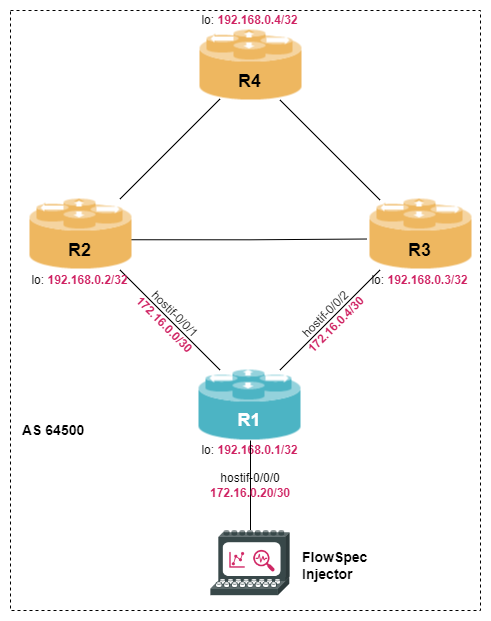
The server generating the Flowspec routes is directly connected to router R1. Configure hostif-0/0/0 on R1 to use IP address 172.16.0.21/30 and create a static route to the loopback address of the server (IPv4 address: 192.168.0.100/32).
Click to reveal the answer
cfg> delete interface hostif-0/0/0 admin-status down
cfg> set interface hostif-0/0/0 description "Link to Service Node"
cfg> set interface hostif-0/0/0 unit 0 instance default
cfg> set interface hostif-0/0/0 unit 0 address ipv4 172.16.0.21/30
cfg> set instance default static route ipv4 192.168.0.100/32 unicast SN
cfg> set instance default static nexthop-profile SN nexthop 172.16.0.22
cfg> commit
Note, that the static route is inactive and the server loopback address unreachable as the BGP application is not yet running on the server.
Typically, a router is only used to receive and forward BGP Flowspec routes, thus configuration is rather simple. All we have to do is enable the address-family ipv4|ipv6 flowspec in the BGP instance and in the corresponding peer groups. Note, that Flowspecs are not routing information that is installed in the RIB, i.e., there is no need to enable Flowspec at the instance level.
On router R1, configure an iBGP session with the server (IPv4 address 192.168.0.100) that support IPv4 and IPv6 flowspec. In addition, add Flowspec support to the existing BGP peerings.
Click to reveal the answer
cfg> set instance default protocol bgp address-family ipv4 flowspec
cfg> set instance default protocol bgp address-family ipv6 flowspec
cfg> set instance default protocol bgp peer-group FlowServer remote-as 64500
cfg> set instance default protocol bgp peer-group FlowServer address-family ipv4 flowspec
cfg> set instance default protocol bgp peer-group FlowServer address-family ipv6 flowspec
cfg> set instance default protocol bgp peer ipv4 192.168.0.100 192.168.0.1 peer-group FlowServer
cfg> set instance default protocol bgp peer-group Internal address-family ipv4 flowspec route-reflect-client true
cfg> set instance default protocol bgp peer-group Internal address-family ipv6 flowspec route-reflect-client true
cfg> commit
cfg> show bgp peer
Instance: default
  Peer                                     Remote AS    State         Up/Down Time               PfxRcvd              PfxSent
  R2                                       64500        Established   0d:00h:35m:58s             0                    0
  R3                                       64500        Established   0d:00h:36m:00s             0                    0
  R4                                       64500        Established   0d:00h:35m:58s             0                    0
  192.168.0.100                            64500        Connect       Never                      0                    0
From the output of the show bgp peer command we can see that the configuration is correct, i.e., router R1 is advertising the capability to send and receive IPv4 and IPv6 Flowspec information.
cfg> show bgp peer address 192.168.0.100
Peer: -, Peer IP: 192.168.0.100, Remote AS: 64500, Local IP: 192.168.0.1, Local AS: 64500, Any AS: False
  Type: ibgp, State: Connect, Up/Down Time: never
  Discovered on interface: -
  Last transition: Thu Jun 11 08:07:35 GMT +0000 2026, Flap count: 0
  Peer ID        : 0.0.0.0, Local ID: 192.168.0.1
  Instance       : default, Peer group: FlowServer
  6PE enabled    : False
  TTL security   : False, TTL limit: -
  Timer values:
    Peer keepalive : 0s, Local keepalive: 30s
    Peer holddown  : 0s, Local holddown : 90s
    Connect retry  : 30s
  Timers:
    Connect retry timer : expires in 6s 705016us
    Keepalive timer     : 0
    Holddown timer      : 0
  NLRIs:
    Sent           : ['ipv4-flowspec', 'ipv6-flowspec']
    Received       : None
    Negotiated     : None
<...>
However, the BGP peering is not established because there is no BGP application running on the remote side. In order to see some useful CLI output, we need to establish a BGP session and advertise a couple of Flowspec routes. The virtual lab environment comes with a service node (SN) that has BNG Blaster pre-installed - an open-source test tool that allows to emulate BGP peers. A short introduction to the BNG Blaster can be found in the Supplementary Material in section BNG Blaster. For more details refer to the BNG Blaster Documentation.
Now let’s open another terminal, log into the service node and start the BNG Blaster.
student@tour:~$ rtb-ssh SN
Logging into SN as supervisor ...
<...>
supervisor@SN:~ $ sudo bngblaster -C bgp_flowspec.json
[sudo] password for supervisor:
Aug 06 08:10:13.239251 Loaded BGP RAW update file /home/supervisor/flow_routes.bgp (0.55 KB, 8 updates)
Aug 06 08:10:13.331764 Total PPS of all streams: 0.00
Aug 06 08:10:14.331852 Resolve network interfaces
Aug 06 08:10:14.331888 All network interfaces resolved
Now the BGP session gets established:
cfg> show bgp peer address 192.168.0.100
Peer: -, Peer IP: 192.168.0.100, Remote AS: 64500, Local IP: 192.168.0.1, Local AS: 64500, Any AS: False
  Type: ibgp, State: Established, Up/Down Time: Thu Jun 11 08:13:00 GMT +0000 2026
  Discovered on interface: -
  Last transition: Thu Jun 11 08:13:00 GMT +0000 2026, Flap count: 0
  Peer ID        : 1.2.3.4, Local ID: 192.168.0.1
  Instance       : default, Peer group: FlowServer
  6PE enabled    : False
  TTL security   : False, TTL limit: -
  Timer values:
    Peer keepalive : 30s, Local keepalive: 30s
    Peer holddown  : 90s, Local holddown : 90s
    Connect retry  : 30s
  Timers:
    Connect retry timer : 0
    Keepalive timer     : expires in 27s 219979us
    Holddown timer      : expires in 1m 23s 906530us
  NLRIs:
    Sent           : ['ipv4-flowspec', 'ipv6-flowspec']
    Received       : ['ipv4-flowspec', 'ipv6-flowspec']
    Negotiated     : ['ipv4-flowspec', 'ipv6-flowspec']
<...>
We can also see that we have learned a few Flowspec routes, both for IPv4 and IPv6.
cfg> show bgp rib-in ipv4 flowspec
Flags: & - Imported, ! - Error
Instance: default, AFI: ipv4, SAFI: flowspec
  Peer IP: 192.168.0.100
  Source IP: 192.168.0.1, Total routes: 4
    Flowspec Hash                                Match                                        Action                        AS Path
    25686245                                     dest-prefix : 10.1.5.100/32                  discard                       -
                                                        ip-proto    : [==tcp ]
                                                        dst-port    : [==80 or 8080 and 8888 ]
    71a83a61                                     dest-prefix : 10.1.1.0/24                    discard                       -
    71d5a4ab                                     dest-prefix : 10.1.4.0/24                    rate-limit: 100.0 kBps        -
    ee72bcf4                                     dest-prefix : 10.1.2.0/24                    discard                       -
                                                        src-prefix  : 10.1.3.0/24                       discard                   -             Valid
cfg> show bgp rib-in ipv6 flowspec
Flags: & - Imported, ! - Error
Instance: default, AFI: ipv6, SAFI: flowspec
  Peer IP: 192.168.0.100
  Source IP: 192.168.0.1, Total routes: 4
    Flowspec Hash                                Match                                        Action                        AS Path
    42546069                                     dest-prefix : 2001:db8:0:d00::/56            rate-limit: 100.0 kBps        -
    46621ca8                                     dest-prefix : 2001:db8:0:a00::/56            discard                       -
    dc5e46c4                                     dest-prefix : 2001:db8:0:e00::100/128        discard                       -
                                                        ip-proto    : [==tcp ]
                                                        dst-port    : [==80 or 8080 and 8888 ]
    e6032bf2                                     dest-prefix : 2001:db8:0:b00::/56            discard                       -
                                                        src-prefix  : 2001:db8:0:c00::/56
These Flowspec rules are translated into access lists and installed on the router.
To see the structure of each rule you can use the show acl rule bgp-flowspec- and press the TAB key, which will show the full names of all flowspec rules.
Then, select a rule and use
cfg> show acl
ACL                                      Ordinal  Type           Attach Point     Priority   Policer Name
default_isis_acl_hostif-0/0/1/0_all_l1         -  l2             -                       -   _DEFAULT_POLICER_ISIS_GLOBAL_50MB
bgp-flowspec-71a83a61c3aee3ee711c257f...       0  l3v4           -                    1502   -
...
bgp-flowspec-dc5e46c4c631d68e1c2a2cee...       0  l3v6           -                    1501   -
...
<...>
cfg> show acl rule bgp-flowspec-<TAB>
 bgp-flowspec-71a83a61c3aee3ee711c257f97a7b939764184d85440c406
 bgp-flowspec-256862451e71396e7bb2754e216c0ce3549f3076d14b3ce4
 bgp-flowspec-e6032bf27ae83ffe48172b65b39b25c47bafa807affe987b
 ...
supervisor@R1>rtbrick: cfg> show acl rule bgp-flowspec-71a83a61c3aee3ee711c257f97a7b939764184d85440c406
Rule: bgp-flowspec-71a83a61c3aee3ee711c257f97a7b939764184d85440c406
  ACL type: l3v4
  Ordinal: 0             Priority: 1502
    Match:
      Destination IPv4 prefix: 10.1.1.0/24
    Action:
      Stats enabled: True
      Drop: True
    Result:
      ACL Handle: -
Finally, let’s have a look at the Flowspec rules that are forwarded from R1 to the route reflector clients R2 and R3:
cfg> show bgp rib-out ipv4 flowspec
Flags: N - RPKI Unknown, I - RPKI Invalid, V - RPKI Valid
Instance: default, AFI: ipv4, SAFI: flowspec
  Peer-group: Internal, Sent routes: 4
   Flags  Flowspec Hash                Match                                         Action                       Origin
          25686245                     dest-prefix : 10.1.5.100/32                   None                         Incomplete
                                       ip-proto    : [==tcp ]
                                       dst-port    : [==80 or 8080 and 8888 ]
          71a83a61                     dest-prefix : 10.1.1.0/24                     None                         Incomplete
71d5a4ab dest-prefix : 10.1.4.0/24 None Incomplete| Although we have learned four IPv4 Flowspec rules via BGP, only three IPv4 rules are translated into ACLs. The reason is that one rule contains a match criteria for port range (e.g., lower, greater, …) which is currently not supported. Even though port ranges are not supported in RBFS, BGP still forwards those rules to other BGP peers that might support them. |