Subscriber Management Operational Commands
Show Commands
The following commands are served by subscriber daemon and are applicable for all kinds of subscribers like PPPoE, L2TP or IPoE.
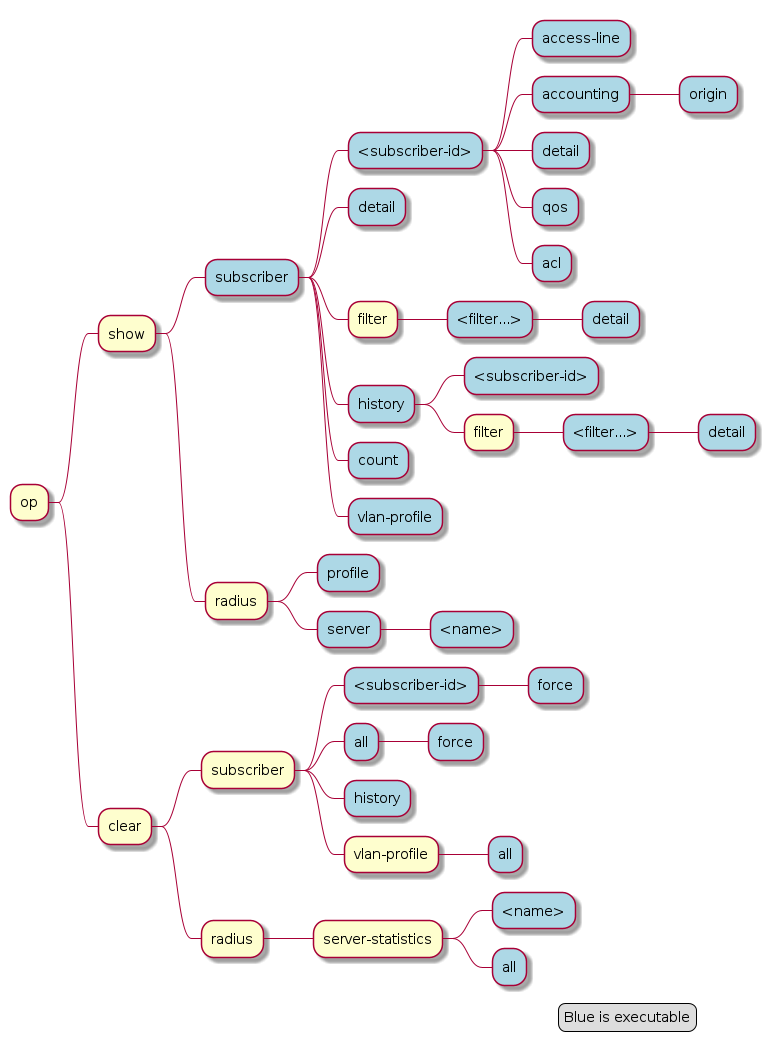
Subscribers
The term subscriber describes an access user or session from a higher level decoupled from underlying protocols like PPPoE or IPoE. Subscribers in RBFS can be managed locally or remote via RADIUS. Each subscriber is uniquely identified by a 64bit number called subscriber-id.
Subscriber States
A good starting point for troubleshooting subscriber services is to verify the status of the subscriber sessions. The state ESTABLISHED means that the session is fully operational.
supervisor@leaf1: op> show subscriber
Subscriber-Id          Interface        VLAN      Type   State
72339069014638600      ifp-0/0/1        1:1       PPPoE  ESTABLISHED
72339069014638601      ifp-0/0/1        1:2       PPPoE  ESTABLISHED
72339069014638602      ifp-0/0/1        1:3       PPPoE  ESTABLISHED
72339069014638603      ifp-0/0/3        2000:7    L2TP   ESTABLISHED
Alternative use show subscriber detail which shows further details like username, Agent-Remote-Id (aka Line-Id) or Agent-Circuit-Id if screen width is large enough to print all those information.
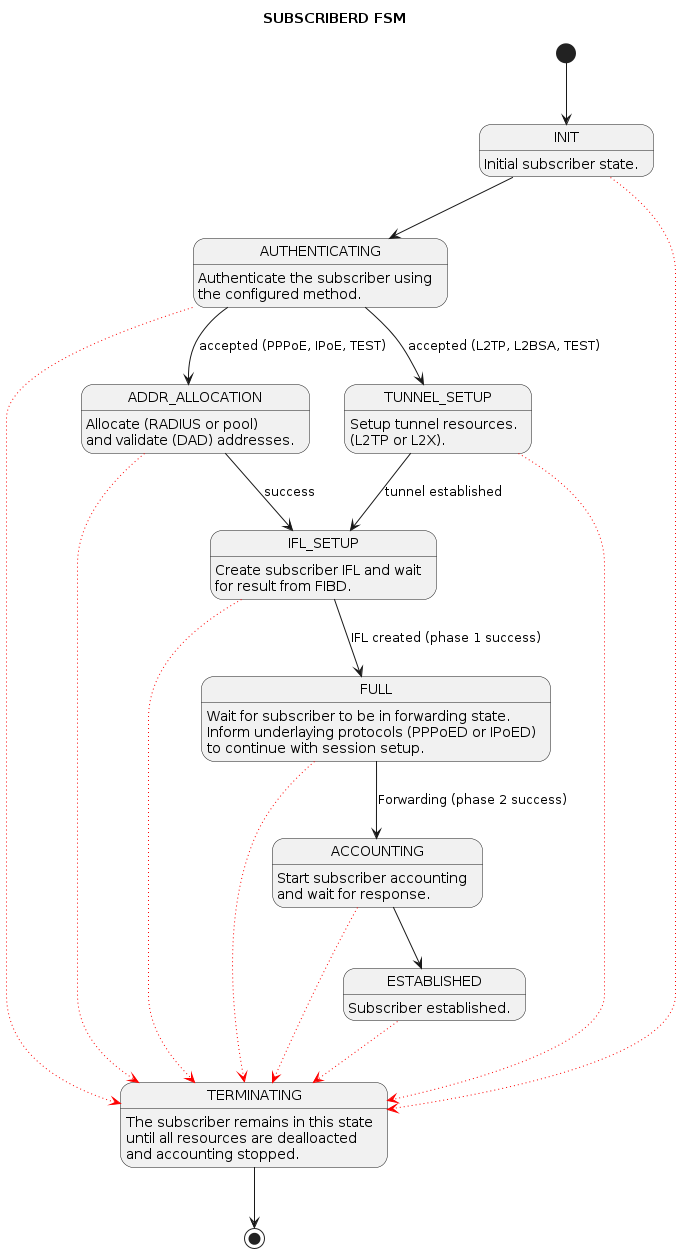
The meaning of the subscriber state is shown in the following table and diagram.
| State | Description |
|---|---|
|
Initial subscriber state. |
|
Authenticate the subscriber using the configured method. |
|
Allocate (RADIUS or pool) and validate (DAD) addresses. |
|
Setup tunnel resources (L2TP or L2X). |
|
Create subscriber IFL with corresponding QoS resources. |
|
Wait for subscriber to be in forwarding state. Inform underlying protocols (PPPoED or IPoED) to continue with session setup. |
|
Start subscriber accounting and wait for response. |
|
The subscriber becomes ESTABLISHED after response to RADIUS Accounting-Request-Start if RADIUS accounting is enabled otherwise immediately after FULL. |
|
The subscriber remains in this state until all resources are freed and accounting stopped. This means that subscriber remain in this state until response to RADIUS Accounting-Request-Stop if RADIUS accounting is enabled. |
For each subscriber a set of commands is available showing detailed information.
| Attribute | Description |
|---|---|
|
Displays a summary of the specified subscriber, including session and state information. |
|
Displays access line details such as interface, VLAN, and physical connectivity information associated with the subscriber. |
|
Displays accounting-related information, including usage counters and session statistics for the subscriber. |
|
Displays the Access Control List (ACL) filters applied to the subscriber and their corresponding match/action details. |
|
Displays comprehensive subscriber information, including session parameters, state, applied profiles, and configuration details. |
|
Displays Quality of Service (QoS) configuration and statistics applied to the subscriber, including policers and traffic classification. |
Example for the specified subscriber details
user@switch: op> show subscriber 72339069014638594 detail
Subscriber-Id: 72339069014638594
    Type: PPPoE
    State: ESTABLISHED
    Created: Fri Sep 18 20:50:02 GMT +0000 2020
    Interface: ifl-0/0/1
    Outer VLAN: 128
    Inner VLAN: 7
    Client MAC: fe:08:e8:ea:1d:32
    Server MAC: 7a:52:4a:01:00:01
    IFL: ppp-0/0/1/72339069014638594
    Username: 1122334455#123456789#0001@t-online.de
    Agent-Remote-Id: DEU.DTAG.1337
    Agent-Circuit-Id: 0.0.0.0/0.0.0.0 eth 1337
    Access-Profile: access-profile1
    AAA-Profile: aaa-profile1
    Session-Timeout: 30000
    Idle-Timeout: 120
    IPv4:
        Instance: default
        Address: 198.51.100.116/255.255.255.255
        Address Active: True
        Primary DNS: 198.51.100.213
        Secondary DNS: 198.51.100.54
    IPv6:
        Instance: default
        RA Prefix: 2001:db8:0:400::/32
        RA Prefix Active: True
        Delegated Prefix (DHCPv6): 2001:db8:0:269::/56
        Delegated Prefix Active: False
        Primary DNS: 2001:db8:0:92::
        Secondary DNS: 2001:db8:0:174::
    Accounting:
        Session-Id: 72339069014638594:1600462202
        Start-Time: 2020-09-18T20:50:02.738306+0000
        Interims Interval: 30 seconds
Subscriber Termination Codes
The following command shows the reasons why subscribers are terminated for the last 24 hours and up to 4000 subscribers.
supervisor@leaf1: op> show subscriber history
Subscriber-Id          Timestamp                            Terminate Code
72339069014638594      Fri Oct 16 20:17:33 GMT +0000 2020   Accounting-Request-On Wait
72339069014638595      Fri Oct 16 20:32:19 GMT +0000 2020   PPPoE LCP Terminate Request Received
Subscriber Count
To view a summary of PPPoE, L2TP, IPoE, and L2BSA subscribers in the Setup, Established, and Terminating state, use the "show subscriber count" command. This command provides information per interface and a total summary based on subscriber type.
The following example for subscriber count output displays the total number of subscribers on the system and categorizes them by state (Setup, Established, Terminating, and Standby) and by access type such as PPPoE, L2TP, and IPoE.
supervisor@rtbrick.net: op> show subscriber count
                       Total        Setup        Established  Terminating  Standby
Summary                10764        2203         0            8561         0
  PPPoE                798          564          0            234          0
  L2TP                 257          0            0            257          0
  IPoE                 9709         1639         0            8070         0
  L2BSA                0            0            0            0            0
  Test                 0            0            0            0            0
ifp-0/1/24             5702         1331         0            4371         0
  PPPoE                668          500          0            168          0
  L2TP                 172          0            0            172          0
  IPoE                 4862         831          0            4031         0
  L2BSA                0            0            0            0            0
  Test                 0            0            0            0            0
ifp-0/1/25             5062         872          0            4190         0
  PPPoE                130          64           0            66           0
  L2TP                 85           0            0            85           0
  IPoE                 4847         808          0            4039         0
  L2BSA                0            0            0            0            0
  Test                 0            0            0            0            0
Example output:
The command show subscriber count brief provides a filter to the existing subscriber count command, excluding lines with zero counts. This provides a clearer overview on systems with a large number of access interfaces. The output provides a summarized view of subscriber statistics, displaying totals and session states (Setup, Established, Terminating, and Standby) by access type and per interface.
supervisor@rtbrick.net: op> show subscriber count brief
                       Total        Setup        Established  Terminating  Standby
Summary                10790        1521         0            9269         0
  PPPoE                803          548          0            255          0
  L2TP                 272          0            0            272          0
  IPoE                 9715         973          0            8742         0
ifp-0/1/24             5688         952          0            4736         0
  PPPoE                653          472          0            181          0
  L2TP                 181          0            0            181          0
  IPoE                 4854         480          0            4374         0
ifp-0/1/25             5102         569          0            4533         0
  PPPoE                150          76           0            74           0
  L2TP                 91           0            0            91           0
  IPoE                 4861         493          0            4368         0
Example for subscriber count for specified interface. The output displays subscriber statistics specifically for the selected interface, including total sessions and their states. It also provides access-type information.
supervisor@rtbrick.net: op> show subscriber count interface ifp-0/1/24
                       Total        Setup        Established  Terminating  Standby
ifp-0/1/24             5621         939          0            4682         0
  PPPoE                614          434          0            180          0
  L2TP                 179          0            0            179          0
  IPoE                 4828         505          0            4323         0
  L2BSA                0            0            0            0            0
  Test                 0            0            0            0            0
RADIUS
RADIUS Profile
The following command shows the status of all RADIUS profiles.
supervisor@leaf1: op> show radius profile
RADIUS Profile: radius-default
    NAS-Identifier: BNG
    NAS-Port-Type: Ethernet
    Authentication:
        Algorithm: ROUND-ROBIN
        Server:
            radius-server-1
            radius-server-2
    Accounting:
        State: UP
        Stop on Reject: True
        Stop on Failure: True
        Backup: True
        Algorithm: ROUND-ROBIN
        Server:
            radius-server-1
            radius-server-2
This meaning of the accounting state is explained in the table below.
| Code | State | Description |
|---|---|---|
0x00 |
DISABLED |
Change profile accounting state from DISABLED to ACTIVE if at least one server referenced is found with accounting enabled. |
0x01 |
ACTIVE |
Server referenced by RADIUS profile but no response received |
0x02 |
STARTING |
Send accounting-on and wait for response. |
0x05 |
UP |
Change profile accounting state to UP if at least one referenced accounting server is UP. |
The profile state becomes immediately ACTIVE if at least one of the referenced accounting servers can be found in RADIUS server table with accounting enabled. Otherwise the profile keeps DISABLED.
If RADIUS Accounting-On is enabled, the profile state becomes STARTING before UP. It is not permitted to send any accounting request start, interim or stop related to a profile in this state. It is also not permitted to send authentication requests if accounting-on-wait is configured in addition. The state becomes UP if at least one server in the accounting server list is in a state UP or higher (UNREACHABLE, DOWN, TESTING, DEAD).
A new profile added which references existing used RADIUS servers must not trigger a RADIUS Accounting-On request if at least one of the referenced servers is in a state of UP or higher.
RADIUS Server
The following command shows the status of all RADIUS servers.
supervisor@leaf1: op> show radius server
RADIUS Server            Address          Authentication State Accounting State
radius-server-1          198.51.100.64    ACTIVE               UP
radius-server-2          198.51.100.163   ACTIVE               ACTIVE
radius-server-3          198.51.100.104   ACTIVE               ACTIVE
This meaning of those states is explained in the table and diagram below.
| Code | State | Description |
|---|---|---|
0x00 |
DISABLED |
RADIUS authentication (authentication state) or accounting (accounting state) is disabled or server not referenced by profile. |
0x01 |
ACTIVE |
Server referenced by RADIUS profile but no valid response received. |
0x02 |
STARTING |
This state is valid for accounting (accounting state) only during accounting-on is sending (wait for accounting-on response). |
0x03 |
STOPPING |
This state is valid for accounting (accounting state) only during accounting-off is sending (wait for accounting-off response). |
0x04 |
FAILED |
This state is valid for accounting (accounting state) only if accounting-on/off timeout occurs. |
0x05 |
UP |
Valid RADIUS response received |
0x06 |
UNREACHABLE |
No response received/timeout but server is still usable. |
0x07 |
DOWN |
Server is down but can be selected. |
0x08 |
TESTING |
Send a request to test if server is back again. The server will not be selected for another request in this state (use a single request to check if server is back again). |
0x09 |
DEAD |
Server is down and should not be selected. |
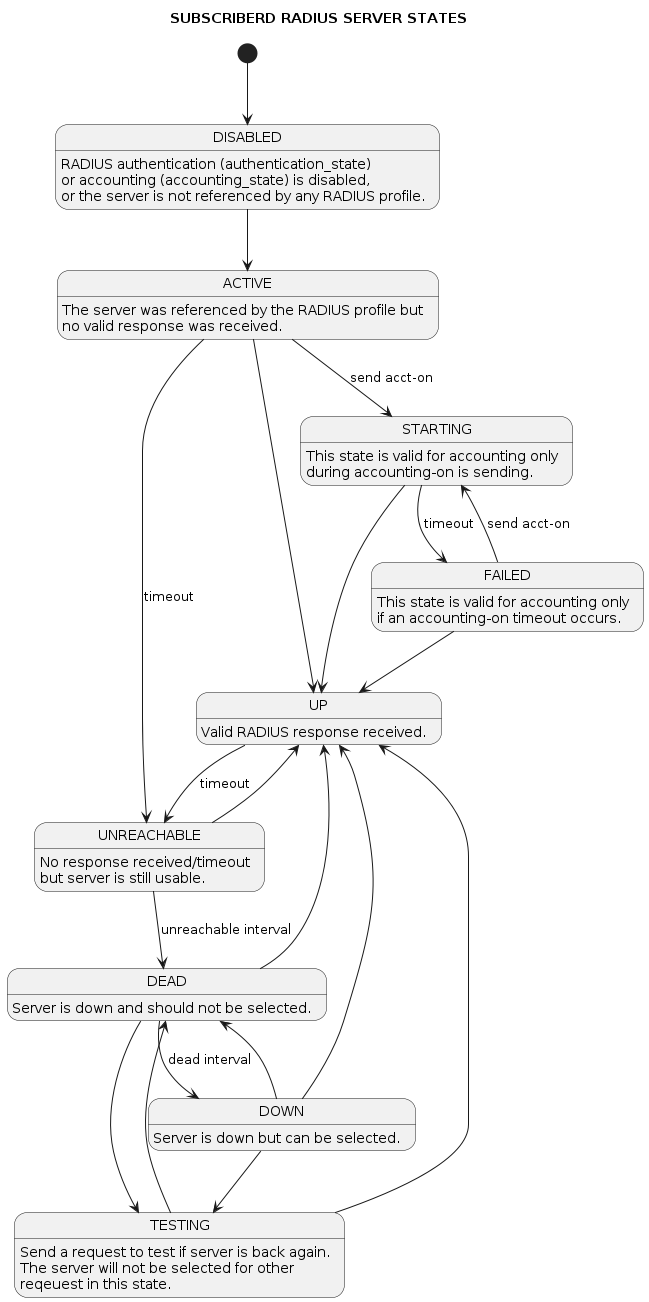
For each server dedicated detailed information are displayed with the following commands.
supervisor@leaf1: op> show radius server radius-server-1
RADIUS Server: radius-server-1
    Address: 198.51.100.64
    Source: 198.51.100.200
    Rate: 600 PPS
    Rate Tokens: 600
    Dropped: 0
    Authentication:
        State: ACTIVE
        State Changed: Fri Oct 16 20:17:27 GMT +0000 2020
        Port: 1812
        Retry: 3
        Timeout: 5
        Outstanding: 100
        Statistics:
            Request Sent: 0
            Request Retry: 0
            Request Timeout: 0
            Accept Received: 0
            Reject Received: 0
            Dropped: 0
    Accounting:
        State: UP
        State Changed: Fri Oct 16 20:18:27 GMT +0000 2020
        Port: 1813
        Retry: 10
        Timeout: 30
        Outstanding: 100
        Statistics:
            Request Sent: 1
            Request Retry: 2
            Request Timeout: 0
            Response Received: 1
            Dropped: 0
    CoA:
        Port: 3799
        Statistics:
            Request Received: 0
            Dropped: 0
PPPoE
The following commands are applicable for PPPoE sessions only.
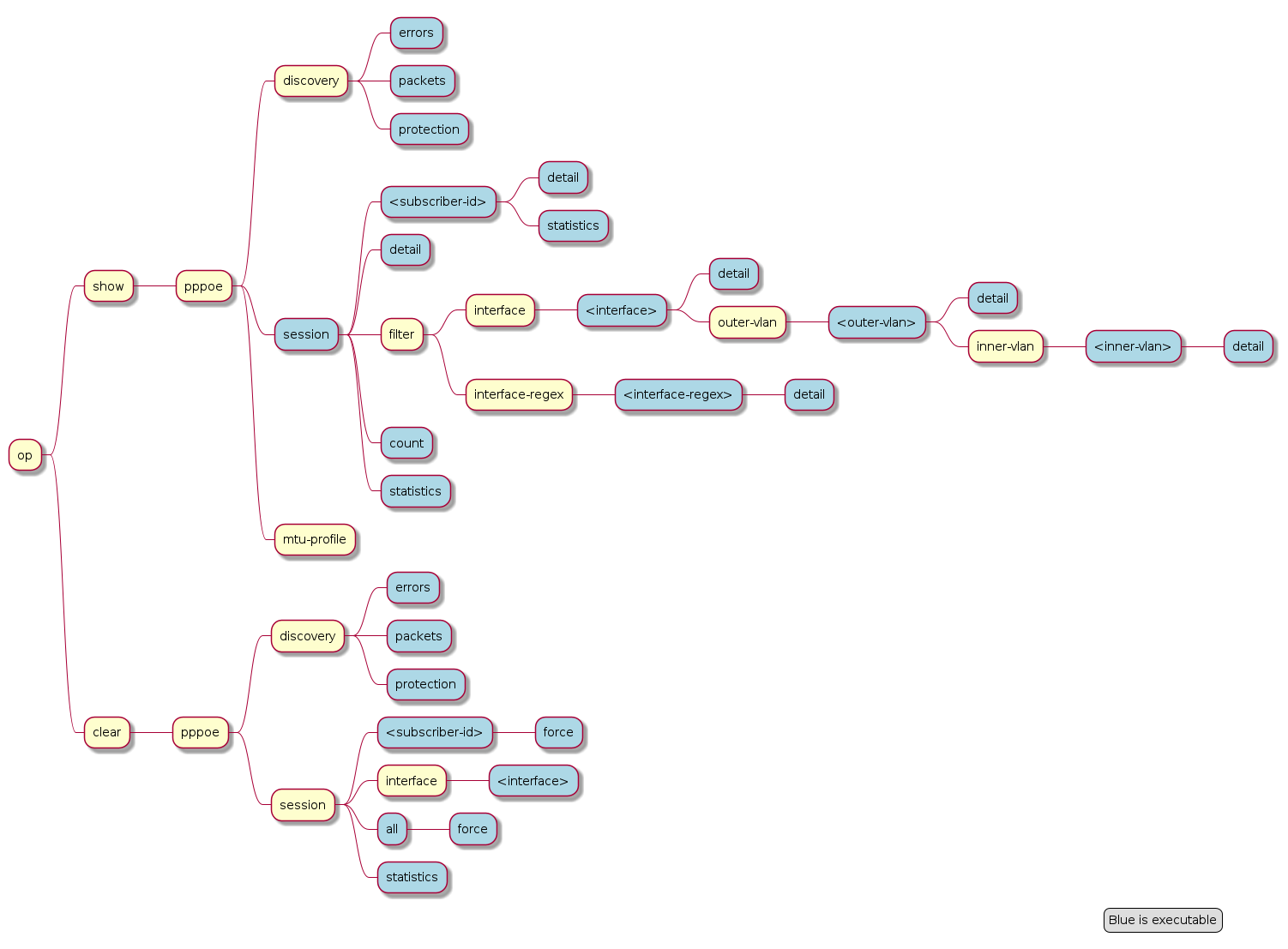
For PPPoE sessions the state should be ESTABLISHED if local terminated or TUNNELLED for L2TPv2 tunnelled sessions.
supervisor@rtbrick: op> show pppoe session
Subscriber-Id          Interface        VLAN      MAC               State
72339069014638604      ifp-0/0/1        1:1       00:04:0e:00:00:01 ESTABLISHED
72339069014638601      ifp-0/0/1        1:2       00:04:0e:00:00:02 ESTABLISHED
72339069014638602      ifp-0/0/1        1:3       00:04:0e:00:00:03 ESTABLISHED
72339069014638603      ifp-0/0/3        2000:7    52:54:00:57:c8:29 TUNNELLED
Alternative use show pppoe session detail which shows further details like username, Agent-Remote-Id (aka Line-Id) or Agent-Circuit-Id if screen width is large enough to print all those information.
| State | Description |
|---|---|
|
PPP LCP setup. |
|
PPP authentication (PAP or CHAP). |
|
PPP IPCP (IPv4) and IP6CP (IPv6) setup. |
|
The PPPoE session becomes established if at least one NCP (IPCP or IP6CP) is established (state OPEN). |
|
This state indicates that a PPPoE session is tunnelled via L2TPv2. |
|
PPP session teardown. |
|
PPPoE session terminated. |
If PPPoE session remain in state TERMINATED, the subscriber state should be checked. Typically, this happens if RADIUS Accounting-Request-Stop is still pending.
Further details per PPPoE session can be shown with the following commands.
| Attribute | Description |
|---|---|
|
Displays a summary of the specified PPPoE session, including session state, identifiers and so on. |
|
Displays comprehensive PPPoE session information, including negotiation parameters, session attributes, and associated subscriber details. |
|
Displays protocol-level statistics for the PPPoE session, including packet and byte counters for transmitted and received traffic. |
The detail command shows the states of the session and all sub-protocols with extensive information and negotiated parameters.
user@switch: op> show pppoe session 72339069014638648 detail
Subscriber-Id: 72339069014638648
    State: ESTABLISHED
    Uptime: Tue Nov 17 11:46:43 GMT +0000 2020 (0:00:21.979775)
    Interface: ifp-0/0/3
    Outer VLAN: 10
    Inner VLAN: 7
    Client MAC: 52:54:00:57:c8:29
    Server MAC: 7a:52:4a:c0:00:03
    Session-Id: 55
    Host-Unique: 00000001
    Agent-Remote-Id: DEU.RTBRICK.1
    Agent-Circuit-Id: 0.0.0.0/0.0.0.0 eth 1
    Access-Profile: pppoe-dual
    AAA-Profile: aaa-default
    PPP LCP:
        State: OPENED
        Negotiated Protocols: CHAP, IPCP, IP6CP
        Negotiated Parameters: MRU, AUTH, MAGIC
        Magic Number: 1079931229 Peer: 3432759752
        MRU: 1492 Peer: 1492
        MTU: 1492 Profile: __default_pppoe__
        Echo Interval: 30 seconds
    CHAP Authentication:
        State: COMPLETED
        Username: user1@rtbrick.com
    PPP IPCP:
        State: OPENED
        Instance: default
        IP Address: 198.51.100.200 Peer: 198.51.100.72
        Primary DNS: 198.51.100.88
        Secondary DNS: 198.51.100.54
    PPP IP6CP:
        State: OPENED
        Instance: default
        Interface Identifier: c5f6:1dbd:8cc1:bea9
        Peer Interface Identifier: 5054:00ff:fe57:c829
    IPv6:
        RA Interval: 60 seconds
        RA Prefix: 2001:db8:0:246::/32
        Delegated Prefix (DHCPv6): 2001:db8:0:9::/32 Assigned: True
        Primary DNS: 2001:db8:0:114::
        Secondary DNS: 2001:db8:0:115::
    Control Traffic Statistics:
        Ingress: 15 packets 1059 bytes
        Egress: 16 packets 1475 bytes
Session statistics are available global and per session.
show pppoe session statistics
show pppoe session 72339069014638601 statistics
The PPPoE discovery statistics are helpful if session setup fails in initial PPPoE tunnel setup before actual PPP negotiation is starting.
supervisor@rtbrick: op> show pppoe discovery packets
Packet           Received         Sent
PADI             17               0
PADO             0                17
PADR             17               0
PADS             0                17
PADT             1                13
supervisor@rtbrick: op> show pppoe discovery errors
PADI Drop No Config            : 0
PADI Drop Session Protection   : 0
PADI Drop Session Limit        : 0
PADI Drop Dup Session          : 0
PADI Drop Interface Down       : 0
PADR Drop No Config            : 0
PADR Drop Wrong MAC            : 0
PADR Drop Interface Down       : 0
PADR Drop Session Limit        : 0
PADR Drop Session Protection   : 0
PADR Drop Bad Cookie           : 0
PADR Drop Bad Session          : 0
PADR Drop Dup Session          : 0
PADR Drop No mapping Id        : 0
PADT Drop No Session           : 0
PADT Drop Wrong MAC            : 0
PADX Interface Get Failure     : 0
If PPPoE session protection is enabled in access configuration profile, short lived or failed sessions will be logged in the PPPoE session protection table (local.pppoe.session.protection). Every session not established for at least 60 seconds per default is considered as failed or short lived session. This will block new sessions on this IFP and VLAN’s for one second per default which increase exponential with any further failed session until the max time of per default 300 seconds is reached. The interval is reset after 900 seconds without failed sessions.
The PPPoE session protection table include also last subscriber-id and terminate code which indicates the reason for session failures.
supervisor@rtbrick: op> show pppoe discovery protection
Interface        VLAN      Status  Attempts   Last Terminate Code
ifp-0/0/1        1:1       OK      1          PPPoE LCP Terminate Request Received
ifp-0/0/1        1:2       OK      1          PPPoE LCP Terminate Request Received
ifp-0/0/1        1:3       OK      1          PPPoE LCP Terminate Request Received
If status OK indicates that new session are accepted where BLOCKED means that sessions will be rejected.
The following example shows the aggregated PPPoE session control-plane statistics across all sessions on the device. The output provides counters for PPP negotiation for LCP, IPCP, and IP6CP.
supervisor@rtbrick: op> show pppoe session statistics
LCP configure-request received                        : 10
LCP configure-ack received                            : 10
LCP terminate-request received                        : 5
LCP terminate-ack received                            : 5
LCP echo-reply received                               : 5
LCP configure-request sent                            : 10
LCP configure-ack sent                                : 10
LCP terminate-request sent                            : 5
LCP terminate-ack sent                                : 5
LCP echo-request sent                                 : 5
LCP MRU negotiation successful                        : 10
LCP magic number negotiation successful               : 10
IPCP configure-request received                       : 20
IPCP configure-ack received                           : 10
IPCP configure-request sent                           : 10
IPCP configure-ack sent                               : 10
IPCP configure-nak sent                               : 10
IP6CP configure-request received                      : 10
IP6CP configure-ack received                          : 10
IP6CP configure-request sent                          : 10
IP6CP configure-ack sent                              : 10
PAP authentication-request received                   : 10
PAP authentication-ack sent                           : 10
ICMPv6 router-solicitation received                   : 10
ICMPv6 router-advertisement sent                      : 10
DHCPv6 solicit received                               : 10
DHCPv6 reply sent                                     : 10
The following example shows the PPPoE session statistics for a specific session. It displays protocol message statistics for an individual PPPoE session identified by the session ID.
supervisor@rtbrick: op> show pppoe session 72339069014638599 statistics
LCP configure-request received                        : 1
LCP configure-ack received                            : 1
LCP echo-reply received                               : 1
LCP configure-request sent                            : 1
LCP configure-ack sent                                : 1
LCP echo-request sent                                 : 1
LCP MRU negotiation successful                        : 1
LCP magic number negotiation successful               : 1
IPCP configure-request received                       : 2
IPCP configure-ack received                           : 1
IPCP configure-request sent                           : 1
IPCP configure-ack sent                               : 1
IPCP configure-nak sent                               : 1
IP6CP configure-request received                      : 1
IP6CP configure-ack received                          : 1
IP6CP configure-request sent                          : 1
IP6CP configure-ack sent                              : 1
PAP authentication-request received                   : 1
PAP authentication-ack sent                           : 1
ICMPv6 router-solicitation received                   : 1
ICMPv6 router-advertisement sent                      : 1
DHCPv6 solicit received                               : 1
DHCPv6 reply sent                                     : 1
L2TP
The following commands are applicable for L2TP only.
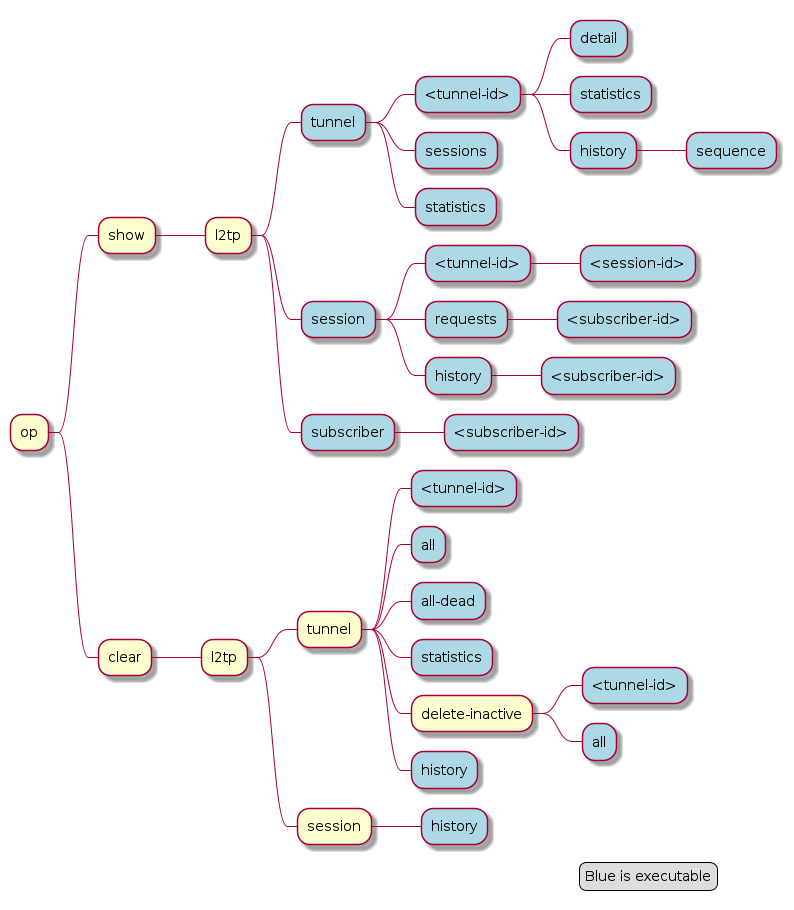
For L2TPv2 tunnelled PPPoE sessions the global unique subscriber-id can be used to get information about the L2TP session.
supervisor@rtbrick: op> show l2tp subscriber 72339069014638621
Subscriber-Id: 72339069014638621
    State: ESTABLISHED
    Local TID: 45880
    Local SID: 39503
    Peer TID: 1
    Peer SID: 1
    Call Serial Number: 10
    TX Speed: 10007000 bps
    RX Speed: 1007000 bps
    CSUN: disabled
The following command gives a good overview over the corresponding tunnels.
supervisor@leaf1: op> show l2tp tunnel sessions
Role Local TID Peer TID State        Preference Sessions Established Peer Name
LAC       2022        1 ESTABLISHED       10000        1           1 LNS3
LAC       3274        1 ESTABLISHED       10000        1           1 LNS8
LAC      14690        1 ESTABLISHED       10000        1           1 LNS6
LAC      29489        1 ESTABLISHED       10000        1           1 LNS9
LAC      33323        1 ESTABLISHED       10000        1           1 LNS4
LAC      35657        1 ESTABLISHED       10000        1           1 LNS10
LAC      37975        1 ESTABLISHED       10000        1           1 LNS1
LAC      45880        1 ESTABLISHED       10000        1           1 LNS7
LAC      46559        1 ESTABLISHED       10000        1           1 LNS2
LAC      58154        1 ESTABLISHED       10000        1           1 LNS5
Detailed information per tunnel are available via show l2tp tunnel <TID> detail.
L2TP tunnel statistics are available global and per tunnel.
show l2tp tunnel statistics
show l2tp tunnel 37975 statistics
The following output provides a high-level summary of L2TP control plane activity, showing the total number of tunnels and sessions successfully established on the device.
supervisor@rtbrick: op> show l2tp tunnel statistics
Tunnel created              : 3
Tunnel initialized          : 3
Session created             : 5
SCCRQ sent                  : 3
SCCCN sent                  : 3
ICRQ sent                   : 5
ICCN sent                   : 5
SCCRP received              : 3
ZLB received                : 5
ICRP received               : 5
This following output provides the view of signaling activity specifically for L2TP tunnel '65244', detailing the control messages used to maintain that specific connection.
supervisor@rtbrick: op> show l2tp tunnel 65244 statistics
Session created             : 3
SCCRQ sent                  : 1
SCCCN sent                  : 1
ICRQ sent                   : 3
ICCN sent                   : 3
SCCRP received              : 1
ZLB received                : 1
ICRP received               : 3
L2TP Result and Disconnect Codes
The received result (RFC2661) and disconnect (RFC3145) code and message from CDN and StopCCN will be stored similar to the subscriber terminate history table for 24 hours and up to 1000 records.
supervisor@leaf1: op> show l2tp tunnel history
Sequence Local TID Peer TID Timestamp                            Terminate Code
       1     34209        0 Wed Jul 28 13:02:35 GMT +0000 2021   Admin Request
       2     39860        1 Wed Jul 28 13:02:35 GMT +0000 2021   Admin Request
       3     39860        2 Wed Jul 28 13:02:54 GMT +0000 2021   Admin Request
       4     39860        3 Wed Jul 28 13:04:29 GMT +0000 2021   StopCCN Received (Requester is being shut down)
       5     39860        1 Wed Jul 28 13:06:19 GMT +0000 2021   StopCCN Received (Requester is being shut down)

supervisor@leaf1: op> show l2tp tunnel history 4
Local TID: 39860 Peer TID: 3
    Terminate Code: StopCCN Received
    Timestamp: Wed Jul 28 13:04:29 GMT +0000 2021
    Local Address: 198.51.100.102
    Peer Address: 198.51.100.133
    Peer Name: LNS1
    Tunnel-Client-Auth-ID: BNG
    Tunnel-Server-Auth-ID: LNS1
    Result Code: Requester is being shut down

supervisor@leaf1: op> show l2tp session history
Subscriber-Id          Local TID Local SID Terminate Code
72339069014638614          39860      5597 Clear Session
72339069014638615          39860      5208 Clear Session
72339069014638623          39860     29626 Clear Session
72339069014638624          39860     42480 L2TP Tunnel Down
72339069014638625          39860     34417 L2TP Tunnel Down
72339069014638626          39860     20229 L2TP Tunnel Down
The show subscriber history <subscriber-id> command will also return L2TP details if found for the corresponding subscriber.
supervisor@leaf1: op> show subscriber history 72339069014638703
Subscriber-Id: 72339069014638703
    Terminate Code: L2TP CDN Request
    Timestamp: Wed Jul 28 13:06:18 GMT +0000 2021
    Interface: ifl-0/0/1
    Outer VLAN: 1000
    Inner VLAN: 2002
    Client MAC: 02:00:00:00:00:04
    Username: blaster@l2tp.de
    Agent-Remote-Id: DEU.RTBRICK.2
    Agent-Circuit-Id: 0.0.0.0/0.0.0.0 eth 0:2
    Accounting-Session-Id: 72339069014638703:1627477569
    L2TP Disconnect Cause:
        Code: Normal disconnection (LCP terminate-request)
        Protocol: 0
        Direction: Peer
        Message: N/A
The following output shows information related to L2TP tunnel and session establishment. The output includes statistics for tunnel creation, initialization, and control messages exchanged during the L2TP control-plane signaling process.
supervisor@rtbrick: op> show l2tp tunnel statistics
Tunnel created              : 3
Tunnel initialized          : 3
Session created             : 5
SCCRQ sent                  : 3
SCCCN sent                  : 3
ICRQ sent                   : 5
ICCN sent                   : 5
SCCRP received              : 3
ZLB received                : 5
ICRP received               : 5
IPoE
The following commands are applicable for IPoE subscribers only.
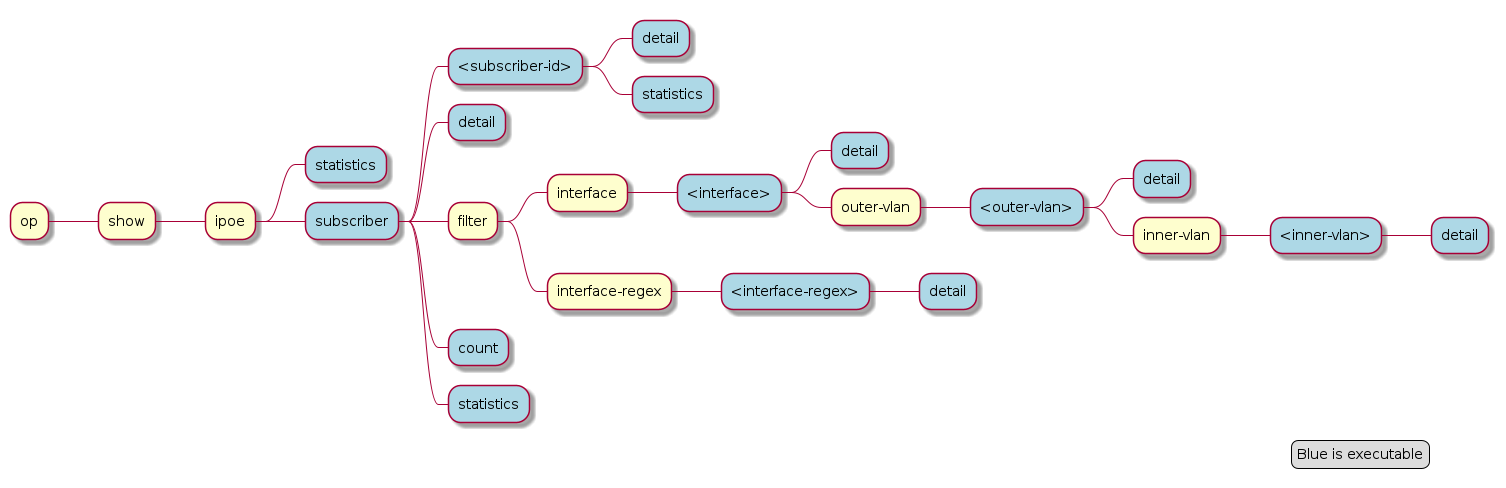
supervisor@leaf1: op> show ipoe subscriber detail
Subscriber-Id          Interface        VLAN      MAC               State          DHCPv4     DHCPv6
216454257090494465     ifl-0/0/1     8:1       02:00:00:00:00:01 ESTABLISHED    Bound      Bound
216454257090494466     ifl-0/0/1     8:2       02:00:00:00:00:02 ESTABLISHED    Bound      Bound
216454257090494467     ifl-0/0/1     8:3       02:00:00:00:00:03 ESTABLISHED    Bound      Bound
216454257090494468     ifl-0/0/1     8:4       02:00:00:00:00:04 ESTABLISHED    Bound      Bound
Further details per subscriber can be shown with the following command.
supervisor@leaf1: op> show ipoe subscriber 216454257090494465 detail
Subscriber-Id: 216454257090494465
    State: ESTABLISHED
    Uptime: Mon Jun 14 15:46:15 GMT +0000 2021 (0:02:19.421591)
    Interface: ifl-0/0/1
    Outer VLAN: 8
    Inner VLAN: 1
    Client MAC: 02:00:00:00:00:01
    Gateway Interface: lo-0/0/0/1
    Gateway Instance: default
    Gateway IPv4: 198.51.100.200/255.255.255.255
    Gateway MAC: 7a:52:4a:c0:00:01
    Agent-Remote-Id: DEU.RTBRICK.1
    Agent-Circuit-Id: 0.0.0.0/0.0.0.0 eth 0:1
    DHCPv4:
        Mode: Server
        State: Bound
        Address: 198.51.100.202/255.255.255.255
        Lease Created: Mon Jun 14 15:46:15 GMT +0000 2021 (0:02:19.427443)
        Lease Time: 300 seconds
        Lease Expire: 161 seconds
    DHCPv6:
        Mode: Server
        State: Bound
        Client DUID: 00030001020000000001
        Server DUID: 0003001b78524afffec00001
        IA_NA:
            Address: 2001:db8:0:96
            IAID: 1181407340
            Active: True
        IA_PD:
            Prefix: 2001:db8:0:333/32
            IAID: 4095128883
            Active: True
        Lease Created: Mon Jun 14 15:46:15 GMT +0000 2021 (0:02:19.428676)
        Lease Time (Lifetime): 14400 seconds
        Lease Expire: 14261 seconds
        Preferred Lifetime: 1800 seconds
Local Address Pools
| Rather than using recommended IP addresses for technical documents, the document shows actual IP pool ranges. |
The usage of local address pools can be monitored using the show subscriber pool commands as shown below.
supervisor@switch: op> show subscriber pool summary
Pool Name                        AFI  Usage           Range
pool-A                           IPv4 256/256         10.0.1.0 - 10.0.1.255
pool-B                           IPv4 2/256           10.0.2.0 - 10.0.2.255
pool-C                           IPv4 0/256           10.0.3.0 - 10.0.3.255
pool-D                           IPv4 0/256           10.0.4.0 - 10.0.4.255
supervisor@switch: op> show subscriber pool ipv4 pool-A
Pool Name: pool-A
    AFI: IPv4
    Usage: 256/256
    Range: 10.0.1.0 - 10.0.1.255
    Next: pool-B
supervisor@switch: op> show subscriber pool ipv4 pool-B
Pool Name: pool-B
    AFI: IPv4
    Usage: 2/256
    Range: 10.0.2.0 - 10.0.2.255
    Next: pool-C
supervisor@switch: op> show subscriber pool ipv4 pool-B allocation
Subscriber-Id          Timestamp                            Address/Prefix
72339069014638598      Wed Sep 15 09:02:15 GMT +0000 2021   10.0.2.0
72339069014638602      Wed Sep 15 09:02:15 GMT +0000 2021   10.0.2.1