Logging Configuration
Configuration Overview
You can enable logging for:
-
Brick Daemon (such as pppod, ipod, confd)
-
Modules (such as OSPF, BGP, IS-IS)
-
RtBrick Host system
Configuration Hierarchy
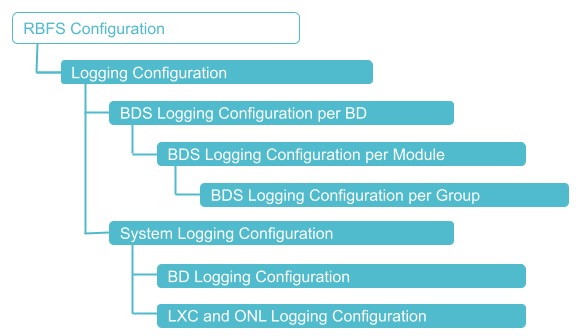
The diagram illustrates the logging configuration hierarchy.
Configuration Syntax and Commands
The following sections describe the logging configuration syntax and commands.
BDS Logging Configuration
You can configure BDS logging for a BD, a module, and for a group.
A specific configuration takes priority over a generic configuration. For example, if you have configured a daemon log level of bgp.iod.1 to "warning", and you have configured a log level of BGP module to "notice", then the final log level of BGP will be "notice".
|
Configuring BDS Logging for a Brick Daemon
You can configure BDS logging for a brick daemon or all daemons to generate logs related that daemon/daemons.
Syntax:
| Attribute | Description |
|---|---|
|
Configure for the specified BD name. |
|
Configure for all BDs. |
|
Module name. For more information, see the section "Configuring BDS Logging for a Module". |
|
Specify the external log management server name for sending the logs to the server. |
|
Log severity level. You can filter logs based on the log severity levels for sending to the external log management server. This allows to send only the required log messages to the log management server instead of sending a whole lot of data. For example, if you configure |
The following example shows how to configure BDS logging for a brick daemon.
set log bd bgp.iod.1 level info
set log bd bgp.iod.1 plugin-alias alias-name ztp plugin-alias level error
{
  "ietf-restconf:data": {
    "rtbrick-config:system": {},
    "rtbrick-config:log": {
      "bd": [
        {
          "bd-name": "bgp.iod.1",
          "level": "info",
          "plugin-alias": {
            "alias-name": "ztp",
            "level": "error"
          }
        }
      ]
    }
  }
}
 To access the RESTCONF API that corresponds to this CLI, click
here.
To access the RESTCONF API that corresponds to this CLI, click
here.
Configuring BDS Logging for a Module
You can enable logging for a module such as BGP, IS-IS.
Syntax:
| Attribute | Description |
|---|---|
|
Module name |
|
BDS log module log-group configuration. For more information, see the section "Configuring BDS Logging for a Group". |
|
Log severity level. |
|
Plugin alias name |
|
Log level. You can filter logs based on the log severity levels for sending to the log management server. This will help you to send only the required log messages to the log management server instead of sending a whole lot of data. For example, if you configure |
The following example shows how to configure BDS logging for a module.
set log module igmp level info
set log module igmp plugin-alias alias-name graylog-srv1 plugin-alias level warning
{
  "ietf-restconf:data": {
    "rtbrick-config:system": {},
    "rtbrick-config:log": {
      "module": [
        {
          "module-name": "igmp",
          "level": "info",
          "plugin-alias": {
            "alias-name": "graylog-srv1",
            "level": "warning"
          }
        }
      ]
    }
  }
}
To access the RESTCONF API that corresponds to this CLI, click
here.
Configuring BDS Logging for a Group
You can enable logging for a group of log IDs. This configuration allows you to generate logs for a group of log IDs (also known as log maps). Using log groups, you can enable logging for a specific set of log IDs. This approach gives you more targeted control over log generation, helping you collect only the relevant information without overwhelming the system.
Syntax:
| Attribute | Description |
|---|---|
|
Group name |
|
Specifies the level of the plug-in alias. |
|
Rate-limiting is only supported for log groups. Configuring a higher rate-limit for a whole module may cause system instability due to generation of high volume of logs. The default value is 10. |
|
Plugin alias name |
|
Specifies the level of the plug-in alias. You can filter logs by severity level before sending them to the log management server. This will help you to send only the required log messages to the log management server instead of sending a whole lot of data. For example, if you configure |
The following example shows how to configure BDS logging for a group.
set log module bgp group interface level warning
{
  "ietf-restconf:data": {
    "rtbrick-config:log": {
      "module": [
        {
          "module-name": "bgp",
          "group": [
            {
              "group-name": "interface",
              "level": "warning"
            }
          ]
        }
      ]
    }
  }
}
To access the RESTCONF API that corresponds to this CLI, click
here.
System Logging (syslog) Configuration
LXC and RtBick Host Logging Configuration
In addition to configuring logging for the various daemons and modules in the RBFS container, you can also enable logging for the underlying RtBrick Host system. You can send logs from Linux and RtBrick Host system facilities, such as auth, authpriv, daemon, and kern to the log management server.
Also, you can configure an external log management server to transport logs. Currently, Syslog and Graylog are the log management servers supported by RBFS.
Syntax:
| Attribute | Description |
|---|---|
|
Supported facilities include |
|
Plugin alias name |
|
Specify the level of the plug-in alias. You can filter logs based on the log severity levels for sending to the log management server. This will help you to send only the required log messages to the log management server instead of sending a whole lot of data. For example, if you configure |
The following example shows how to configure system logging for the kern facility and send the logs to Graylog.
set log system facility kern plugin-alias alias-name graylog plugin-alias level notice
{
  "ietf-restconf:data": {
    "rtbrick-config:log": {
      "system": {
        "facility": [
          {
            "facility-name": "kern",
            "plugin-alias": {
              "alias-name": "graylog",
              "level": "notice"
            }
          }
        ]
      }
    }
  }
}
To access the RESTCONF API that corresponds to this CLI, click
here.
Configuring an External Log Server (Plugin Alias)
You can configure an external log management server as a destination to send logs. This is done by configuring a plugin alias in RBFS. A plugin alias represents the log management server endpoint to which the logs will be sent. When you configure a plugin alias, you specify the log management server details such as the address, type (Syslog or Graylog), network protocol (TCP or UDP), and severity level of the logs to be sent.
| By default, logs are sent to the log management server through the device management interface (eth0 in hardware devices), which is intended for out-of-band management. If you want to send logs through an in-band connection, you need to enable in-band management on RBFS. For more information, see the section Configuring an External Log Server (Plugin Alias) Using In-band Connection |
Syntax:
| Attribute | Description |
|---|---|
|
Log alias name |
|
Plugin address. For example: GELF: http://192.0.2.0:1102/gelf |
|
Severity level for the log. |
|
Log alias endpoint port. |
|
Server type of log alias. |
The following example shows how to configure a plugin alias for a log management server.
set system host log-alias bng endpoint http://192.0.2.0:1102/gelf
set system host log-alias bng endpoint http://192.0.2.0:1102/gelf type gelf
set system host log-alias bng endpoint http://192.0.2.0:1102/gelf network http
set system host log-alias bng endpoint http://192.0.2.0:1102/gelf level info
{
  "ietf-restconf:data": {
    "rtbrick-config:system": {
      "host": {
        "log-alias": [
          {
            "name": "bng",
            "endpoint": [
              {
                "address": "http://192.0.2.0:1102/gelf",
                "type": "gelf",
                "network": "http",
                "level": "info"
              }
            ]
          }
        ]
      }
    }
  }
}
The following example shows how to configure a plugin alias for a Graylog server with the address http://192.0.2.0:1102/gelf:
set system host log-alias graylog endpoint http://192.0.2.0:1102/gelf
set system host log-alias graylog endpoint http://192.0.2.0:1102/gelf type gelf
set system host log-alias graylog endpoint http://192.0.2.0:1102/gelf network http
set system host log-alias graylog endpoint http://192.0.2.0:1102/gelf level info
{
  "ietf-restconf:data": {
    "rtbrick-config:system": {
      "host": {
        "log-alias": [
          {
            "name": "graylog",
            "endpoint": [
              {
                "address": "http://192.0.2.0:1102/gelf",
                "type": "gelf",
                "network": "http",
                "level": "info"
              }
            ]
          }
        ]
      }
    }
  }
}
The following example shows how to configure a plugin alias for a Syslog server using TCP as the transport protocol with the address 198.51.100.0:525:
set system host log-alias syslog endpoint 198.51.100.0:525
set system host log-alias syslog endpoint 198.51.100.0:525 type syslog
set system host log-alias syslog endpoint 198.51.100.0:525 network tcp
supervisor@rtbrick: cfg> show config
{
  "ietf-restconf:data": {
    "rtbrick-config:system": {
      "host": {
        "log-alias": [
          {
            "name": "syslog",
            "endpoint": [
              {
                "address": "198.51.100.0:525",
                "type": "syslog",
                "network": "tcp"
              }
            ]
          }
        ]
      }
    }
  }
}
The following example shows how to configure a plugin alias for a Syslog server using UDP as the transport protocol with the address 198.51.100.0:525:
set system host log-alias syslog endpoint 198.51.100.0:525
set system host log-alias syslog endpoint 198.51.100.0:525 type syslog
set system host log-alias syslog endpoint 198.51.100.0:525 network udp
supervisor@rtbrick: cfg> show config
{
  "ietf-restconf:data": {
    "rtbrick-config:system": {
      "host": {
        "log-alias": [
          {
            "name": "syslog",
            "endpoint": [
              {
                "address": "198.51.100.0:525",
                "type": "syslog",
                "network": "udp"
              }
            ]
          }
        ]
      }
    }
  }
}
To access the RESTCONF API that corresponds to this CLI, click
here.
Configuring an External Log Server (Plugin Alias) Using In-band Connection
By default, plugins send messages exclusively through the device management interface (eth0 in hardware devices), which is intended for out-of-band management. However, you can also configure an external log server (Plugin Alias) using an in-band connection. This requires in-band to be enabled on RBFS.
Syntax:
set inband-management instance default connection-tracking true
| The external log server’s IP address must be reachable from the in-band network. |
The following example shows how to configure a plugin alias for a Syslog server using UDP as the transport protocol with the address 198.51.100.0:525 via in-band connection:
set system host log-alias syslog endpoint 198.51.100.0:525
set system host log-alias syslog endpoint 198.51.100.0:525 type syslog
set system host log-alias syslog endpoint 198.51.100.0:525 network udp
set inband-management instance default connection-tracking true
supervisor@rtbrick: cfg> show config
{
  "ietf-restconf:data": {
    "rtbrick-config:system": {
      "load-last-config": "true",
      "host": {
        "log-alias": [
          {
            "name": "syslog",
            "endpoint": [
              {
                "address": "198.51.100.0:525",
                "type": "syslog",
                "network": "udp"
              }
            ]
          }
        ]
      }
    },
    "rtbrick-config:inband-management": {
      "instance": [
        {
          "name": "default",
          "connection-tracking": "true"
        }
      ]
    },