IP Address Pool Configuration
IP address pools are crucial for assigning IP addresses to subscribers, and configuring these pools is an essential for subscriber management.
The following image illustrates the IP address pool configuration and how they are associated with the other subscriber management tasks.
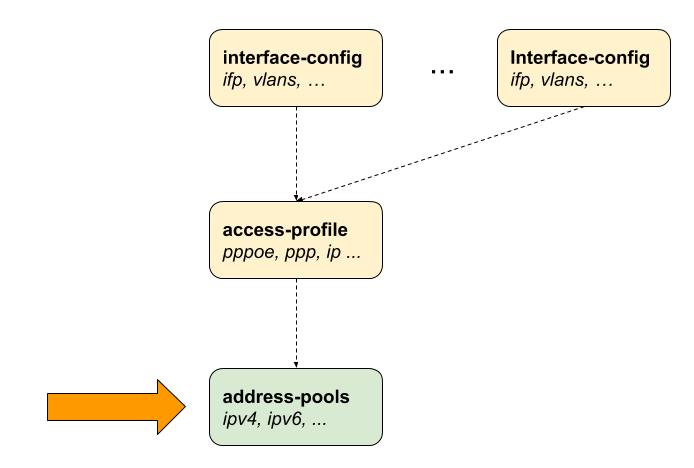
RBFS IP Address Pool
RBFS allows you to manage address pools with more flexibility. It enables you to modify or remove pools without disrupting active subscriber sessions. If an address pool is deleted, subscribers who have already been assigned IP addresses from that pool can continue using those addresses until their session ends. The system does not immediately revoke the IP addresses assigned to active sessions.
Imagine a subscriber has been allocated an IP address from a specific address pool. If that pool is later deleted, the subscriber’s connection remains unaffected until their session ends.
It displays an error message when a pool that is part of a pool chain is deleted, or when a non-existent pool is attached to an access profile. It ensures configuration consistency when 'next-pool-name' is not defined or invalid.
The following is an example of a generated error message.
Jan 16 04:28:37: Commit failed. Edit and try again or discard changes: application operation-failed IPv6 pool referenced in access-profile does not exist
| Ensure that the deleted address pool is not reallocated elsewhere until all assigned addresses are no longer in use. This prevents IP address conflicts. |
Duplicate Address Detection
RBFS provides an optional duplicate address detection feature that prevents a new session from using an IP address already in use by another active session. This is to avoid conflicts. However, when an address pool is moved to a different BNG, the duplicate address detection feature may not work as expected.
| Migrating address pools across different BNGs could lead to address conflicts, if not managed carefully. |
Configuring the Address Pool
The following command and options allows you to configure both IPv4 and IPv6 address pools for subscriber access.
| Attribute | Description |
|---|---|
|
Specifies the unique name used to identify the address pool. |
|
Configures the IPv4 address range and related parameters for assigning IPv4 addresses to subscribers. |
|
Configures the IPv6 prefix pool used for delegating IPv6 prefixes to subscribers. |
|
Specifies an alternate address pool to be used when the current pool is exhausted, enabling hierarchical or fallback allocation. |
The following example shows typical IPv4 address and IPv6 prefix pools. It shows three pools: one for IPv4 addresses and two for IPv6 prefixes. Each pool is defined by a name, and a range of addresses or prefixes is specified using the 'low' and 'high' values. These pools are used for dynamically assigning IP addresses or prefixes to devices or subscribers, depending on the protocol (IPv4 or IPv6).
The IPv4 address pool, named 'ipv4-local', includes the address range from ‘198.51.100.76’ to ‘198.51.100.117’. This pool defines a range of IPv4 addresses from 198.51.100.76 to 198.51.100.117. These addresses can be dynamically assigned to devices or subscribers that require IPv4 connectivity.
The specified second pool is ‘ipv6-local’ that defines a range of IPv6 prefixes, from ‘2001:db8:0:79::/32’ to ‘2001:db8:0:139::/32’. These prefixes can be assigned to devices or subscribers that require IPv6 connectivity.
The IPv6 Prefix Delegation Pool is specified as ‘ipv6pd-local’. It defines the range of IPv6 from 2001:db8:0:1::/32 to ‘2001:db8:0:100::/32’. This pool is similar to the previous IPv6 pool, but is specifically meant for IPv6 Prefix Delegation.
supervisor@switch: cfg> show config access
{
  "rtbrick-config:access": {
    "pool": [
      {
        "pool-name": "ipv4-local",
        "ipv4-address": {
          "low": "198.51.100.76",
          "high": "198.51.100.117"
        }
      },
      {
        "pool-name": "ipv6-local",
        "ipv6-prefix": {
          "low": "2001:db8:0:79::/32",
          "high": "2001:db8:0:139::/32"
        }
      },
      {
        "pool-name": "ipv6pd-local",
        "ipv6-prefix": {
          "low": "2001:db8:0:1::/32",
          "high": "2001:db8:0:100::/32"
        }
      }
    ],
  }
}
 To access the RESTCONF API that corresponds to this CLI, click
here.
To access the RESTCONF API that corresponds to this CLI, click
here.
Configuring IPv4 Address Pools
The following command and options allow you to configure an IPv4 address pool.
Syntax:
| Attribute | Description |
|---|---|
|
Specifies the highest IPv4 address in the local address pool range that can be assigned to subscribers. |
|
Specifies the lowest IPv4 address in the local address pool range that can be assigned to subscribers. |
|
Defines the subnet mask for the IPv4 address pool, determining the size and boundary of the address range. |
To access the RESTCONF API that corresponds to this CLI, click
here.
Configuring IPv6 Prefix Pools
The following command and options allow you to configure an IPv6 prefix pools.
Syntax:
| Attribute | Description |
|---|---|
|
Specifies the highest IPv4 address in the local address pool range that can be assigned to subscribers. |
|
Specifies the lowest IPv6 address in the local address pool range that can be assigned to subscribers. |
| IPv6 prefixes must be at least /64 or larger (/56, /48, …) or /128. |
Configuring Linked Pools (Pool Chain)
RBFS enables pool linking. You can link or chain multiple IP address pools so that when a pool gets exhausted, the next pool defined will start performing address allocation. Pool linking allows the creation of discontinuous address pools connected together in a sequence, creating an extended pool. The pools are connected using the next-pool-name attribute.
Syntax:
Example:
A -→ B -→ C -→ D
set access pool pool-A next-pool pool-B
set access pool pool-B next-pool pool-C
set access pool pool-C next-pool pool-D
The actual address pool assigned to a subscriber is determined by the access configuration profile or RADIUS, starting with the specified pool in the chain. If that pool is full, the system requests the next pool in sequence, continuing until an available pool is found or the end of the chain is reached. To prevent looping, RBFS halts automatically if it detects that any pool in the chain has been accessed twice.
Additionally, the system can continuously cycle through all available pools in the chain, even if allocation starts from a pool in the middle. This ensures every pool in the sequence gets considered till finding an available address.
The following configuration commands link a set of IP address pools in a cycle order. The 'pool-A' is linked with the 'pool-B', 'pool-C' is set as a next pool after the 'pool-B'. 'Pool-D' is specified as next pool for 'pool-C'. 'Pool-A' is set as the next pool for 'pool-A'.
A -→ B -→ C -→ D -→ A
set access pool pool-A next-pool pool-B
set access pool pool-B next-pool pool-C
set access pool pool-C next-pool pool-D
set access pool pool-D next-pool pool-A
To access the RESTCONF API that corresponds to this CLI, click
here.