Access Interface Configuration
While there is no single specific way to configure subscriber management, it is ideal to start with mandatory configurations and then move on to optional ones. The access interface configuration is the anchor point for almost all further access configurations. The interface configuration defines the access type and access profile. For more information, see sections Access Profile Configuration, AAA profile AAA Profile Configuration.
| Multiple interface configurations per IFP with disjoint VLAN ranges are supported. |
The following image illustrates the access interface configurations and how they are associated with the entire subscriber management.
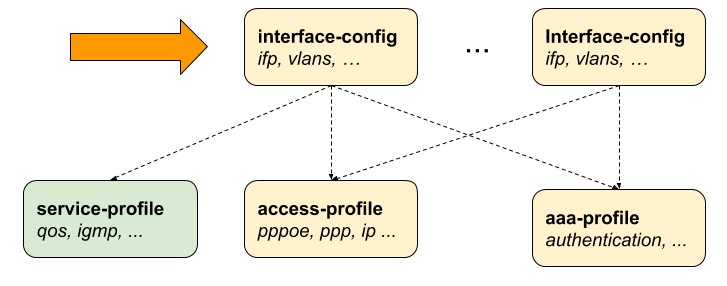
You can configure multiple interfaces for access and subscriber management, and each interface can reference the same profiles. This allows for efficient and scalable network management.
To configure the access interface, you must complete the following tasks.
-
Configure the physical interface name (IFP or LAG) and VLAN range
-
Configure the mandatory access type (PPPoE or IPoE)
-
Configure the mandatory access profile
-
Configure the mandatory AAA profile
-
Configure optional attributes such as service profile or session limit
Configuring Access Interfaces
This section describes how to configure access interfaces for subscriber management on the device. Access interfaces define how subscriber traffic is received, classified, and processed based on VLAN tagging and access type. Proper configuration ensures correct subscriber session establishment and policy application. It also enables integration with AAA, DHCP, and service profiles. Access interfaces can be configured without VLAN tags (untagged VLAN) and with one VLAN tag (single-tagged) or with two VLAN tags (double-tagged).
Syntax:
The following table provides the command options/attributes and descriptions.
| Attribute | Description | ||
|---|---|---|---|
|
Without any option, it configures an access interface. |
||
|
Defines the access protocol used for this interface. This is a mandatory attribute. Values: PPPoE or IPoE. |
||
|
Specifies the name of the access profile (mandatory). For more information, see Access Profile Configuration. |
||
|
Specifies the name of the AAA profile (mandatory). For more information, see AAA Profile Configuration. |
||
|
This option allows assigning an optional service profile which can be dynamically overwritten via RADIUS. For more information, see Service Profile Configuration . |
||
|
This option defines the maximum number of subscribers per IFP and VLAN. A value of '1' will implicitly set the VLAN mode to 1:1 VLAN mode, where any value greater than 1 indicates N:1 VLAN mode. Default: 1 Range: 1 - 65535. |
||
|
Maximum number of subscribers per IFP, VLAN, and MAC address. This option must be less or equal specified for the 'max-subscribers-per-vlan' attribute. This option does not affect IPoE subscribers, as they are inherently limited to a maximum of one per MAC address. Default: 1 Range: 1 - 65535. |
||
|
Limits the outer VLAN encapsulation to 802.1ad (TPID 0x88a8) or 802.1q (TPID 0x8100). By default, RBFS uses an auto-sensing mechanism that determines the correct TPID based on the first subscriber-initiated packet, such as PPPoE Discovery (PADI, PADR), DHCP discovery, or DHCPv6 solicit. Default: Auto-sensing. Values: 802.1ad or 802.1q. |
||
|
If enabled, incoming PPPoE sessions (PPPoE PADI/PADR) are not honored unless matching vlan-profile is found in the table |
||
|
This options selects the IPoE gateway IFL (unnumbered source IFL) which is typically a loopback interface used as a gateway for IPoE subscribers. |
||
|
Specifies the PPPoE PADO delay, in seconds. This setting allows you to specify a wait time in seconds after receiving a PPPoE Active Discovery Initiation (PADI) control packet from a PPPoE client before sending a PPPoE Active Discovery Offer (PADO) packet to indicate that it can serve the client request. Default: Disabled. Range: 1 - 255.
|
||
|
Defines the minimum elapsed time, in seconds, for DHCPv4/DHCPv6 transactions. This setting ensures that a DHCP request must meet the specified minimum duration before it is processed. Default: Disabled. Range: 1 - 600.
|
||
|
Specifies the redundancy session ID required for stateful high availability. Default: Disabled. Range: 1 - 65535. |
 To access the RESTCONF API that corresponds to this CLI, click
here.
To access the RESTCONF API that corresponds to this CLI, click
here.
Configuring Untagged Interfaces
This section explains how to configure interfaces that handle untagged subscriber traffic. Untagged interfaces are typically used in deployments where VLAN tagging is not required or is handled upstream. The configuration allows you to associate access profiles, AAA profiles, and subscriber policies directly with the physical interface. It is suitable for simple access deployments with minimal VLAN complexity.
Syntax:
The following tables describes the command options to configure the untagged access interface.
| Attribute | Description |
|---|---|
|
Specifies the physical interface on which untagged subscriber access is configured. |
|
Specifies the AAA profile used for authentication, authorization, and accounting of subscribers. |
|
Associates an access profile that defines subscriber session handling and policies. |
|
Specifies the access method for subscribers, such as PPPoE or IPoE. |
|
Specifies the minimum elapsed time before accepting DHCP packets. Range: 1 - 600 seconds. |
|
Specifies the logical interface used as the gateway for IPoE subscribers. |
|
Limits the number of subscriber sessions allowed per MAC address. Range: 1 - 65535. |
|
Limits the number of subscriber sessions allowed per VLAN. Range: 1 - 65535. |
|
Configures the delay before sending PPPoE PADO responses. Range: 1 - 255 seconds. |
|
Assigns a session ID used for subscriber session redundancy. Range: 1 - 65535. |
|
Specifies the service profile applied to subscriber sessions. |
|
Enables or disables the use of VLAN profiles for subscriber management. |
Example:
In the following example configuration, the untagged access interface 'ifp-0/0/0' is configured for PPPoE access type, with the Access Profile set to 'pppoe-dual', Service Profile set to 'service-profile1', and AAA Profile set to 'aaa-radius'. The option 'vlan-profile-enable' is enabled by setting it to 'true', and the parameters 'max-subscribers-per-vlan' and 'max-subscribers-per-mac' are both assigned the value of '1'.
supervisor@switch: cfg> show config access interface untagged ifp-0/0/0
{
  "rtbrick-config:untagged": {
    "interface-name": "ifp-0/0/0",
    "access-type": "PPPoE",
    "access-profile-name": "pppoe-dual",
    "service-profile-name": "service-profile1",
    "aaa-profile-name": "aaa-radius",
    "vlan-profile-enable": "true",
    "max-subscribers-per-vlan": 1,
    "max-subscribers-per-mac": 1
  }
}
|
To access the RESTCONF API that corresponds to this CLI, click
here.
Configuring Single VLAN Tagged Interfaces
This section covers the configuration of interfaces that use a single VLAN tag (802.1Q) for subscriber identification. It allows defining a range of VLANs to support multiple subscribers over the same physical interface. This model is commonly used in broadband deployments where each VLAN represents a subscriber or service. The configuration supports flexible policy application per VLAN.
| Attribute | Description |
|---|---|
|
Specifies the physical interface on which subscriber access is configured. |
|
Defines the starting VLAN ID for the outer VLAN range. Range: 1 - 4094. |
|
Defines the ending VLAN ID for the outer VLAN range. Range: 1 - 4094. |
|
Specifies the AAA profile used for authentication, authorization, and accounting of subscribers. |
|
Associates an access profile that defines subscriber session handling and policies. |
|
Specifies the access method for subscribers, such as PPPoE or IPoE. |
|
Specifies the minimum elapsed time before accepting DHCP packets. Range: 1 - 600 seconds. |
|
Specifies the logical interface used as the gateway for IPoE subscribers. |
|
Limits the number of subscriber sessions allowed per MAC address. Range: 1 - 65535. |
|
Limits the number of subscriber sessions allowed per VLAN. Range: 1 - 65535. |
|
Specifies the encapsulation type for the outer VLAN (for example, 802.1Q or 802.1ad). |
|
Configures the delay before sending PPPoE PADO responses. Range: 1 - 255 seconds. |
|
Assigns a session ID used for subscriber session redundancy. Range: 1 - 65535. |
|
Specifies the service profile applied to subscriber sessions. |
|
Enables or disables the use of VLAN profiles for subscriber management. |
You need to define the VLAN identifier range within the range from 128 to 4000 for VLAN tagged interface. The following command and options are used to configure a single VLAN-tagged interface.
In the following example, the single tagged access interface ifp-0/0/0 is configured with the Outer VLAN minimum value 128 and the outer VLAN maximum value 3000. The Access Type is defined PPPoE, Access Profile pppoe-dual, and AAA Profile as aaa-radius.
supervisor@switch: cfg> set access interface single-tagged ifp-0/0/0 128 3000 access-type PPPoE
supervisor@switch: cfg> set access interface single-tagged ifp-0/0/0 128 3000 access-profile-name pppoe-dual
supervisor@switch: cfg> set access interface single-tagged ifp-0/0/0 128 3000 aaa-profile-name aaa-radius
supervisor@switch: cfg> commit
supervisor@switch: cfg> show config access interface single-tagged ifp-0/0/0 128 3000
{
  "rtbrick-config:single-tagged": [
    {
      "interface-name": "ifp-0/0/0",
      "outer-vlan-min": 128,
      "outer-vlan-max": 3000,
      "access-type": "PPPoE",
      "access-profile-name": "pppoe-dual",
      "aaa-profile-name": "aaa-radius"
    }
  ]
}
The access interface-name can be a physical IFP or LAG.
|
To access the RESTCONF API that corresponds to this CLI, click
here.
Configuring Double Tagged VLAN Interfaces
This section describes how to configure interfaces using double VLAN tagging (Q-in-Q or 802.1ad). Double tagging enables hierarchical subscriber identification using outer (service) and inner (customer) VLANs. It is widely used in large-scale broadband networks to support multi-tenant or wholesale models. The configuration provides greater scalability and flexibility in subscriber and service separation.
| When configuring double-tagged VLAN interfaces, setting the minimum and maximum VLAN ID to the same value ensures that only a specific VLAN ID is matched. It indicates that the VLAN interface will specifically recognize and process traffic tagged with that exact VLAN ID. |
Syntax:
The following commands and options are used to configure double-tagged VLAN interfaces.
| Attribute | Description |
|---|---|
|
Specifies the physical interface on which double-tagged subscriber access is configured. |
|
Defines the starting VLAN ID for the outer VLAN range. Range: 1 - 4094. |
|
Defines the ending VLAN ID for the outer VLAN range. Range: 1 - 4094. |
|
Defines the starting VLAN ID for the inner VLAN range. Range: 1 - 4094. |
|
Defines the ending VLAN ID for the inner VLAN range. Range: 1 - 4094. |
|
Specifies the AAA profile used for authentication, authorization, and accounting of subscribers. |
|
Associates an access profile that defines subscriber session handling and policies. |
|
Specifies the access method for subscribers, such as PPPoE or IPoE. |
|
Specifies the minimum elapsed time before accepting DHCP packets. Range: 1 - 600 seconds. |
|
Specifies the logical interface used as the gateway for IPoE subscribers. |
|
Limits the number of subscriber sessions allowed per MAC address. Range: 1 - 65535. |
|
Limits the number of subscriber sessions allowed per VLAN. Range: 1 - 65535. |
|
Specifies the encapsulation type for the outer VLAN (for example, 802.1Q or 802.1ad). |
|
Configures the delay before sending PPPoE PADO responses. Range: 1 - 255 seconds. |
|
Assigns a session ID used for subscriber session redundancy. Range: 1 - 65535. |
|
Specifies the service profile applied to subscriber sessions. |
|
Enables or disables the use of VLAN profiles for subscriber management. |
In the following example, the double-tagged access interface ifp-0/0/0 is configured with the Outer VLAN minimum value 128 and the outer VLAN maximum value 3000. The configuration also defines the inner VLAN minimum value 7 and Inner VLAN maximum value 7. The Access Type is defined PPPoE, Access Profile pppoe-dual, and AAA Profile aaa-radius.
supervisor@switch: cfg> set access interface double-tagged ifp-0/0/0 128 3000 7 7 access-type PPPoE
supervisor@switch: cfg> set access interface double-tagged ifp-0/0/0 128 3000 7 7 access-profile-name pppoe-dual
supervisor@switch: cfg> set access interface double-tagged ifp-0/0/0 128 3000 7 7 aaa-profile-name aaa-radius
supervisor@switch: cfg> commit
supervisor@switch: cfg> show config access interface single-tagged ifp-0/0/0 128 3000 7 7
{
  "rtbrick-config:double-tagged": {
    "interface-name": "ifp-0/0/0",
    "outer-vlan-min": 128,
    "outer-vlan-max": 3000,
    "inner-vlan-min": 7,
    "inner-vlan-max": 7,
    "access-type": "PPPoE",
    "access-profile-name": "pppoe-dual",
    "aaa-profile-name": "aaa-radius"
  }
}
The access interface-name can be a physical IFP or LAG.
|
The following example sets a PPPoE PADO delay of 30 seconds for a double-tagged interface ifp-0/0/0.
set access interface double-tagged ifp-0/0/0 201 250 201 250
set access interface double-tagged ifp-0/0/0 201 250 201 250 access-type PPPoE
set access interface double-tagged ifp-0/0/0 201 250 201 250 access-profile-name pppoe-default-ds
set access interface double-tagged ifp-0/0/0 201 250 201 250 aaa-profile-name aaa-profile
set access interface double-tagged ifp-0/0/0 201 250 201 250 pppoe-pado-delay 30
To access the RESTCONF API that corresponds to this CLI, click
here.