ARP/ND Configuration
Configuration Hierarchy
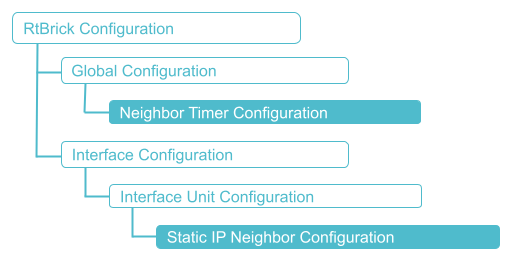
The diagram illustrates the Neighbor Timer configuration hierarchy.
Configuration Syntax and Commands
Neighbor Timer Configuration
The following sections describe the interface configuration syntax and commands.
Syntax:
| Attribute | Description |
|---|---|
|
Gratuitous ARP interval. The value is in seconds. |
|
Neighbor probe interval. The value is in seconds. |
|
Router advertisement interval. The value is in seconds. |
|
Neighbor scan interval. The value is in seconds. |
|
ARP throttle interval. The value is in seconds. |
Example: Neighbor timer Configuration
{
    "rtbrick-config:neighbor": {
      "garp-interval": 10,
      "probe-interval": 120,
      "scan-interval": 120,
      "throttle-interval": 120,
      "ra-interval": 120
    }
  }
Static IP Neighbor Configuration
This section describes configuration options at static IP neighbors.
Syntax:
set interface <interface-name> unit <unit-id> neighbor <attribute> <value>
| Attribute | Description |
|---|---|
|
Name of the interface. Examples: ifp-0/0/1. |
|
Create a logical interface (also referred to as a sub-interface) under the physical interface. |
|
Neighbor IPv4 or IPv6 address. |
|
Neighbor MAC address. |
Example: Static IP Neighbor Configuration
supervisor@rtbrick>LEAF01: cfg> show config
{
  "data": {
    "rtbrick-config:interface": [
      {
        "name": "ifp-0/1/5",
        "unit": [
          {
            "unit-id": 1,
            "neighbor": {
              "ipv4": [
                {
                  "address4": "198.51.100.10",
                  "mac": "11:11:11:11:11:11"
                }
              ]
            }
          }
        ]
      }
    ]
  }
}
Disabling Gratuitous ARP on Interface
You can disable the sending of Gratuitous ARP (GARP) on an interface, which is enabled by default on all interfaces.
To enable GARP on an interface, you need to delete the garp-disable true configuration.
|
Syntax:
set interface <interface-name> unit <unit-id> garp-disable true
| Attribute | Description |
|---|---|
interface <interface-name> |
Name of the interface. Examples: ifp-0/0/1. |
garp-disable true |
Disables Gratuitous ARP (GARP). Default is GARP enabled. |
Example: Disabling Gratuitous ARP
supervisor@rtbrick.net: cfg> set interface ifp-0/0/0 unit 100 garp-disable true
Enabling Permanent ARP Entry on IFLs
You can enable the Permanent ARP Entry on IFLs functionality.
Syntax:
| Attribute | Description |
|---|---|
|
Name of the interface. Example: ifp-0/0/1. |
|
Create a logical interface (also referred to as a sub-interface) under the physical interface. |
|
Neighbor IPv4 or IPv6 address. |
|
Dynamic resolution mode. |
Example: Enable Permanent ARP Entry on IFLs
{
  "ietf-restconf:data": {
    "rtbrick-config:interface": [
      {
        "name": "ifp-0/0/0",
        "host-if": "S1-1-SN",
        "unit": [
          {
            "unit-id": 10,
            "neighbor": {
              "ipv4": [
                {
                  "address4": "10.2.2.2",
                  "dynamic": "true"
                }
              ]
            }
          }
        ]
      },
      {
        "name": "ifp-0/0/1",
        "host-if": "S1-2-SN"
      },
      {
        "name": "ifp-0/0/2",
        "host-if": "S1-3-L1"
      },
      {
        "name": "ifp-0/0/3",
        "host-if": "S1-4-L1"
      }
    ]
  }
}
Host-Path Rate Limiting for Unresolved ARP/ND Traffic
RBFS supports host-path traffic policing for packets generated due to ARP/ND resolution failures for directly connected destinations. When ARP/ND resolution fails, traffic destined for unresolved next hops can be redirected to the control plane, causing excessive host-path load. By default, this feature is enabled with a default policer value of 10Mbps.
Syntax:
| Option | Description |
|---|---|
|
Name of the policer to be applied to the host path. |
The following configuration example attaches a specific policer named 'policer-hostpath' to the hostpath to ensure that management and protocol traffic does not overwhelm the processor during traffic spikes.
set forwarding-options hostpath policer policer-hostpath
{
  "forwarding-options": {
    "hostpath": {
      "policer": {
        "policer-name": policer-hostpath
      }
    }
  }
}