RADIUS Server Configuration
Subscriber Management often relies on the RADIUS server for authentication, authorization, and accounting. There are alternative AAA solutions, including local methods that operate independently of network availability.
The RADIUS server configuration is not standalone; it is inherently dependent on the configuration of a RADIUS profile. You must first create a RADIUS profile before configuring the associated RADIUS server.
The following diagram illustrates how RADIUS server configuration fits into the broader context of subscriber management tasks.
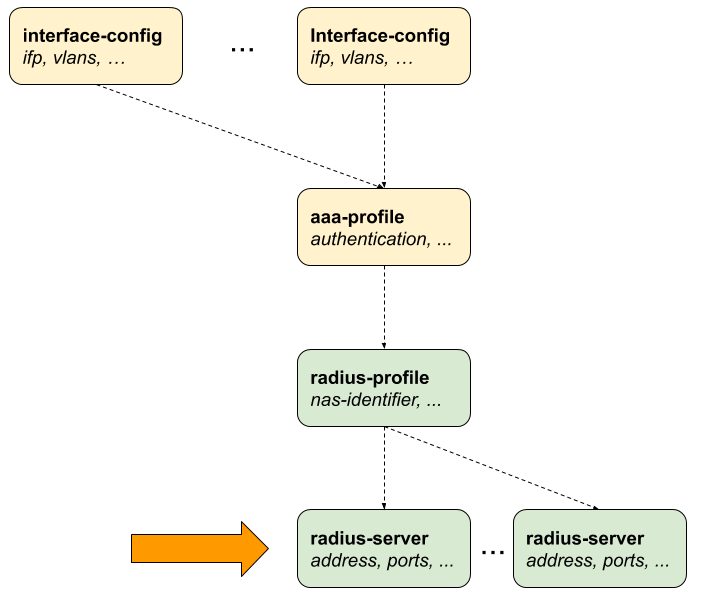
Configuring the RADIUS Server
The following configuration command and options are used to configure a RADIUS server.
| Attribute | Description |
|---|---|
|
Specifies the name used to identify the RADIUS server within the system. |
|
Enables and configures RADIUS accounting, allowing the system to send session usage and lifecycle information (start, stop, interim updates) to the server. |
|
Defines the IP address or hostname of the RADIUS server to which authentication and accounting requests are sent. NOTE: Multiple RADIUS servers with the same IPv4 address are not supported, even if the instance or port is different. |
|
Enables and configures RADIUS-based authentication for validating subscriber or user credentials. |
|
Enables support for Change of Authorization (CoA), allowing the RADIUS server to dynamically modify session parameters after authentication. |
|
Specifies the maximum number of RADIUS requests that can be sent to the server per second, used to control traffic and prevent server overload. Default: 600. Range: 1 - 65535. |
|
Associates the RADIUS server communication with a specific routing instance (VRF), enabling reachability in multi-VRF deployments. |
|
Configures the shared secret key in encrypted form for secure communication between the device and the RADIUS server. |
|
Configures the shared secret key in plain text format; typically used for initial setup before encryption is applied. |
|
Specifies the source IPv4 address used for outgoing RADIUS packets, ensuring consistent identification and proper routing. |
 To access the RESTCONF API that corresponds to this CLI, click
here.
To access the RESTCONF API that corresponds to this CLI, click
here.
The following example shows the RADIUS server configuration for authentication and accounting. Each of these options allows you to define how the RADIUS server will operate. The command sets RADIUS server name as 'radius-server-1'. The configuration specifies the IP address '198.51.100.101' of the RADIUS server, which the router will use to send RADIUS requests. The source IP address is specified as '198.51.100.200'. It sets 'CoA' (Change-of-Authorization), a feature that allows the RADIUS server to change the authorization parameters of a session after it has been established.
The secret-encrypted-text parameter is specified that configures the RADIUS secret in an encrypted format. The key is used for encrypting RADIUS messages between the client and server to ensure security.
supervisor@switch: cfg> show config access radius-server radius-server-1
{
  "rtbrick-config:radius-server": {
    "server-name": "radius-server-1",
    "address": "198.51.100.101",
    "source-address": "198.51.100.200",
    "secret-encrypted-text": "$21e4946e31b406de98b3077aef03ed5a7",
    "authentication": {
      "enable": "true"
    },
    "accounting": {
      "enable": "true"
    },
    "coa": {
      "enable": "true"
    }
  }
}
Configuring Authentication
The following command and options allow to configure the authentication settings on a RADIUS server. The enable option is used to activate RADIUS authentication for the specified RADIUS server 'radius-server-1'. The outstanding option allows you to specify the maximum number of pending authentication requests that the device can have at any given time. The port option enables you to define the port number used for RADIUS authentication requests. The retry option defines the maximum number of retries the device makes if the RADIUS server does not acknowledge an authentication request. This ensures that transient network issues do not cause authentication failures. The timeout setting determines the time, in seconds, that the device will wait for a response from the RADIUS server after sending authentication requests. If the server does not respond within this time frame, the request will be considered timed out.
| Attribute | Description |
|---|---|
|
Without any option, the command sets RADIUS server authentication. |
|
Enables RADIUS authentication. Default: False. |
|
RADIUS authentication port. Default: 1812. Range: 1 - 65535. |
|
This option specifies the number of authentication retries before declaring this server as unreachable for authentication. After reaching the limit, the client begins to send requests to other RADIUS servers and rejects the request after receiving the end of the list. Default: 3. Range: 1 - 255. |
|
Authentication request timeout, in seconds. Default: 5. Range: 1 - 65535. |
|
This option specifies the maximum number of outstanding authentication requests for this RADIUS server. A request is counted as outstanding if sent out but the response is not received. Default: 100. Range: 1 - 65535. |
To access the RESTCONF API that corresponds to this CLI, click
here.
Configuring Accounting
RADIUS accounting allows the tracking of user sessions. This configuration sets up RADIUS accounting on a specified RADIUS server. When enabled, the device will send accounting data to the RADIUS server.
Syntax:
| Attribute | Description |
|---|---|
|
Enable RADIUS accounting. Default: False. |
|
This specifies the port number on the RADIUS server that is used for accounting purpose. Default: 1813. Range: 1 - 65535. |
|
This option determines the maximum number of attempts the device will make to send an accounting request to the RADIUS server before marking the server as unreachable for accounting. Once the retry limit is reached, the device will attempt to send accounting requests to other configured RADIUS servers. Default: 10. Range: 1 - 255. |
|
Accounting request timeout, in seconds. Default: 30. Range: 1 - 65535. |
|
This option specifies the maximum number of outstanding accounting requests for this RADIUS server. A request is counted as outstanding if sent out, but the response is not received. Default: 100. Range: 1 - 65535. |
To access the RESTCONF API that corresponds to this CLI, click
here.
Configuring Change-of-Authorization (CoA)
Change-of-Authorization (CoA) allows a RADIUS server to send requests to the network device to change the authorization parameters of an active session. The following configuration involves setting up CoA for a specified RADIUS server called 'radius-server-1'.
Syntax:
| Attribute | Description |
|---|---|
|
This option enables the device to receive CoA requests from the specified RADIUS server. Default: False. |
|
Specifies the device port that listens/receives for CoA requests from the RADIUS server. Default: 3799. Range: 1 - 65535. |
To access the RESTCONF API that corresponds to this CLI, click
here.