Subscriber Management Configuration Overview
RBFS Subscriber Management configuration involves setting up various profiles and parameters that control how subscribers interact with network services. This includes authentication, service access, protocol handling, and other functions organized under a structured configuration hierarchy. The profiles determine how subscribers authenticate, access network services, and use various protocols. The configuration starts with mandatory settings such as interface, access, and AAA profiles, followed by optional configurations for more features such as RADIUS, L2TP, and service profiles. Each profile plays a crucial role in ensuring efficient and secure subscriber management.
Configuration Hierarchy
The configuration of physical interfaces (IFP) and their associated VLANs is managed through a set of profiles that define parameters for various functions. These include authentication settings with AAA, service management for protocols such as IGMP and MLD, and access protocols such as PPPoE.
The following image illustrates how the subscriber management configuration and profile system are organized.
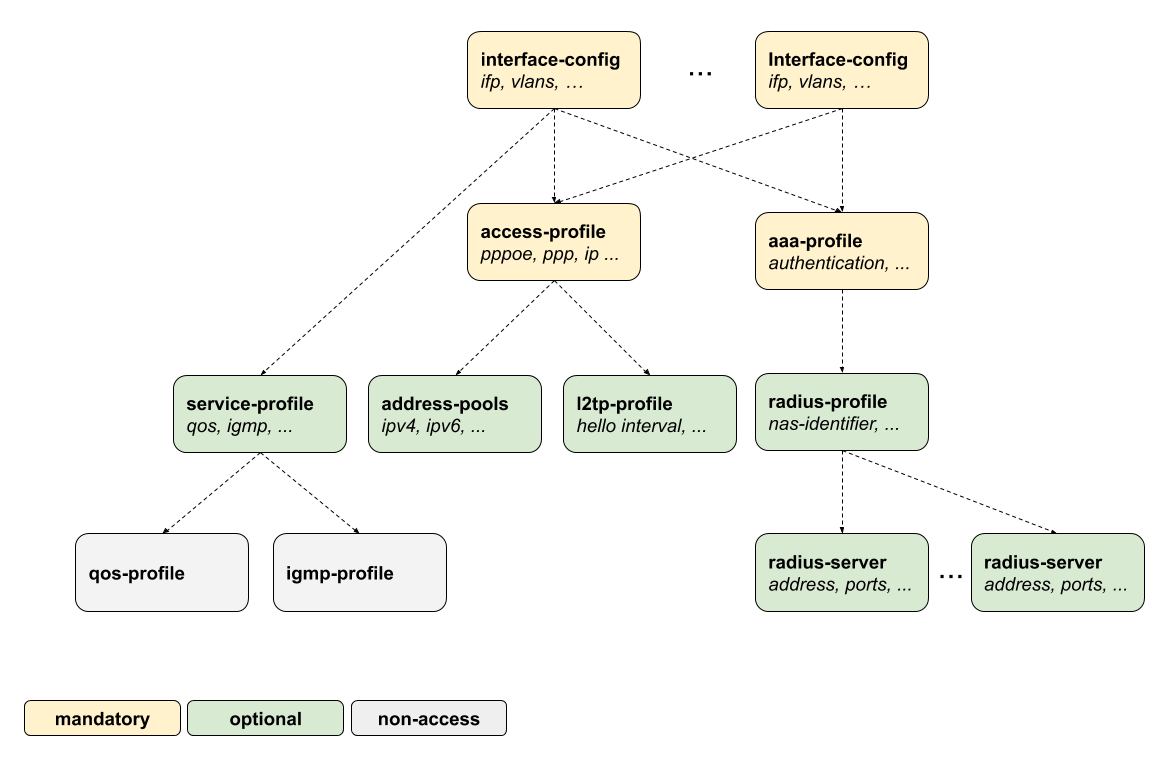
All subscriber management configurations and profiles are managed under the top-level hierarchy access. This hierarchy acts as the central point for defining and managing various access protocols, subscriber management profiles, and authentication settings that are crucial for network operations.
The following is the high-level command syntax and the table provides command options and descriptions available for Subscriber Management configurations.
Syntax:
| Attribute | Description |
|---|---|
|
Defines global AAA profiles used for subscriber authentication, authorization, and accounting. |
|
Specifies global access profiles that control subscriber session behavior and policies. |
|
Configures a unique chassis identifier for the node, used in subscriber session and redundancy handling. Range: 0 - 15. |
|
Configures global DHCP relay settings to forward DHCP requests between clients and servers. |
|
Defines global DHCPv4 server configurations for dynamic IP address assignment to subscribers. |
|
Defines global DHCPv6 server configurations for IPv6 address and prefix assignment. |
|
Configures global access interface settings for handling subscriber traffic. |
|
Defines global L2TPv2 tunnel endpoint pools used for subscriber session termination. |
|
Specifies global L2TPv2 profiles that control tunnel parameters and behavior. |
|
Configures global IP address pools used for assigning addresses to subscribers. |
|
Defines global RADIUS profiles for AAA communication parameters and behavior. |
|
Configures RADIUS server details used for subscriber authentication and accounting. |
|
Defines service profiles that apply policies and services to subscriber sessions. |
|
Specifies the duration to retain terminated subscriber session history. Range: 0 - 720 hours. |
|
Defines user-specific profiles that control subscriber attributes and service parameters. |
The following options can be configured directly at the global access level, rather than within subsections.
| Attribute | Description |
|---|---|
|
This option must be set to a unique value for each redundancy cluster and is only needed for stateful redundancy. Default: 0. |
|
Change the retention period (in hours) for storing the termination history of subscribers after they have been disconnected. Default: 24. |
The following sections provides you the steps for each configuration. The process begins with setting up the access interface configuration, which is the first step. This is then followed by other important access profile and AAA profile configurations, which are crucial for managing subscriber access.
The second part covers the optional configurations:
The user-profile and l2tp-pool are the only components not referenced by name. The key here is the user or pool name.