RADIUS Profile Configuration
Subscriber management allows the configuration of a RADIUS profile, which is mandatory if RADIUS is used for authentication or accounting.
The diagram below illustrates how the RADIUS profile is associated with the subscriber management tasks at a broader level.
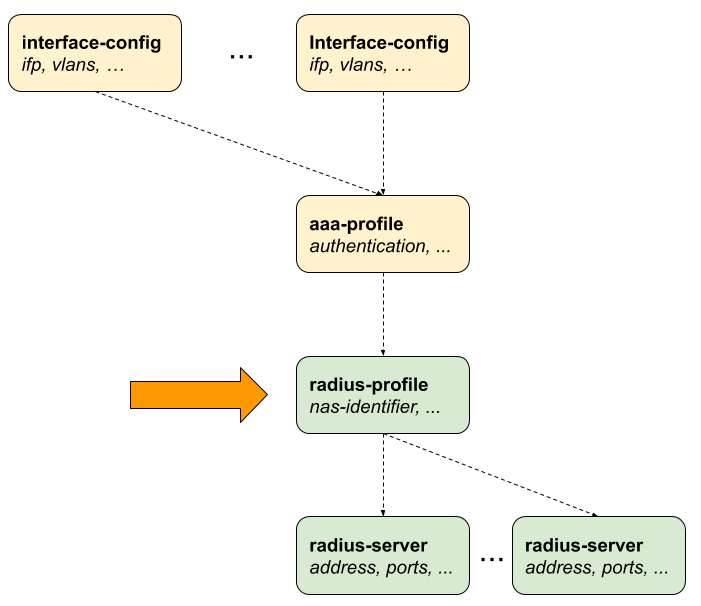
Configuring the RADIUS Profile
The RADIUS profile configuration involves setting up various parameters that define how the router interacts with the RADIUS server for authentication, accounting, and so on.
| Attribute | Description | ||||||||||||
|---|---|---|---|---|---|---|---|---|---|---|---|---|---|
|
Set the value for RADIUS attribute Calling-Station-Id (31). The default setting is NONE, meaning the attribute is not sent. If set to MAC, the client MAC address is sent as a string. Default: NONE. |
||||||||||||
|
Set the value for the RADIUS attribute NAS-Identifier (32). Default: system hostname. |
||||||||||||
|
Set the value for RADIUS attribute NAS-IP-Address (4). Default: source IPv4 address. |
||||||||||||
|
Set the value for RADIUS attribute NAS-Port-Type (61). Default: Ethernet. |
||||||||||||
|
Set the format of the 32-bit RADIUS attribute NAS-Port (5).
|
 To access the RESTCONF API that corresponds to this CLI, click
here.
To access the RESTCONF API that corresponds to this CLI, click
here.
The following example shows a typical RADIUS profile for authentication and accounting. The RADIUS profile name is specified as 'radius-default'. NAS Identifier is set as BNG and NAS Port Type is specified as 'Ethernet'. RADIUS servers used for authentication is set 'radius-server-1' and 'radius-server-2'. RADIUS servers used for accounting is also set as 'radius-server-1' and 'radius-server-2'.
The Accounting RADIUS servers are specified as 'radius-server-1' 'radius-server-2'. For information about other options, see the table descriptions below.
supervisor@switch: cfg> show config access radius-profile radius-default
{
  "rtbrick-config:radius-profile": {
    "profile-name": "radius-default",
    "nas-identifier": "BNG",
    "nas-port-type": "Ethernet",
    "authentication": {
      "radius-server-profile-name": [
        "radius-server-1",
        "radius-server-2"
        ]
    },
    "accounting": {
      "radius-server-profile-name": [
        "radius-server-1",
        "radius-server-2"
        ],
      "stop-on-reject": "true",
      "stop-on-failure": "true",
      "accounting-on-off": "true",
      "accounting-on-wait": "true",
      "accounting-backup": "true",
      "accounting-backup-max": 86400
    }
  }
}
Configuring Authentication
The following configuration command and options set the 'radius-profile' as authentication method. It also defines the list of RADIUS servers and the algorithm for RADIUS high-availability.
| Attribute | Description |
|---|---|
|
Without any option, the command sets authentication for the RADIUS profile. |
|
List of multiple RADIUS servers used for authentication. |
|
Specifies the authentication server selection algorithm. For more information, see RADIUS Redundancy. Default: DIRECT Values: DIRECT, ROUND-ROBIN |
To access the RESTCONF API that corresponds to this CLI, click
here.
Configuring Accounting
Configuring accounting involves specifying its name and defining various parameters. The following command and options allow you to configure RADIUS accounting.
| Attribute | Description |
|---|---|
|
Without any option, the command sets accounting for the RADIUS profile. |
|
List of RADIUS servers used for accounting. |
|
Specifies the accounting server selection algorithm. For more information, see RADIUS Redundancy. Default: DIRECT, Values: DIRECT and ROUND-ROBIN. |
|
If set to |
|
If set to |
|
Enables RADIUS Accounting-On/Off messages. For more information, see RADIUS Accounting. Default: False. |
|
Waits for an |
|
Enables backup for accounting (optional). RADIUS accounting requests are often used for billing and, therefore should be able to store and retry over a longer period (commonly, up to 24 hours or more). Default: False. |
|
If enabled, this option defines maximum backup accounting hold time, in seconds. Default: 3600, Range: 1 - 4294967295. |
To access the RESTCONF API that corresponds to this CLI, click
here.