L2X Configuration
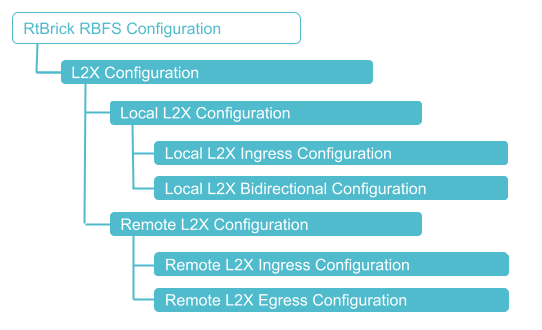
Configuration Hierarchy
The diagram illustrates the L2X configuration hierarchy.
Configuration Syntax and Commands
The following sections describe the L2X configuration syntax and commands.
Local L2X Configuration
The following sections describe the Local L2X unidirectional and bidirectional configurations.
Local L2X Ingress Configuration
This configuration enables local unidirectional L2X (Local Cross-Connect) on the same device.
Syntax:
| Attribute | Description |
|---|---|
|
Name of L2X |
|
(Optional) L2X description |
|
(Optional) Egress VLAN encapsulation value. NOTE: This option can be configured only after ‘swap-outer-vlan’ configuration. |
|
(Optional) Outgoing VLAN operation |
|
(Optional) Incoming inner VLAN |
|
Incoming physical interface name |
|
(Optional) Incoming outer VLAN |
|
(Optional) Outer VLAN at ingress side |
|
(Optional) Ingress VLAN encapsulation value. NOTE: This option can be configured only after ‘swap-outer-vlan’ configuration. |
|
(Optional) VLAN operation on ingress side outer VLAN |
|
L2X match type |
|
The option enables L2X to recognize and handle packets tagged with 0x88a8/0x8100 TPID, allowing interoperability with 802.1ad/802.1q encapsulated traffic. |
|
Outgoing physical interface name |
|
(Optional) Outgoing outer VLAN |
|
Enables (true) L2X statistics. Default: Disabled. |
Example: Local L2X Ingress Configuration with Port Match
The following configuration creates two local cross-connect (L2X) entries to forward traffic directly between the interfaces ifp-0/0/10 and ifp-0/0/11. One entry handles downstream traffic from ifp-0/0/10 to ifp-0/0/11, while the other handles upstream traffic in the reverse direction. The match-any option ensures that all ingress traffic on the specified interface is forwarded to the configured outgoing interface.
set l2x name local_cross_connect_ds ingress
set l2x name local_cross_connect_ds ingress incoming-interface ifp-0/0/10
set l2x name local_cross_connect_ds ingress outgoing-interface ifp-0/0/11
set l2x name local_cross_connect_ds ingress match-type match-any
set l2x name local_cross_connect_us ingress
set l2x name local_cross_connect_us ingress incoming-interface ifp-0/0/11
set l2x name local_cross_connect_us ingress outgoing-interface ifp-0/0/10
set l2x name local_cross_connect_us ingress match-type match-any
{
  "rtbrick-config:l2x": {
    "name": [
      {
        "name": "local_cross_connect_ds",
        "direction": "ingress",
        "incoming-interface": "ifp-0/0/10",
        "outgoing-interface": "ifp-0/0/11",
        "match-type": "match-any"
      },
      {
        "name": "local_cross_connect_us",
        "direction": "ingress",
        "incoming-interface": "ifp-0/0/11",
        "outgoing-interface": "ifp-0/0/10",
        "match-type": "match-any"
      }
    ]
  }
}
Example: Local L2X Ingress VLAN Operations
This configuration defines a local Layer 2 cross-connect for traffic arriving on 'ifp-0/0/10' with outer VLAN 200, forwarding it to ifp-0/0/11. The match condition is based on the outer VLAN (match-outer), ensuring only VLAN 200 traffic is processed. A VLAN operation is applied to add a single outer VLAN tag 400 to the traffic before forwarding.
set l2x name local_cross_connect_ds ingress
set l2x name local_cross_connect_ds ingress incoming-interface ifp-0/0/10
set l2x name local_cross_connect_ds ingress incoming-outer-vlan 200
set l2x name local_cross_connect_ds ingress outgoing-interface ifp-0/0/11
set l2x name local_cross_connect_ds ingress match-type match-outer
set l2x name local_cross_connect_ds ingress ingress-vlan-operation single-vlan-add
set l2x name local_cross_connect_ds ingress ingress-outer-vlan 400
{
  "rtbrick-config:l2x": {
    "name": [
      {
        "name": "local_cross_connect_ds",
        "direction": "ingress",
        "incoming-interface": "ifp-0/0/10",
        "incoming-outer-vlan": 200,
        "outgoing-interface": "ifp-0/0/11",
        "match-type": "match-outer",
        "ingress-vlan-operation": "single-vlan-add",
        "ingress-outer-vlan": 400
      }
    ]
  }
}
This configuration sets up a local Layer 2 cross-connect for traffic received on ifp-0/0/10 with outer VLAN 100, forwarding it to ifp-0/0/11 based on outer VLAN matching. On ingress, the outer VLAN tag is removed (single-vlan-delete), and on egress, the VLAN tag is re-added using a swap operation with VLAN 100 and '802.1ad' encapsulation. This configuration rewrites the VLAN tag while maintaining service delimitation using the specified TPID.
set l2x name local_cross_connect_ds ingress incoming-interface ifp-0/0/10
set l2x name local_cross_connect_ds ingress incoming-outer-vlan 100
set l2x name local_cross_connect_ds ingress outgoing-interface ifp-0/0/11
set l2x name local_cross_connect_ds ingress egress-vlan-operation swap-outer-vlan
set l2x name local_cross_connect_ds ingress outgoing-outer-vlan 100
set l2x name local_cross_connect_ds ingress egress-vlan-encapsulation 802.1ad
set l2x name local_cross_connect_ds ingress match-type match-outer
set l2x name local_cross_connect_ds ingress ingress-vlan-operation single-vlan-delete
set l2x name local_cross_connect_ds ingress match-tp-id 802.1ad
{
  "rtbrick-config:l2x": {
    "name": [
      {
        "name": "local_cross_connect_ds",
        "direction": "ingress",
        "incoming-interface": "ifp-0/0/10",
        "incoming-outer-vlan": 100,
        "outgoing-interface": "ifp-0/0/11",
        "egress-vlan-operation": "swap-outer-vlan",
        "outgoing-outer-vlan": 100,
        "egress-vlan-encapsulation": "802.1ad",
        "match-type": "match-outer",
        "ingress-vlan-operation": "single-vlan-delete",
        "match-tp-id": "802.1ad"
      }
    ]
  }
}
 To access the RESTCONF API that corresponds to this CLI, click
here.
To access the RESTCONF API that corresponds to this CLI, click
here.
Local L2X Bidirectional Configuration
This configuration enables redirecting traffic incoming (ingress) on a particular interface to another interface and vice versa on the same hardware device.
Syntax:
| Attribute | Description |
|---|---|
|
Match types with which traffic can be matched. |
|
Incoming interface is where the traffic originates from. |
|
Outgoing interface where the traffic is going to. |
|
(Optional) L2X description |
|
(Optional) Egress VLAN encapsulation |
|
(Optional) Incoming inner VLAN |
|
(Optional) Incoming outer VLAN |
|
(Optional) Outer VLAN at ingress side |
|
(Optional) Ingress VLAN encapsulation |
|
(Optional) Outgoing outer VLAN |
|
Enables bi-directional traffic statistics collection for this L2X connection. When set to true, the system collects and reports statistics for both directions of traffic. |
Example: Local L2X Bidirectional Configuration
This configuration creates a bidirectional local Layer 2 cross-connect between interfaces ifp-0/0/10 and ifp-0/0/11. It forwards traffic in both directions without requiring separate ingress entries for each path. The match-type 'match-untagged' ensures that only untagged traffic is matched and cross-connected between the interfaces.
set l2x name local_bidi bi-directional
set l2x name local_bidi bi-directional incoming-interface ifp-0/0/10
set l2x name local_bidi bi-directional outgoing-interface ifp-0/0/11
set l2x name local_bidi bi-directional match-type match-untagged
{
  "rtbrick-config:l2x": {
    "name": [
      {
        "name": "local_bidi",
        "direction": "bi-directional",
        "incoming-interface": "ifp-0/0/10",
        "outgoing-interface": "ifp-0/0/11",
        "match-type": "match-untagged"
      }
    ]
  }
}
Local L2X VLAN Operation Configuration
This configuration enables VLAN operations for both ingress and egress traffic on a particular interface to another interface and vice versa on the same hardware device.
Syntax:
| Attribute | Description |
|---|---|
|
Name of the l2x. |
|
Adds a single VLAN tag to the packet. |
|
Removes a single VLAN tag from the packet. |
|
Replaces the outer VLAN tag with a new one. |
Remote L2X Configuration
The following sections describe the remote L2X configurations.
Remote L2X Ingress Configuration
This configuration enables the remote L2X ingress side.
Syntax:
| Attribute | Description | ||
|---|---|---|---|
|
Match types with which traffic can be matched. The 'match-type' option includes |
||
|
Incoming interface is where the traffic originates from. |
||
|
(Optional) VLAN operation on ingress side outer VLAN |
||
|
(Optional) Outer VLAN at ingress side |
||
|
(Optional) Ingress VLAN encapsulation value |
||
|
Next-Hop address |
||
|
(Optional) Instance name |
||
|
(Optional) AFI value: IPv4, IPv6, and MPLS. |
||
|
(Optional) SAFI value: safi values are unicast, labeled-unicast, and multicast. |
||
|
Service label value.
|
||
|
Enables bi-directional traffic statistics collection for this L2X connection. When set to true, the system collects and reports statistics for both directions of traffic. |
Example: Remote L2X Ingress Configuration with Port Match
This configuration defines a remote Layer 2 cross-connect for traffic arriving on ifp-0/0/10, forwarding it towards a remote endpoint using the next-hop 198.51.100.44. The forwarding decision is performed via the default routing instance using IPv4 labeled-unicast lookup, with service label 10000 applied for MPLS-based transport. The match-type 'match-any' ensures that all incoming traffic on the interface is processed by this cross-connect.
set l2x name remote_l2x ingress incoming-interface ifp-0/0/10
set l2x name remote_l2x ingress nexthop4 198.51.100.44
set l2x name remote_l2x ingress lookup-instance default
set l2x name remote_l2x ingress lookup-afi ipv4
set l2x name remote_l2x ingress lookup-safi labeled-unicast
set l2x name remote_l2x ingress service-label 10000
set l2x name remote_l2x ingress match-type match-any
{
  "rtbrick-config:l2x": {
    "name": [
      {
        "name": "remote_l2x",
        "direction": "ingress",
        "incoming-interface": "ifp-0/0/10",
        "nexthop4": "198.51.100.44",
        "lookup-instance": "default",
        "lookup-afi": "ipv4",
        "lookup-safi": "labeled-unicast",
        "service-label": 10000,
        "match-type": "match-any"
      }
    ]
  }
}
Example: Remote L2X Ingress Configuration with VLAN match
This configuration defines a remote Layer 2 cross-connect for double-tagged traffic received on ifp-0/0/10 with outer VLAN 100 and inner VLAN 200. The traffic is matched using match-outer-inner and forwarded to a remote endpoint via next-hop 198.51.100.44 using IPv4 labeled-unicast lookup in the default instance. A service label 10000 is applied to enable MPLS-based transport of the matched traffic.
set l2x name remote_l2x ingress incoming-interface ifp-0/0/10
set l2x name remote_l2x ingress incoming-outer-vlan 100
set l2x name remote_l2x ingress incoming-inner-vlan 200
set l2x name remote_l2x ingress nexthop4 198.51.100.44
set l2x name remote_l2x ingress lookup-instance default
set l2x name remote_l2x ingress lookup-afi ipv4
set l2x name remote_l2x ingress lookup-safi labeled-unicast
set l2x name remote_l2x ingress service-label 10000
set l2x name remote_l2x ingress match-type match-outer-inner
{
  "rtbrick-config:l2x": {
    "name": [
      {
        "name": "remote_l2x",
        "direction": "ingress",
        "incoming-interface": "ifp-0/0/10",
        "incoming-outer-vlan": 100,
        "incoming-inner-vlan": 200,
        "nexthop4": "198.51.100.44",
        "lookup-instance": "default",
        "lookup-afi": "ipv4",
        "lookup-safi": "labeled-unicast",
        "service-label": 10000,
        "match-type": "match-outer-inner"
      }
    ]
  }
}
Example: Remote L2X Ingress VLAN operations
This configuration defines a remote Layer 2 cross-connect for double-tagged traffic received on ifp-0/0/10 with outer VLAN 100 and inner VLAN 200, using 'match-outer-inner' for classification. The matched traffic has one VLAN tag removed on ingress (single-vlan-delete) before being forwarded to the remote endpoint via next-hop 198.51.100.44 using IPv4 labeled-unicast lookup. A service label 10000 is applied to carry the traffic over MPLS.
set l2x name remote_l2x ingress incoming-interface ifp-0/0/10
set l2x name remote_l2x ingress incoming-outer-vlan 100
set l2x name remote_l2x ingress incoming-inner-vlan 200
set l2x name remote_l2x ingress nexthop4 198.51.100.44
set l2x name remote_l2x ingress lookup-instance default
set l2x name remote_l2x ingress lookup-afi ipv4
set l2x name remote_l2x ingress lookup-safi labeled-unicast
set l2x name remote_l2x ingress service-label 10000
set l2x name remote_l2x ingress match-type match-outer-inner
set l2x name remote_l2x ingress ingress-vlan-operation single-vlan-delete
{
  "rtbrick-config:l2x": {
    "name": [
      {
        "name": "remote_l2x",
        "direction": "ingress",
        "incoming-interface": "ifp-0/0/10",
        "incoming-outer-vlan": 100,
        "incoming-inner-vlan": 200,
        "nexthop4": "198.51.100.44",
        "lookup-instance": "default",
        "lookup-afi": "ipv4",
        "lookup-safi": "labeled-unicast",
        "service-label": 10000,
        "match-type": "match-outer-inner",
        "ingress-vlan-operation": "single-vlan-delete"
      }
    ]
  }
}
Remote L2X Egress Configuration
This configuration enables the remote L2X egress side.
Syntax:
| Attribute | Description | ||
|---|---|---|---|
|
Match types with which traffic can be matched. The 'match-type' option includes |
||
|
Interface where traffic is going to. |
||
|
Service label value.
|
||
|
Next-Hop address |
||
|
(Optional) Instance name |
||
|
(Optional) AFI value: IPv4, IPv6, and MPLS. |
||
|
(Optional) SAFI value: safi values are unicast, labeled-unicast, and multicast. |
||
|
(Optional) Outgoing VLAN operation. |
||
|
(Optional) Outgoing outer VLAN. |
||
|
Enables bi-directional traffic statistics collection for this L2X connection. When set to true, the system collects and reports statistics for both directions of traffic. |
Example: Remote L2X Egress Configuration
This configuration defines the egress handling for a remote Layer 2 cross-connect with service label 10000. Traffic received over MPLS with the matching service label is decapsulated and forwarded to the local interface ifp-0/0/11. This enables proper termination of the remote L2X service on the device.
set l2x name remote_l2x egress
set l2x name remote_l2x egress service-label 10000
set l2x name remote_l2x egress outgoing-interface ifp-0/0/11
{
  "rtbrick-config:l2x": {
    "name": [
      {
        "name": "remote_l2x",
        "direction": "egress",
        "service-label": 10000,
        "outgoing-interface": "ifp-0/0/11"
      }
    ]
  }
}
Example: Local L2X Egress Configuration with VLAN Operation
This configuration defines the egress handling for a remote Layer 2 cross-connect with service label 10000, forwarding traffic to ifp-0/0/11. Upon egress, a VLAN tag 400 is added to the traffic using single-vlan-add. This ensures the decapsulated MPLS traffic is properly VLAN-tagged before being transmitted on the outgoing interface.
set l2x name remote_l2x egress service-label 10000
set l2x name remote_l2x egress outgoing-interface ifp-0/0/11
set l2x name remote_l2x egress egress-vlan-operation single-vlan-add
set l2x name remote_l2x egress outgoing-outer-vlan 400
{
  "rtbrick-config:l2x": {
    "name": [
      {
        "name": "remote_l2x",
        "direction": "egress",
        "service-label": 10000,
        "outgoing-interface": "ifp-0/0/11",
        "egress-vlan-operation": "single-vlan-add",
        "outgoing-outer-vlan": 400
      }
    ]
  }
}