OSPF Configuration
Configuration Hierarchy
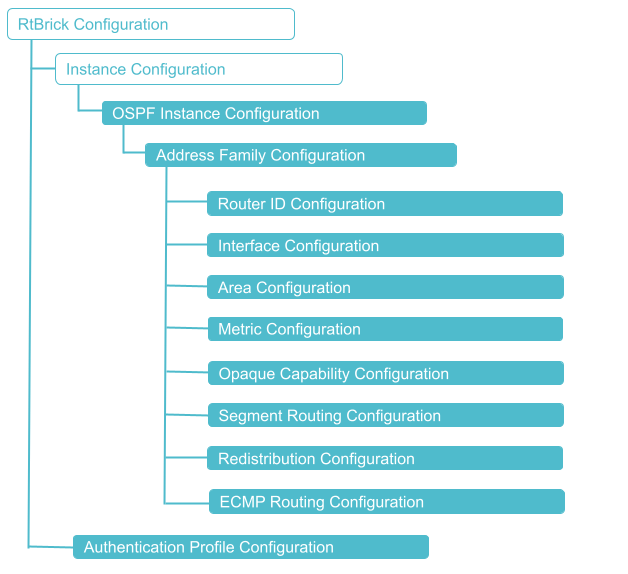
The diagram illustrates the OSPF configuration hierarchy. All OSPF configuration is performed within an instance, for example, the default instance or a VPN service instance. The OSPF instance configuration hierarchy includes parameters that are generic to the respective OSPF instance. The sub-hierarchies include parameters that are specific to redistribution or authentication.
Configuration Syntax and Commands
The following sections describe the OSPF configuration syntax and commands.
OSPF Instance Configuration
At this configuration hierarchy, you can configure an OSPF instance.
Syntax:
| Attribute | Description |
|---|---|
|
Name of the OSPF instance. |
 To access the RESTCONF API that corresponds to this CLI, click
here.
To access the RESTCONF API that corresponds to this CLI, click
here.
OSPF Address Family Configuration
At this configuration level, you configure the OSPF protocol address family.
| You must configure the OSPF address family on an OSPF instance before configuring other supported OSPF features. |
Syntax
| Attribute | Description |
|---|---|
|
Name of the instance |
|
Specifies the Address family identifier (AFI), either IPv4 or IPv6. |
The following example shows the OSPF address family (IPv4) configuration.
Example: OSPF Instance Address Family IPv4 Configuration
This configuration sets up the IPv4 address family for the OSPF protocol. It defines router ID, OSPF area (0.0.0.0), and the interfaces (ifl-0/0/0/1 and lo-0/0/0/1) associated with that area and specifies a point-to-point network type for ifl-0/0/0/1.
set instance default protocol ospf address-family ipv4
set instance default protocol ospf address-family ipv4 router-id 198.51.100.10
set instance default protocol ospf address-family ipv4 area 0.0.0.0
set instance default protocol ospf address-family ipv4 area 0.0.0.0 interface ifl-0/0/0/1
set instance default protocol ospf address-family ipv4 area 0.0.0.0 interface ifl-0/0/0/1 network-type p2p
set instance default protocol ospf address-family ipv4 area 0.0.0.0 interface lo-0/0/0/1
supervisor@rtbrick>SPINE01: cfg> show config instance default protocol ospf address-family ipv4
{
  "rtbrick-config:ipv4": {
    "router-id": "198.51.100.10",
    "area": [
      {
        "area-id": "0.0.0.0",
        "interface": [
          {
            "name": "ifl-0/0/0/1",
            "network-type": "p2p"
          },
          {
            "name": "lo-0/0/0/1"
          }
        ]
      }
    ]
  }
}
<...>
Example: OSPF Instance Address Family IPv6 Configuration
The following example shows the OSPF IPv6 address family configuration. This configuration sets up an OSPF instance for the IPv6 address family. It defines a router ID, a default metric, and enables segment routing with a specified SRGB. It also configures route redistribution from BGP and direct routes using the policy named 'ospf_policy_1'. It also configures an OSPF area '0.0.0.0' and lists a few interfaces (ifl-0/0/0/1 , ifl-0/0/0/100, ifl-0/0/1/1, and ifl-0/0/1/100) within this area, each with a specific metric, network type (where applicable), and an authentication profile named 'AUTH_PROFILE_SHA_512_1'.
set instance default protocol ospf address-family ipv6 instance-id 0 router-id 192.168.0.10
set instance default protocol ospf address-family ipv6 instance-id 0 metric 1000
set instance default protocol ospf address-family ipv6 instance-id 0 segment-routing status enable
set instance default protocol ospf address-family ipv6 instance-id 0 segment-routing srgb base 1000
set instance default protocol ospf address-family ipv6 instance-id 0 segment-routing srgb range 1000
set instance default protocol ospf address-family ipv6 instance-id 0 redistribute source bgp metric 2000
set instance default protocol ospf address-family ipv6 instance-id 0 redistribute source direct policy ospf_policy_1
set instance default protocol ospf address-family ipv6 instance-id 0 area 0.0.0.0 metric 1000
set instance default protocol ospf address-family ipv6 instance-id 0 area 0.0.0.0 interface ifl-0/0/0/1 authentication-profile AUTH_PROFILE_SHA_512_1
set instance default protocol ospf address-family ipv6 instance-id 0 area 0.0.0.0 interface ifl-0/0/0/100 metric 20000
set instance default protocol ospf address-family ipv6 instance-id 0 area 0.0.0.0 interface ifl-0/0/0/100 network-type p2p
set instance default protocol ospf address-family ipv6 instance-id 0 area 0.0.0.0 interface ifl-0/0/0/100 authentication-profile AUTH_PROFILE_SHA_512_1
set instance default protocol ospf address-family ipv6 instance-id 0 area 0.0.0.0 interface ifl-0/0/1/1 metric 40000
set instance default protocol ospf address-family ipv6 instance-id 0 area 0.0.0.0 interface ifl-0/0/1/1 network-type p2p
set instance default protocol ospf address-family ipv6 instance-id 0 area 0.0.0.0 interface ifl-0/0/1/1 authentication-profile AUTH_PROFILE_SHA_512_1
set instance default protocol ospf address-family ipv6 instance-id 0 area 0.0.0.0 interface ifl-0/0/1/100 metric 30000
set instance default protocol ospf address-family ipv6 instance-id 0 area 0.0.0.0 interface ifl-0/0/1/100 authentication-profile AUTH_PROFILE_SHA_512_1
supervisor@rtbrick>SPINE01: cfg> show config instance default protocol ospf address-family ipv6
{
  "rtbrick-config:ipv6": {
    "instance-id": [
      {
        "instance-id": 0,
        "router-id": "192.168.0.10",
        "metric": 1000,
        "segment-routing": {
          "status": "enable",
          "srgb": {
            "base": 1000,
            "range": 1000
          }
        },
        "redistribute": [
          {
            "source": "bgp",
            "metric": 2000
          },
          {
            "source": "direct",
            "policy": "ospf_policy_1"
          }
        ],
        "area": [
          {
            "area-id": "0.0.0.0",
            "metric": 1000,
            "interface": [
              {
                "name": "ifl-0/0/0/1",
                "authentication-profile": "AUTH_PROFILE_SHA_512_1"
              },
              {
                "name": "ifl-0/0/0/100",
                "metric": 20000,
                "network-type": "p2p",
                "authentication-profile": "AUTH_PROFILE_SHA_512_1"
              },
              {
                "name": "ifl-0/0/1/1",
                "metric": 40000,
                "network-type": "p2p",
                "authentication-profile": "AUTH_PROFILE_SHA_512_1"
              },
              {
                "name": "ifl-0/0/1/100",
                "metric": 30000,
                "authentication-profile": "AUTH_PROFILE_SHA_512_1"
<...>
To access the RESTCONF API that corresponds to this CLI, click
here.
OSPF Router ID Configuration
The router ID is an IP address that OSPF uses to identify a device on the network. The router ID should be configured under the address family hierarchy.
Syntax
| Attribute | Description |
|---|---|
|
Specifies the Address family identifier (AFI), either IPv4 or IPv6. |
|
Specifies the instance ID. When using an IPv6 address family with OSPFv3, an instance ID ranging from 0 to 31 must be specified. |
|
The router ID of the routing instance. It is recommended to specify the router ID. |
Example: OSPF IPv4 Router Identifier Configuration
This command configures router ID for a router that belong to the OSPF IPv4 address family.
set instance default protocol ospf address-family ipv4 router-id 192.168.0.10
supervisor@rtbrick: cfg> show config instance default protocol ospf address-family ipv4 router-id
{
  "rtbrick-config:router-id": "192.168.0.10"
}
Example: OSPF IPv6 Router Identifier Configuration
This command configures router ID for OSPF the IPv6 address family. It sets the router’s unique identifier (192.168.0.10) for the OSPF instance 0.
set instance default protocol ospf address-family ipv6 instance-id 0 router-id 192.168.0.10
supervisor@rtbrick: cfg> show config instance default protocol ospf address-family ipv6 instance-id 0 router-id
{
  "rtbrick-config:router-id": "192.168.0.10"
}
OSPF Hostname Configuration
Identifying routers through Open Shortest Path First (OSPF) hostnames can simplify network management as they are easier to remember than router IDs.
Syntax
| Attribute | Description |
|---|---|
|
Specifies the Address family identifier (AFI), either IPv4 or IPv6. |
|
Specifies the instance ID. When using an IPv6 address family with OSPFv3, an instance ID ranging from 0 to 31 must be specified. |
|
The hostname of the routing instance. |
Example: OSPF IPv4 host name Configuration
This command sets the OSPF IPv4 default instance host name to 'multiservice-edge'.
set instance default protocol ospf address-family ipv4 hostname multiservice-edge
supervisor@rtbrick: cfg> show config instance default protocol ospf address-family ipv4 hostname
{
  "rtbrick-config:hostname": "multiservice-edge"
}
Example: OSPF IPv6 host name configuration
This command sets the OSPF IPv6 default instance host name to 'multiservice-edge'.
set instance default protocol ospf address-family ipv6 hostname multiservice-edge
supervisor@rtbrick: cfg> show config instance default protocol ospf address-family ipv6 instance-id 0 hostname
{
  "rtbrick-config:hostname": "multiservice-edge"
}
OSPF Area Configuration
A particular area is defined by its area ID.
| Attribute | Description |
|---|---|
|
Specifies the Address family identifier (AFI), either IPv4 or IPv6. |
|
Specifies the instance ID. When using an IPv6 address family with OSPFv3, an instance ID ranging from 0 to 31 must be specified. |
|
Specifies the OSPF area ID. |
|
Area scope metric. Range: 1 - 65535. Default: 10000. |
|
A stub area is an area through which or into which AS external advertisements are not flooded instead type-3 LSA advertise with a default route. |
|
Totally stub area is an area in which type-3 LSAs are not allowed instead type-3 LSAs advertise with a default route. |
|
Specifies the authentication profile name used to create an attachment point at the area level. |
|
When enabled, OSPF packets received here will not undergo authentication validation, even if the user has enabled authentication. However, OSPF will continue to send authenticated packets from this interface. |
Example: OSPF IPv4 Area Configuration
The following configuration defines OSPFv2 settings for IPv4 under the default instance and associates multiple interfaces with area 0.0.0.0. Each interface is configured with parameters such as metric, network type, and authentication profile. This configuration includes multiple physical and logical interfaces connected to OSPF area 0.0.0.0, with varying interface metrics to manage path preference effectively. For the interface 'ifl-0/0/0/100', the metric is set to 20,000; for 'ifl-0/0/1/1', the metric is set to 40,000; and for 'ifl-0/0/4/1', the metric is set to 60,000. This defines the interface cost, which influences OSPF route selection, the lower the metric, the more preferred the path.
The network type is configured as point-to-point (p2p), indicating that OSPF considers this link as a direct connection between two routers. This point-to-point network type is applied to both the interfaces 'ifl-0/0/1/100' and 'ifl-0/0/1/1'. Also, the loopback interfaces 'lo-0/0/0/1' and 'lo-0/0/0/2' are included in OSPF area '0.0.0.0'.
set instance default protocol ospf address-family ipv4 area 0.0.0.0 interface ifl-0/0/0/1 authentication-profile AUTH_PROFILE_SHA_512_1
set instance default protocol ospf address-family ipv4 area 0.0.0.0 interface ifl-0/0/0/100 metric 20000
set instance default protocol ospf address-family ipv4 area 0.0.0.0 interface ifl-0/0/0/100 network-type p2p
set instance default protocol ospf address-family ipv4 area 0.0.0.0 interface ifl-0/0/0/100 authentication-profile AUTH_PROFILE_SHA_512_1
set instance default protocol ospf address-family ipv4 area 0.0.0.0 interface ifl-0/0/1/1 metric 40000
set instance default protocol ospf address-family ipv4 area 0.0.0.0 interface ifl-0/0/1/1 network-type p2p
set instance default protocol ospf address-family ipv4 area 0.0.0.0 interface ifl-0/0/1/1 authentication-profile AUTH_PROFILE_SHA_512_1
set instance default protocol ospf address-family ipv4 area 0.0.0.0 interface ifl-0/0/1/100 metric 30000
set instance default protocol ospf address-family ipv4 area 0.0.0.0 interface ifl-0/0/1/100 authentication-profile AUTH_PROFILE_SHA_512_1
set instance default protocol ospf address-family ipv4 area 0.0.0.0 interface ifl-0/0/4/1 metric 60000
set instance default protocol ospf address-family ipv4 area 0.0.0.0 interface lo-0/0/0/1
set instance default protocol ospf address-family ipv4 area 0.0.0.0 interface lo-0/0/0/2
supervisor@rtbrick: cfg> show config instance default protocol ospf address-family ipv4 area 0.0.0.0
{
  "rtbrick-config:area": [
    {
      "area-id": "0.0.0.0",
      "interface": [
        {
          "name": "ifl-0/0/0/1",
          "authentication-profile": "AUTH_PROFILE_SHA_512_1"
        },
        {
          "name": "ifl-0/0/0/100",
          "metric": 20000,
          "network-type": "p2p",
          "authentication-profile": "AUTH_PROFILE_SHA_512_1"
        },
        {
          "name": "ifl-0/0/1/1",
          "metric": 40000,
          "network-type": "p2p",
          "authentication-profile": "AUTH_PROFILE_SHA_512_1"
        },
        {
          "name": "ifl-0/0/1/100",
          "metric": 30000,
          "authentication-profile": "AUTH_PROFILE_SHA_512_1"
        },
        {
          "name": "ifl-0/0/4/1",
          "metric": 60000
        },
        {
          "name": "lo-0/0/0/1"
        },
        {
          "name": "lo-0/0/0/2"
        }
      ]
    }
  ]
}
Example: OSPF IPv6 Area Configuration
This configuration defines OSPFv3 (IPv6) settings under the default instance for area 0.0.0.0. Multiple interfaces are associated with this area, each configured with parameters such as metric, network type, and authentication profile. The area includes interfaces under the instance 'default' and instance-id 0. Each interface is configured with parameters such as metric, network type, and authentication profile. It uses the authentication profile 'AUTH_PROFILE_SHA_512_1' for secure OSPF authentication for interfaces 'ifl-0/0/0/1', 'ifl-0/0/0/100', 'ifl-0/0/1/1', and 'ifl-0/0/1/100'.
It configures OSPF settings for this instance, including specific parameters such as metrics, network types, and authentication requirements for the interfaces. Interfaces 'ifl-0/0/0/100' and 'ifl-0/0/1/1' are configured as point-to-point links. These interfaces also have custom OSPF metrics set to influence route selection: 20,000 and 40,000 respectively. The interface 'ifl-0/0/1/100' uses the same authentication profile and has a metric of 30,000. The interface 'ifl-0/0/4/1' is configured with a metric of 60,000 but does not employ authentication. The loopback interfaces 'lo-0/0/0/1' and 'lo-0/0/0/2' are included in the OSPF configuration.
set instance default protocol ospf address-family ipv6 instance-id 0 area 0.0.0.0 interface ifl-0/0/0/1 authentication-profile AUTH_PROFILE_SHA_512_1
set instance default protocol ospf address-family ipv6 instance-id 0 area 0.0.0.0 interface ifl-0/0/0/100 metric 20000
set instance default protocol ospf address-family ipv6 instance-id 0 area 0.0.0.0 interface ifl-0/0/0/100 network-type p2p
set instance default protocol ospf address-family ipv6 instance-id 0 area 0.0.0.0 interface ifl-0/0/0/100 authentication-profile AUTH_PROFILE_SHA_512_1
set instance default protocol ospf address-family ipv6 instance-id 0 area 0.0.0.0 interface ifl-0/0/1/1 metric 40000
set instance default protocol ospf address-family ipv6 instance-id 0 area 0.0.0.0 interface ifl-0/0/1/1 network-type p2p
set instance default protocol ospf address-family ipv6 instance-id 0 area 0.0.0.0 interface ifl-0/0/1/1 authentication-profile AUTH_PROFILE_SHA_512_1
set instance default protocol ospf address-family ipv6 instance-id 0 area 0.0.0.0 interface ifl-0/0/1/100 metric 30000
set instance default protocol ospf address-family ipv6 instance-id 0 area 0.0.0.0 interface ifl-0/0/1/100 authentication-profile AUTH_PROFILE_SHA_512_1
set instance default protocol ospf address-family ipv6 instance-id 0 area 0.0.0.0 interface ifl-0/0/4/1 metric 60000
set instance default protocol ospf address-family ipv6 instance-id 0 area 0.0.0.0 interface lo-0/0/0/1
set instance default protocol ospf address-family ipv6 instance-id 0 area 0.0.0.0 interface lo-0/0/0/2
supervisor@rtbrick>SPINE01: cfg> show config instance default protocol ospf address-family ipv6 instance-id 0 area 0.0.0.0
{
  "rtbrick-config:area": [
    {
      "area-id": "0.0.0.0",
      "interface": [
        {
          "name": "ifl-0/0/0/1",
          "authentication-profile": "AUTH_PROFILE_SHA_512_1"
        },
        {
          "name": "ifl-0/0/0/100",
          "metric": 20000,
          "network-type": "p2p",
          "authentication-profile": "AUTH_PROFILE_SHA_512_1"
        },
        {
          "name": "ifl-0/0/1/1",
          "metric": 40000,
          "network-type": "p2p",
          "authentication-profile": "AUTH_PROFILE_SHA_512_1"
        },
        {
          "name": "ifl-0/0/1/100",
          "metric": 30000,
          "authentication-profile": "AUTH_PROFILE_SHA_512_1"
        },
        {
          "name": "ifl-0/0/4/1",
          "metric": 60000
        },
        {
          "name": "lo-0/0/0/1"
        },
        {
          "name": "lo-0/0/0/2"
        }
      ]
    }
  ]
}
To access the RESTCONF API that corresponds to this CLI, click
here.
OSPF Interface Configuration
Enable OSPF protocol on the router interfaces.
Syntax:
| Attribute | Description | ||
|---|---|---|---|
|
Specifies the Address family identifier (AFI), either IPv4 or IPv6. |
||
|
Specifies the instance ID. When using an IPv6 address family with OSPFv3, an instance ID ranging from 0 to 31 must be specified. |
||
|
Enables LDP OSPF Synchronization. By default, LDP OSPF synchronization is disabled. |
||
|
Specify the metric value of an OSPF interface. |
||
|
Specifies the maximum ECMP paths that can be calculated.
|
||
|
broadcast - Sets the network type to broadcast; p2p - Sets the network type to point-to-point. By default, the network-type is |
||
|
Sets the router priority for an interface. Allowed range: 0 - 255, Default: 1. Routers with priority value '0' do not participate in the DR or BDR election. |
||
|
Sets the prefix segment identifier (SID) index for the specified interface. |
||
|
Interface timer for configuring
|
||
|
If there is an MTU mismatch on both sides of the link where OSPF runs, the OSPF adjacency will not come up as the MTU value carried in the Database Description (DBD) packets. To avoid MTU validation in the Database Description (DBD) packets, configure |
||
|
Specifies the authentication profile name used to create an attachment point at the interface level. |
||
|
When enabled, OSPF packets received here will not undergo authentication validation at the interface level, even if the user has enabled authentication. |
| If an authentication profile is attached to an interface and an area, the authentication profile attached to the interface takes priority. |
Example: OSPF IPv4 Interface Configuration
The following configuration sets up interfaces in the OSPF protocol under the default OSPF instance, within the IPv4 address family and area 0.0.0.0. The interfaces 'ifl-0/0/0/1', 'ifl-0/0/0/100', 'ifl-0/0/1/1', and 'ifl-0/0/1/100' are defined and they use the same authentication profile 'AUTH_PROFILE_SHA_512_1'.
The interfaces 'ifl-0/0/0/100' and 'ifl-0/0/1/1' are configured as point-to-point links. These interfaces also have custom OSPF metrics set to influence route selection: 20,000 and 40,000 respectively. The interface 'ifl-0/0/1/100' uses the same authentication profile and has a metric of 30,000, although it does not have a specific network type defined. Additionally, the interface 'ifl-0/0/4/1' is configured with a metric of 60,000 but does not employ authentication. The loopback interfaces 'lo-0/0/0/1' and 'lo-0/0/0/2' are included in the OSPF configuration with default settings.
set instance default protocol ospf address-family ipv4 area 0.0.0.0 interface ifl-0/0/0/1 authentication-profile AUTH_PROFILE_SHA_512_1
set instance default protocol ospf address-family ipv4 area 0.0.0.0 interface ifl-0/0/0/100 metric 20000
set instance default protocol ospf address-family ipv4 area 0.0.0.0 interface ifl-0/0/0/100 network-type p2p
set instance default protocol ospf address-family ipv4 area 0.0.0.0 interface ifl-0/0/0/100 authentication-profile AUTH_PROFILE_SHA_512_1
set instance default protocol ospf address-family ipv4 area 0.0.0.0 interface ifl-0/0/1/1 metric 40000
set instance default protocol ospf address-family ipv4 area 0.0.0.0 interface ifl-0/0/1/1 network-type p2p
set instance default protocol ospf address-family ipv4 area 0.0.0.0 interface ifl-0/0/1/1 authentication-profile AUTH_PROFILE_SHA_512_1
set instance default protocol ospf address-family ipv4 area 0.0.0.0 interface ifl-0/0/1/100 metric 30000
set instance default protocol ospf address-family ipv4 area 0.0.0.0 interface ifl-0/0/1/100 authentication-profile AUTH_PROFILE_SHA_512_1
set instance default protocol ospf address-family ipv4 area 0.0.0.0 interface ifl-0/0/4/1 metric 60000
set instance default protocol ospf address-family ipv4 area 0.0.0.0 interface lo-0/0/0/1
set instance default protocol ospf address-family ipv4 area 0.0.0.0 interface lo-0/0/0/2
supervisor@rtbrick>SPINE01: cfg> show config instance default protocol ospf address-family ipv4 area 0.0.0.0 interface
{
  "rtbrick-config:interface": [
    {
      "name": "ifl-0/0/0/1",
      "authentication-profile": "AUTH_PROFILE_SHA_512_1"
    },
    {
      "name": "ifl-0/0/0/100",
      "metric": 20000,
      "network-type": "p2p",
      "authentication-profile": "AUTH_PROFILE_SHA_512_1"
    },
    {
      "name": "ifl-0/0/1/1",
      "metric": 40000,
      "network-type": "p2p",
      "authentication-profile": "AUTH_PROFILE_SHA_512_1"
    },
    {
      "name": "ifl-0/0/1/100",
      "metric": 30000,
      "authentication-profile": "AUTH_PROFILE_SHA_512_1"
    },
    {
      "name": "ifl-0/0/4/1",
      "metric": 60000
    },
    {
      "name": "lo-0/0/0/1"
    },
    {
      "name": "lo-0/0/0/2"
    }
  ]
}
Example: OSPF IPv6 Interface Configuration
This configuration defines OSPFv3 (IPv6) interfaces under the instance 'default', instance ID '0', and the area 0.0.0.0. Each interface is configured with parameters such as metric, network type, and authentication profile. It uses the authentication profile AUTH_PROFILE_SHA_512_1 for interfaces 'ifl-0/0/0/1', 'ifl-0/0/0/100', 'ifl-0/0/1/1', and 'ifl-0/0/1/100'.
Interfaces 'ifl-0/0/0/100' and 'ifl-0/0/1/1' are configured as point-to-point links. These interfaces also have custom OSPF metrics set to influence route selection: 20,000 and 40,000 respectively. The interface 'ifl-0/0/1/100' uses the same authentication profile and has a metric of 30,000. The interface 'ifl-0/0/4/1' is configured with a metric of 60,000 but does not employ authentication. The loopback interfaces 'lo-0/0/0/1' and 'lo-0/0/0/2' are included in the OSPF configuration with default settings.
set instance default protocol ospf address-family ipv6 instance-id 0 area 0.0.0.0 interface ifl-0/0/0/1 authentication-profile AUTH_PROFILE_SHA_512_1
set instance default protocol ospf address-family ipv6 instance-id 0 area 0.0.0.0 interface ifl-0/0/0/100 metric 20000
set instance default protocol ospf address-family ipv6 instance-id 0 area 0.0.0.0 interface ifl-0/0/0/100 network-type p2p
set instance default protocol ospf address-family ipv6 instance-id 0 area 0.0.0.0 interface ifl-0/0/0/100 authentication-profile AUTH_PROFILE_SHA_512_1
set instance default protocol ospf address-family ipv6 instance-id 0 area 0.0.0.0 interface ifl-0/0/1/1 metric 40000
set instance default protocol ospf address-family ipv6 instance-id 0 area 0.0.0.0 interface ifl-0/0/1/1 network-type p2p
set instance default protocol ospf address-family ipv6 instance-id 0 area 0.0.0.0 interface ifl-0/0/1/1 authentication-profile AUTH_PROFILE_SHA_512_1
set instance default protocol ospf address-family ipv6 instance-id 0 area 0.0.0.0 interface ifl-0/0/1/100 metric 30000
set instance default protocol ospf address-family ipv6 instance-id 0 area 0.0.0.0 interface ifl-0/0/1/100 authentication-profile AUTH_PROFILE_SHA_512_1
set instance default protocol ospf address-family ipv6 instance-id 0 area 0.0.0.0 interface ifl-0/0/4/1 metric 60000
set instance default protocol ospf address-family ipv6 instance-id 0 area 0.0.0.0 interface lo-0/0/0/1
set instance default protocol ospf address-family ipv6 instance-id 0 area 0.0.0.0 interface lo-0/0/0/2
supervisor@rtbrick>SPINE01: cfg> show config instance default protocol ospf address-family ipv6 instance-id 0 area 0.0.0.0 interface
{
  "rtbrick-config:interface": [
    {
      "name": "ifl-0/0/0/1",
      "authentication-profile": "AUTH_PROFILE_SHA_512_1"
    },
    {
      "name": "ifl-0/0/0/100",
      "metric": 20000,
      "network-type": "p2p",
      "authentication-profile": "AUTH_PROFILE_SHA_512_1"
    },
    {
      "name": "ifl-0/0/1/1",
      "metric": 40000,
      "network-type": "p2p",
      "authentication-profile": "AUTH_PROFILE_SHA_512_1"
    },
    {
      "name": "ifl-0/0/1/100",
      "metric": 30000,
      "authentication-profile": "AUTH_PROFILE_SHA_512_1"
    },
    {
      "name": "ifl-0/0/4/1",
      "metric": 60000
    },
    {
      "name": "lo-0/0/0/1"
    },
    {
      "name": "lo-0/0/0/2"
    }
  ]
}
To access the RESTCONF API that corresponds to this CLI, click
here.
OSPF Metric Configuration
Metric is the cost that OSPF uses to calculate and identify the best paths to other routers.
Syntax
| Attribute | Description | ||
|---|---|---|---|
|
Specifies the Address family identifier (AFI), either IPv4 or IPv6. |
||
|
Specifies the instance ID. When using an IPv6 address family with OSPFv3, an instance ID ranging from 0 to 31 must be specified. |
||
|
OSPF address-family metric. Allowed range: 1 - 65535. Default: 10000.
If you specify a metric value for an area on an interface will override any area and address-family metric configurations for this area. |
Example 1: OSPF IPv4 Metric Configuration
This configuration sets the OSPF cost (metric) for all interfaces within area 0.0.0.0 (for IPv4 address family) to 1000.
set instance default protocol ospf address-family ipv4 area 0.0.0.0 metric 1000
supervisor@rtbrick>SPINE01: cfg> show config instance default protocol ospf address-family ipv4 area 0.0.0.0 metric
{
  "rtbrick-config:metric": 1000
}
Example: OSPF IPv6 Metric Configuration
This configuration sets the OSPFv3 cost (metric) for all interfaces within area 0.0.0.0 (for IPv6 address family) to 1000.
set instance default protocol ospf address-family ipv6 instance-id 0 area 0.0.0.0 metric 1000
supervisor@rtbrick: cfg> show config instance default protocol ospf address-family ipv6 instance-id 0 area 0.0.0.0 metric
{
  "rtbrick-config:metric": 1000
}
OSPF Opaque Capability Configuration
Enables opaque link-state advertisements. Routers in the OSPF network can receive and advertise Type-9, Type-10 and Type-11 opaque LSAs.
Syntax
| Attribute | Description |
|---|---|
|
Enable or disable opaque LSA advertisement and reception. Set as 'enable' to enable the router to receive and advertise opaque LSAs. |
Example: OSPF Opaque Capability Configuration
This configuration enables opaque capability for the OSPF IPv4 address family. This configuration allows the exchange of opaque LSAs.
set instance default protocol ospf address-family ipv4 opaque-capability enable
supervisor@rtbrick>: cfg> show config instance default protocol ospf address-family ipv4 opaque-capability
{
  "rtbrick-config:opaque-capability": "enable"
}
Segment Routing Configuration
It enables segment routing for OSPF. For configuring segment routing, you must enable the opaque capability by defining it as 'true'. For information, see the section: "Opaque Capability Configuration".
Syntax
| Attribute | Description |
|---|---|
|
Specifies the Address family identifier (AFI), either IPv4 or IPv6. |
|
Specifies the instance ID. When using an IPv6 address family with OSPFv3, an instance ID ranging from 0 to 31 must be specified. |
|
Specifies the segment routing global block (SRGB) in source packet routing. SRGB is used for prefix SIDs. |
|
OSPF system range of labels from the base label. NOTE: For details on the supported label ranges, see the Static, System, and Dynamic Label Ranges section in the Platform Guide. |
|
Enable or disable the segment routing feature. By default, the status is disabled. |
Example: OSPF IPv4 Segment routing Configuration
This configuration enables Segment Routing for the OSPF IPv4 address family. It defines SRGB base as '1000' and the range as '1000'.
set instance default protocol ospf address-family ipv4 segment-routing status enable
set instance default protocol ospf address-family ipv4 segment-routing srgb base 1000
set instance default protocol ospf address-family ipv4 segment-routing srgb range 1000
supervisor@rtbrick>SPINE01: cfg> show config instance default protocol ospf address-family ipv4 segment-routing
{
  "rtbrick-config:segment-routing": {
    "status": "enable",
    "srgb": {
      "base": 1000,
      "range": 1000
    }
  }
}
Example: OSPF IPv6 Segment routing Configuration
This configuration enables Segment Routing for the OSPF IPv6 address family. It defines SRGB base as '1000' and the range as '1000'.
set instance default protocol ospf address-family ipv6 instance-id 0 segment-routing status enable
set instance default protocol ospf address-family ipv6 instance-id 0 segment-routing srgb base 1000
set instance default protocol ospf address-family ipv6 instance-id 0 segment-routing srgb range 1000
supervisor@rtbrick>SPINE01: cfg> show config instance default protocol ospf address-family ipv6 instance-id 0 segment-routing
{
  "rtbrick-config:segment-routing": {
    "status": "enable",
    "srgb": {
      "base": 1000,
      "range": 1000
    }
  }
}
To access the RESTCONF API that corresponds to this CLI (OSPF IPv4 Segment routing), click
here.
To access the RESTCONF API that corresponds to this CLI (OSPF IPv6 Segment routing), click
here.
OSPF Redistribution Configuration
It enables route redistribution for the routes originating from other sources or protocols such as BGP, Direct, IPoE, IS-IS, PPP, and Static.
Syntax
| Attribute | Description |
|---|---|
|
Specifies the Address family identifier (AFI), either IPv4 or IPv6. |
|
Specifies the instance ID. When using an IPv6 address family with OSPFv3, an instance ID ranging from 0 to 31 must be specified. |
|
Specifies the source protocol from which the routes are to be redistributed. The available options include |
|
Specifies the metric value for the redistributed routes |
|
Specifies the external metric type for the redistributed routes. |
|
Specifies the name of the policy map. The redistribute attach point allows routes from other sources to be advertised by OSPFv2. |
Example: OSPF IPV4 BGP Redistribution Configuration
The following OSPF IPv4 redistribution configuration ensures that BGP-learned routes are injected into OSPF with a defined metric (2000). It ensures routing across protocol boundaries.
set instance default protocol ospf address-family ipv4 redistribute bgp
set instance default protocol ospf address-family ipv4 redistribute bgp metric 2000
supervisor@rtbrick: cfg> show config instance default protocol ospf address-family ipv4 redistribute bgp
{
  "rtbrick-config:redistribute": [
    {
      "source": "bgp",
      "metric": 2000
    }
  ]
}
Example: OSPF IPv6 Redistribution Policy
The following IPv6 redistribution policy configuration ensures that only the directly connected routes are allowed to import into OSPFv3 according to the rules defined in ospf_policy_1.
set instance default protocol ospf address-family ipv6 instance-id 0 redistribute source direct policy ospf_policy_1
supervisor@rtbrick>SPINE01: cfg> show config instance default protocol ospf address-family ipv6 instance-id 0 redistribute direct
{
  "rtbrick-config:redistribute": [
    {
      "source": "direct",
      "policy": "ospf_policy_1"
    }
  ]
}
To access the RESTCONF API that corresponds to this CLI (OSPF IPv4 Redistribution), click
here.
To access the RESTCONF API that corresponds to this CLI (OSPF IPv6 Redistribution ), click
here.
ECMP Routing Configuration
ECMP (equal-cost multiple paths) routing is a mechanism in which routers forward packets to a destination using the multiple available best paths. This mechanism can increase network bandwidth substantially by load-balancing traffic through multiple best paths.
Syntax
| Attribute | Description |
|---|---|
|
Specifies the Address family identifier (AFI), either IPv4 or IPv6. |
|
Specifies the instance ID. When using an IPv6 address family with OSPFv3, an instance ID ranging from 0 to 31 must be specified. |
|
Maximum number of equal-cost multiple paths to be calculated for load balancing. Default: 16. Allowed range: 1 - 255. |
Example: OSPF IPv4 ECMP Routing Configuration
This configuration specifies a maximum of 100 equal-cost multipath (ECMP) routes that can be installed for the OSPF IPv4 address family.
set instance default protocol ospf address-family ipv4 max-load-balance 100
supervisor@rtbrick: cfg> show config instance default protocol ospf address-family ipv4 max-load-balance
{
  "rtbrick-config:max-load-balance": 100
}
Example: OSPF IPv6 ECMP Routing Configuration
This configuration sets OSPF IPv6 ECMP routing. It specifies a maximum of 100 equal-cost multipath (ECMP) routes that can be installed for the OSPF IPv6 address family.
set instance default protocol ospf address-family ipv6 instance-id 0 max-load-balance 100
supervisor@rtbrick>SPINE01: cfg> show config instance default protocol ospf address-family ipv6 instance-id 0 max-load-balance
{
  "rtbrick-config:max-load-balance": 100
}
OSPF Authentication Configuration
OSPF supports the secure exchange of routing updates through authentication. You can enable authentication by attaching an authentication profile at the area or interface level. OSPF allows multiple keys to be attached to prevent session interruption.
The table below shows the authentication types supported by OSPFv2 and v3.
| Authentication Type | OSPFv2 | OSPFv3 |
|---|---|---|
|
Yes |
No |
|
Yes |
Yes |
|
Yes |
Yes |
|
Yes |
Yes |
|
Yes |
Yes |
|
Yes |
No |
| To authenticate OSPF, there must be a global authentication profile present. |
Configuring an Authentication Profile
| Attribute | Description |
|---|---|
|
Specifies the authentication profile name. |
|
Specifies the message digest key identifier to be used by the neighboring routers for the OSPF password authentication. Allowed range: 1 - 255. |
|
Specifies the type of authentication that is being used, such as MD5, HMAC-SHA-1, and others. |
|
Specifies the password in plain text format. |
|
Specifies the password in an encrypted text format. |
|
Preferred key-id configuration will be used while sending out the packet with the specified key. |
|
The authentication profile "auth-profile1" has md5, hmac-sha-1, and clear-text enabled. The preferred key-id being 20, the hmac-sha-1 method will be used for authentication.
In the following configuration, the authentication profile is defined for each OSPF interface within a specific area. It specifies the authentication profile 'AUTH_PROFILE_SHA_512_1' for OSPF packet authentication and is applied to the interfaces 'ifl-0/0/0/1' and 'ifl-0/0/0/100', ensuring that OSPF neighbors on these interfaces use the same authentication mechanism to securely establish and maintain adjacencies.
This configuration also enables segment routing for this OSPF instance and defines route redistribution into OSPF. It specifies the source protocols (BGP and direct) whose routes will be imported into OSPF.
    "rtbrick-config:instance": [
      {
        "name": "default",
        "address-family": [
          {
            "afi": "ipv4",
            "safi": "unicast"
          },
          {
            "afi": "ipv6",
            "safi": "unicast"
          }
        ],
        "protocol": {
          "ospf": {
            "address-family": {
              "ipv6": {
                "instance-id": [
                  {
                    "instance-id": 0,
                    "router-id": "192.168.0.10",
                    "max-load-balance": 100,
                    "metric": 1000,
                    "segment-routing": {
                      "status": "enable",
                      "srgb": {
                        "base": 1000,
                        "range": 1000
                      }
                    },
                    "redistribute": [
                      {
                        "source": "bgp",
                        "metric": 2000
                      },
                      {
                        "source": "direct",
                        "policy": "ospf_policy_1"
                      }
                    ],
                    "area": [
                      {
                        "area-id": "0.0.0.0",
                        "metric": 1000,
                        "interface": [
                          {
                            "name": "ifl-0/0/0/1",
                            "authentication-profile": "AUTH_PROFILE_SHA_512_1"
                          },
                          {
                            "name": "ifl-0/0/0/100",
                            "metric": 20000,
                            "network-type": "p2p",
                            "authentication-profile": "AUTH_PROFILE_SHA_512_1"
To access the RESTCONF API that corresponds to this CLI, click
here.